
90 Day Security Awareness Training Topics and AI Risks for SMBs 2026

A complete program covers essential groups including phishing and email-based social engineering, password and MFA hygiene, malware and ransomware, broader social engineering (BEC, vishing, smishing), device and remote-work security, data handling and privacy, cloud and collaboration risks, incident reporting, role-based modules, and behavior-focused measurement. Everything else, including AI-driven scams and deepfakes, belongs in targeted add-on modules once that foundation is solid. If you're building or rebuilding a curriculum this year, pick three high-impact behaviors from that list and get those right before expanding further.
TL;DR:
- Focusing on core behaviors like reporting suspicious emails and using MFA is more effective than covering extensive technical topics in awareness programs.
- Monthly simulated phishing tests and short microlearning modules help build lasting security habits without overwhelming staff.
- Measuring program success relies on tracking suspicious report rates and time-to-contain incidents, rather than just completion rates.
- AI-driven scams and deepfakes should be added as targeted modules only after establishing a solid foundation in basic security behaviors.
- Pairing training with active monitoring and incident support enhances overall security posture and reduces the risk of breaches.
Table of Contents
- Core Security Awareness Training Topics and Learning Objectives
- Scoping Training by Role and Seniority
- AI Scams, Deepfakes, and Cloud Risks to Add Now
- What to Measure Beyond Completion Rates
- Building a 90-Day Curriculum That Actually Sticks
- Aligning Awareness With Governance and HR
- Ready-to-Use Module Outlines and Free Toolkits
- What Small Business IT Support Sees on the Ground
- The Checklist Conversation Nobody's Having Enough
- Getting Expert Help Building Your Security Program
- Where to Find the Primary Guidance Behind This Checklist
- Sources
- FAQ
Core Security Awareness Training Topics and Learning Objectives
Most awareness programs fail not because they lack content, but because they teach too much theory and too little behavior. SANS Institute's recommended curriculum leans on this exact principle, favoring transferable scenarios over exhaustive technical explanation. Think of it as building a shield rather than delivering a lecture. Below is a working list of the topics that belong in any serious program, along with the outcome each one should produce and a quick way to test whether it stuck.
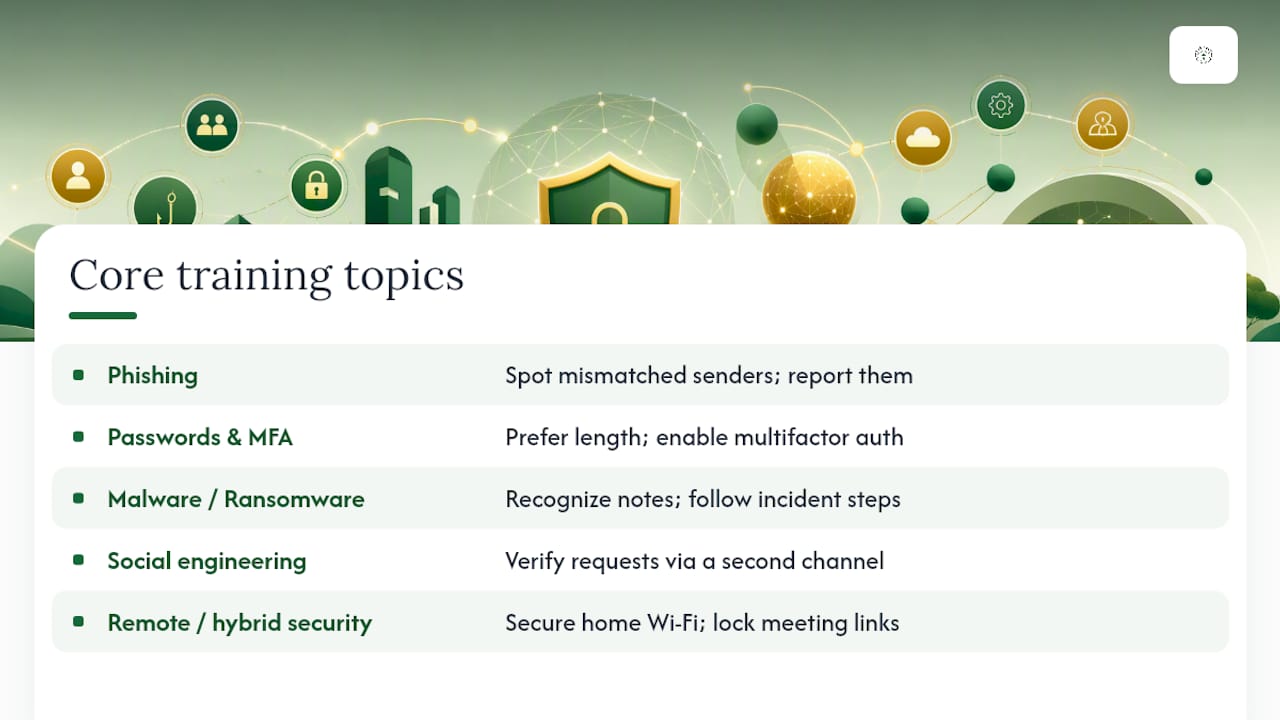
Phishing and email-based social engineering. Employees should learn to spot mismatched sender domains, urgency language, and unexpected attachments, then report instead of just deleting. A simulated phishing email sent monthly, paired with a one-click "report" button, teaches the habit faster than any slide deck. Our own 90-day phishing awareness training plan shows how staggered simulations build muscle memory without fatiguing staff.
Password and authentication hygiene. The objective here is simple: every employee understands why password length beats complexity, and every account that supports multifactor authentication has it turned on. A short quiz asking staff to identify a weak versus strong password, followed by a live MFA enrollment walkthrough, closes the gap between knowing and doing.
Malware and ransomware awareness. Staff need to recognize the warning signs of a ransomware note, understand why they should never pay or negotiate on their own, and know who to call first. A tabletop scenario, "your screen just locked, what do you do in the next five minutes," works better than a definition of ransomware ever could. Our guide on protecting your business from ransomware attacks is a useful companion reading assignment for this module.
Social engineering beyond email. Business email compromise, vishing, and smishing exploit trust rather than technology. Employees should learn to verify unusual payment or credential requests through a second channel, such as a phone call to a known number, before acting. A short role-play where a "vendor" calls asking to change a wire transfer account number teaches the habit in under ten minutes.
Remote and hybrid work security. Home routers, personal devices, and video-conferencing tools carry different risks than an office network. Learners should walk away knowing how to secure a home Wi-Fi network, recognize an unsafe public network, and lock down meeting links against uninvited guests.
Data protection and privacy. Teach staff how to classify data (public, internal, confidential), where it's allowed to live, and how to dispose of it properly. An example activity: hand employees a mock spreadsheet and have them sort rows into the correct classification tier.
Physical security awareness. Tailgating into secured doors, leaving a laptop unattended in a coffee shop, and failing to lock a screen before stepping away are still some of the most common breach starting points. A quick "spot the risk" photo exercise, showing a badge left on a desk or a door propped open, drives the point home fast.
Safe browsing and suspicious websites. Employees should be able to identify a spoofed login page, understand what HTTPS does and doesn't guarantee, and know why browser extensions from unknown sources are a liability.
Mobile device security. Covers screen locks, app permissions, and the risks of connecting to unsecured public Wi-Fi, along with what to do if a phone is lost or stolen.
Insider threats. Not every incident starts outside the building. This topic teaches staff to recognize unusual data access patterns and understand the reporting path for a coworker's suspicious behavior, without turning the workplace into a surveillance culture.
Every one of the topics above is a required baseline. Recommended additions, like advanced cloud permission audits or executive-level threat briefings, should scale with your organization's actual risk profile rather than get bolted onto every employee's training load by default.
Scoping Training by Role and Seniority
A dental hygienist and a network administrator face wildly different risks, so treating them identically wastes training time and dilutes attention on what actually matters to each. NIST SP 800-50 recommends building a role matrix that separates universal awareness content from job-specific modules, and that structure holds up well for organizations of any size.
- General staff get the ten core topics above, delivered in plain language with minimal technical jargon.
- IT and helpdesk staff need deeper modules on privileged account management, patch verification, and secure configuration review, since they're the ones fielding the reports everyone else generates.
- Managers and executives need briefings focused on incident response roles, who has authority to make a ransom decision, and what to say publicly if a breach happens. CISA's leader-focused webinars specifically target this audience with ransomware defense and indicator-of-compromise training.
- Contractors and third parties should complete a condensed version of core training before system access is granted, and access should be revoked the same day an engagement ends, not "sometime this week."
Pro Tip: Build your role matrix before you buy or write a single module. It's far easier to assign existing content to roles than to retrofit a one-size-fits-all course after the fact.
AI Scams, Deepfakes, and Cloud Risks to Add Now
AI-generated phishing emails and voice-cloned phone calls have made social engineering harder to spot on instinct alone. A SANS 2026 workforce awareness update flags AI-driven threats and cloud collaboration gaps as the two fastest-growing additions to modern curricula, and both deserve a dedicated module rather than a passing mention.
- Teach staff to verify any urgent voice or video request, especially ones asking for money movement, through a separate channel like a callback to a known number.
- Explain that deepfake audio can now mimic a specific executive's voice convincingly, so policy (not instinct) should govern financial approvals.
- Cover safe sharing practices in cloud tools: setting file links to "specific people" instead of "anyone with the link," and reviewing shared folder permissions quarterly.
- Introduce AI-written phishing detection cues, since grammar mistakes are no longer a reliable tell.
Our breakdown of emerging business cybersecurity threats goes deeper on how generative AI is reshaping impersonation attacks, and it's worth assigning to anyone building this module from scratch.
What to Measure Beyond Completion Rates
Completion rates tell you who clicked through a slideshow. They tell you almost nothing about whether behavior actually changed. The SANS Security Awareness and Culture Maturity Model charts five stages of program maturity, moving from Non-Existent up through Compliance-Focused, Promoting Behavior Change, Long-Term Sustainment, and finally Culture and Resilience, with metrics evolving at each stage.
Statistic Callout: The maturity model's core argument is structural rather than numerical: programs stuck measuring only completion percentages plateau at the Compliance stage, while those tracking behavior indicators, like report rates and time-to-contain, progress toward measurable culture change.
Practical metrics worth tracking from month one:
- Simulated-phish click rate over time, segmented by department, not just company-wide.
- Suspicious-report rate, which should climb even as click rate falls. A rising report rate paired with a falling click rate is the clearest sign the training is working.
- Time-to-contain for real incidents, since faster internal reporting shortens this window directly.
- Role-based task completion, such as whether IT staff actually complete privileged-access reviews on schedule.
Baseline everything before you launch new content. Run one simulation and one survey before training begins, then compare results quarterly rather than annually. A single data point six months apart tells you far less than a trend line does.
Building a 90-Day Curriculum That Actually Sticks
Small teams don't need a sprawling annual syllabus. They need a tight core course, plus a monthly theme that keeps the topic fresh without demanding hours of anyone's time.
- Days 1 to 30: Launch the core curriculum (phishing, passwords, device security, reporting) as short microlearning videos, five minutes or less each.
- Days 31 to 60: Run the first phishing simulation and follow it with a targeted refresher for anyone who clicked, not a company-wide scolding.
- Days 61 to 90: Deliver a role-specific module (leader briefing, IT deep-dive, or contractor onboarding) and hold a short tabletop exercise to test reporting speed.
Plan content roughly three months ahead of delivery so writing and review don't collapse into a last-minute scramble. After the first 90 days, shift to a quarterly refresher cadence with monthly micro-touches, mixing short videos, posters near common areas, and a single leader briefing per quarter.
Pro Tip: Keep every module focused on one behavior. A five-minute video that teaches "report suspicious emails" beats a twenty-minute video trying to cover phishing, malware, and passwords at once.
Aligning Awareness With Governance and HR
Training content decays fast without a governance structure feeding it. CISA's Cyber Resilience Review guidance recommends treating training as an ongoing cycle, not a once-a-year checkbox, with management support baked in from the start.
- Keep a role matrix and training-completion log that maps directly to your incident response plan, so auditors and insurers can see the connection.
- Run a short tabletop exercise twice a year and feed every finding back into the next training cycle, closing the loop between simulation and curriculum.
- Loop in HR early: onboarding and offboarding timing determines whether new hires get trained before system access, and whether departing staff lose access the same day.
- Decide early whether to license existing content or build modules internally. Buying makes sense for baseline topics; building makes sense for anything specific to your industry or workflow.
Ready-to-Use Module Outlines and Free Toolkits
You don't need to write every module from scratch. The CISA Cybersecurity Awareness Program Toolkit offers free, ready-made tip sheets covering password creation and mobile security that you can drop straight into a training deck.
- Phishing module: Objective: identify and report a suspicious email in under 60 seconds. Quiz question: "What's the first thing you should do with a suspicious attachment?"
- MFA and passwords module: Objective: enroll in MFA and explain why length beats complexity. One-minute check: can the employee locate the MFA settings on their own account?
- Ransomware response module: Objective: know the first three calls to make after a lockout. Our ransomware recovery playbook is a solid template for this outline.
- Secure collaboration module: Objective: correctly set a shared file's permission level in under 30 seconds.
| Module | Primary source for reuse | Best for |
|---|---|---|
| Password and MFA | CISA tip sheets | Quick, low-cost baseline training |
| Role-based training design | NIST SP 800-50 | Mapping content to job function |
| Core curriculum structure | SANS core modules | Building the annual outline |
For readers in regulated industries layering compliance requirements on top of general awareness, this HIPAA risk assessment guide is a useful reference for documenting training as part of a broader risk-assessment file.
What Small Business IT Support Sees on the Ground
Across the dental practices and law firms Great Plains Networking supports, the pattern repeats: staff who report a suspicious email within minutes contain incidents faster than staff who were simply never told who to call. Monitoring catches what training misses.
The Checklist Conversation Nobody's Having Enough
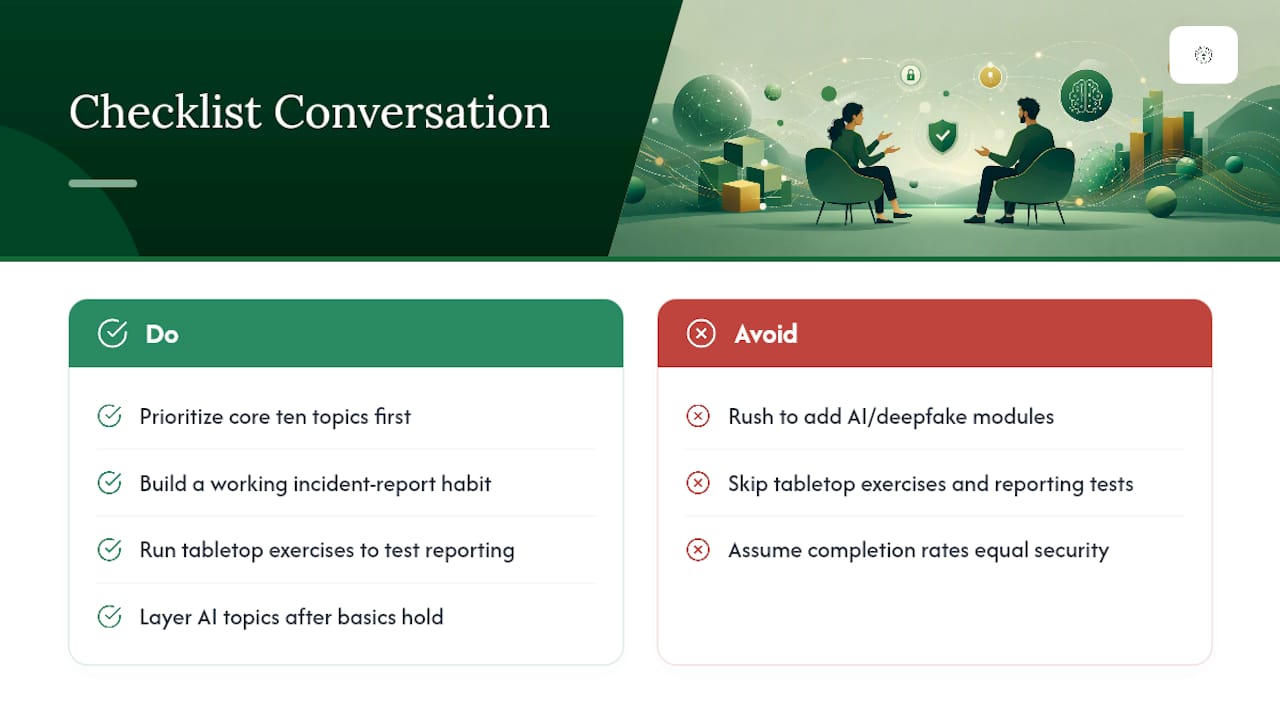
Most awareness programs still get graded on how many people clicked through a course, and that's the wrong scoreboard. The research backs this up clearly: SANS's own maturity model treats completion tracking as the lowest rung, not the goal. What actually predicts fewer incidents is whether report rates climb over time, which means the "boring" topics, password hygiene, device locking, knowing who to call, do more work than any flashy AI-deepfake module ever will on its own.
Here's the miscalibration I see most often: organizations rush to add AI and deepfake content because it feels current, while skipping the tabletop exercise that would actually test whether staff know the reporting path. Both matter, but only one of them is optional depending on your risk profile. If you're building a program from zero, get the core ten topics and a working incident report habit solid first. Layer in AI-driven scam detection and cloud permission hygiene once that foundation holds, not before. Skipping straight to the exciting stuff is how programs end up compliant on paper and unprepared in practice.
— Nicholas
Getting Expert Help Building Your Security Program
There are IT providers that offer 24/7 monitoring services designed to catch incidents your training is designed to prevent, paired with plain-language support instead of technical jargon.

Awareness training teaches people what to watch for. Managed IT support and cybersecurity services make sure someone is watching around the clock when a click happens anyway. That combination, trained staff backed by active monitoring, closes the gap between "we taught this" and "we caught this." If a ransomware incident does slip through, backup and recovery services get you back online without paying a ransom or losing a week of records.
Not sure where your program's biggest gap actually sits? Start with the free network assessment or the 10-minute readiness audit to see where monitoring and training should meet, no long-term contract required.
Where to Find the Primary Guidance Behind This Checklist
For policy templates and role-mapping matrices, NIST SP 800-50 remains the most detailed public framework available. The SANS core curriculum is best for structuring the baseline course itself, while its maturity model helps benchmark where your program actually stands. For tabletop exercises and cyber resilience planning, CISA's CRR training guide and its incident response training resources provide ready-made compliance documentation.
Sources
- NIST SP 800-50 - Building an Information Technology Security Awareness and Training Program
- Incident Response and Awareness Training | CISA
FAQ
What Topics Should a Security Awareness Program Always Cover?
Every program needs phishing recognition, password and MFA hygiene, malware and ransomware response, social engineering beyond email, device and remote-work security, data handling, cloud collaboration risks, incident reporting, role-based modules, and behavior measurement. These ten groups form the baseline that SANS's core curriculum and NIST's role-based framework both point toward.
How Often Should Security Awareness Training Happen?
A short core course at onboarding, followed by monthly micro-touches and quarterly refreshers, works better than one long annual session. Simulated phishing tests should run monthly or bimonthly to keep detection skills sharp between formal modules.
Should AI and Deepfake Threats Be Part of Core Training?
They belong in a targeted add-on module rather than the universal baseline, especially for finance and executive-facing staff who handle payment approvals. SANS's 2026 workforce update flags AI-driven threats as one of the fastest-growing additions to modern programs.
How Do You Measure If Security Training Is Actually Working?
Track suspicious-report rate alongside simulated-phish click rate, not completion percentage alone. A rising report rate paired with a falling click rate is the clearest sign the training changed behavior rather than just checked a box.
Does Great Plains Networking Help With Security Awareness Training?
Great Plains Networking supports awareness programs through 24/7 monitoring, incident response, and cybersecurity services that catch what training alone can miss. Pricing is available on request through a free network assessment.
Recommended
Want help putting this into practice?
We'll audit your security, speed, and hardware in under an hour — no commitment, no sales pitch. Just a clear roadmap of what to fix and why.