
HIPAA Risk Assessment Steps: A Compliance Officer's Playbook

Perform seven core steps to complete a defensible HIPAA risk assessment: scope the project, inventory every system touching electronic protected health information (ePHI), identify threats and vulnerabilities, assess current safeguards, rate likelihood and impact, document findings, and build a prioritized remediation plan. The Security Rule requires this analysis in writing, and tools like the ONC's SRA Tool and NIST SP 800-66 give you the methodology to make it audit-proof. Update the assessment annually or whenever your systems change meaningfully.
TL;DR:
- Organizations must document all threats, vulnerabilities, and safeguards for every ePHI asset, ensuring a complete and defensible risk analysis.
- The inventory should include both physical and logical assets, with vendor assessments and access privileges reviewed regularly to prevent gaps.
- Risk ratings must be supported by specific evidence, with a clear rationale, to pass auditor scrutiny and avoid failing enforcement actions.
- Continuous monitoring, regular reassessments, and a risk register with tracked findings are essential for ongoing HIPAA compliance.
- Small practices should simplify processes and seek tailored support to integrate risk assessments into their limited resources and avoid common pitfalls.
Table of Contents
- What Are the Core HIPAA Risk Assessment Steps?
- How Do You Scope the Assessment and Inventory Every ePHI Asset?
- What Threats and Vulnerabilities Should You Look For?
- How Do You Rate Likelihood, Impact, and Overall Risk?
- What Documentation Do Auditors Actually Expect to See?
- Which Tools and Templates Simplify the Assessment Process?
- What Mistakes Trigger OCR Enforcement Actions?
- How Often Should You Reassess for HIPAA Compliance?
- Who Should Sit on Your Risk Assessment Team?
- How Do You Write a Risk Assessment Policy?
- How Do You Train Staff Involved in the Assessment?
- How Do You Validate That Safeguards Actually Work?
- How Do Findings Feed a Continuous Compliance Program?
- A Practical Note on Making This Work for Small Practices
- Get Help Turning Your Risk Assessment Into a Remediation Plan
- Sources
What Are the Core HIPAA Risk Assessment Steps?
Every credible risk analysis follows the same skeleton, whether you run a five-chair dental office or a regional hospital network. HHS guidance on risk analysis lays out the sequence: scope the effort, find every place ePHI lives, identify anticipated threats and vulnerabilities, evaluate the safeguards you already have, rate the risk, and document the whole thing well enough that a stranger could follow your reasoning a year later.
That last part trips up more organizations than any technical gap. Auditors don't just want a risk score. They want to see how you got there.
The seven-step sequence
- Prepare and scope. Name a project owner, pull in stakeholders from IT, clinical operations, HR, and finance, and set a realistic timeline. Decide upfront how you'll define "high," "medium," and "low" risk so nobody argues about definitions in month three.
- Build the ePHI inventory. Catalog every system, device, application, and vendor that creates, receives, maintains, or transmits ePHI, including laptops, backup drives, cloud storage, and medical devices with network connections.
- Identify threats and vulnerabilities. For each asset, list the realistic ways it could be compromised, from phishing emails to an unpatched imaging workstation.
- Assess existing safeguards. Document what administrative, physical, and technical controls are already in place, and collect evidence: access logs, patch reports, encryption settings.
- Rate likelihood and impact. Apply a consistent scale to determine which risks deserve immediate attention and which can wait.
- Document findings and prioritize remediation. Convert every identified risk into a tracked action item with an owner and a deadline.
- Implement, verify, and monitor. Close out remediation items with evidence, then fold the updated inventory into your ongoing monitoring process.
Pro Tip: Assign a single "risk owner" for each finding, not a department. When three people are technically responsible for a remediation item, none of them actually own it, and it shows up unresolved at your next audit.
Steps 2 through 5 often run in parallel rather than strictly sequentially. NIST SP 800-66 acknowledges this directly. A hospital IT team might be inventorying network switches while a compliance analyst interviews front-desk staff about paper record handling, and both feed the same risk register. What matters is that by the time you reach step 6, every identified asset has a documented threat, a documented safeguard, and a documented rating tied back to it. Skipping straight to a remediation list without that trail is the single fastest way to fail an OCR review.
How Do You Scope the Assessment and Inventory Every ePHI Asset?
Scope failures are the quiet killer of most HIPAA risk analyses. An organization assesses its EHR platform thoroughly, then forgets the receptionist's tablet running a patient intake app, or the third-party billing vendor with remote access to the network. Enforcement history shows that incomplete inventories remain one of the most common weaknesses regulators cite.
Define scope in two dimensions: physical (on-premises servers, workstations, mobile devices, telework setups) and logical (cloud applications, remote access tools, medical IoT). Both dimensions need equal attention. A practice that locks down its server room but ignores an unmanaged personal laptop syncing patient files at home has not actually reduced its risk.
Discovery works best through a mix of methods:
- Staff interviews across departments, not just IT, since front-desk and billing staff often know about shadow systems IT never approved.
- Configuration reviews of firewalls, cloud storage permissions, and mobile device management policies.
- Network and device scans to catch systems nobody remembered still exist.
- Vendor contract reviews to confirm which business associates actually touch ePHI.
Your inventory record should capture, for each asset: an asset ID, its owner, the data types it handles, its physical or cloud location, vendor and business associate agreement status, access privileges, and the date it was last reviewed. Business associates deserve particular scrutiny. A signed BAA on file means nothing if the vendor's remote access credentials haven't been reviewed in two years.
Pro Tip: Ask every vendor with system access one direct question: "When was your last independent security assessment?" A vague answer is itself a finding worth documenting.
What Threats and Vulnerabilities Should You Look For?
A threat is something that could happen; a vulnerability is the weakness that lets it happen. Confusing the two makes your documentation harder to defend later, so keep them in separate columns of your risk register.
Common threat categories worth cataloging for nearly every healthcare organization:
- Phishing and business email compromise targeting staff with system access.
- Ransomware delivered through unpatched software or compromised credentials.
- Insider error, from misdirected faxes to accidental data exposure in shared drives.
- Lost or stolen laptops, tablets, and phones containing unencrypted ePHI.
- Environmental hazards like fire or flooding affecting on-site servers.
- Supply-chain compromise through a vendor's own breach.
Vulnerabilities that consistently show up during discovery include unpatched operating systems, weak or shared authentication credentials, misconfigured cloud storage buckets left publicly accessible, and legacy medical devices running operating systems the manufacturer stopped supporting years ago. That legacy device problem shows up constantly in dental and medical practices, where imaging equipment often runs for a decade or more without a security update path.
A sample mapping might look like this: an unpatched practice-management server (vulnerability) combined with a known ransomware strain targeting that software version (threat) creates a potential impact of full patient-record encryption and multi-day downtime. Document the evidence behind each mapping. Patch histories, firewall logs, and configuration snapshots turn a guess into a defensible finding. Reviewing common business cybersecurity threat categories can help you build out a starting taxonomy before your first interview.
How Do You Rate Likelihood, Impact, and Overall Risk?
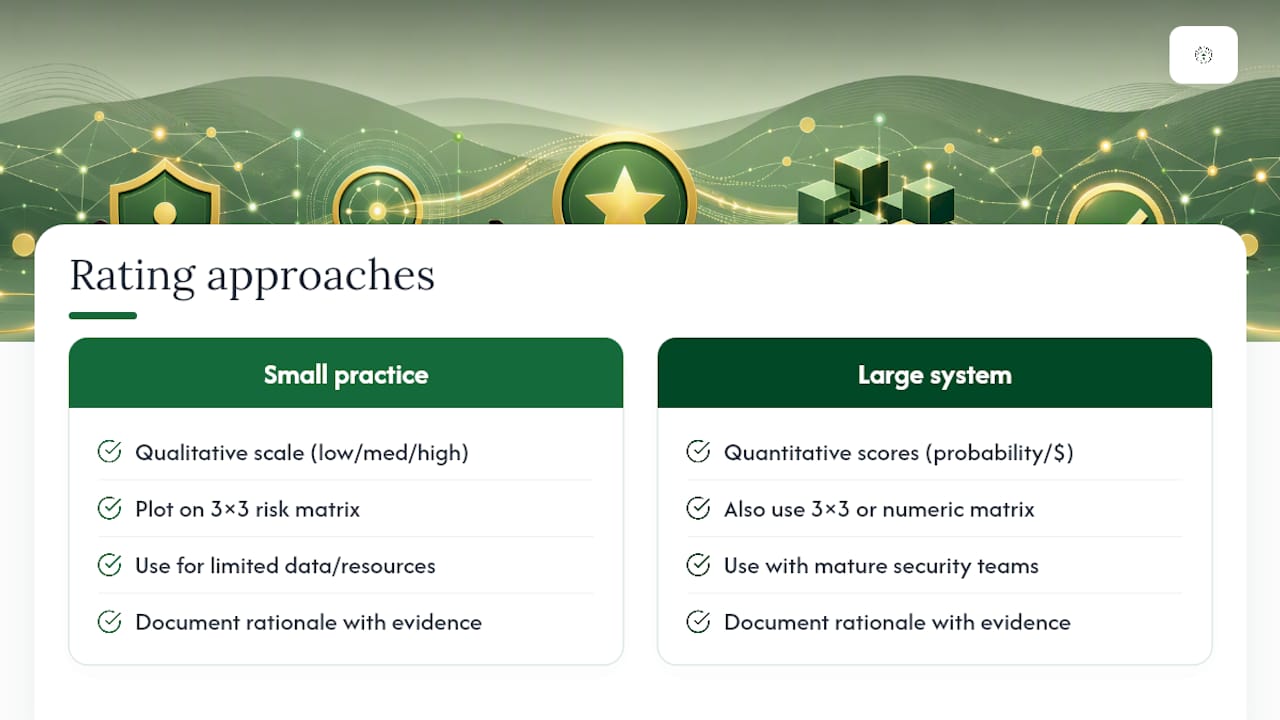
Small practices generally do better with a qualitative scale, ranking likelihood and impact as low, medium, or high, then plotting the combination on a simple three-by-three matrix. Larger systems with more data and more mature security teams can layer in quantitative scoring, assigning numeric probabilities and dollar-value impact estimates. NIST SP 800-66 supports both approaches and explicitly tells organizations to scale the methodology to their own size and complexity, rather than forcing a hospital-grade framework onto a two-provider clinic.
Here's a working example. An unencrypted laptop used by a traveling nurse might rate as "medium" likelihood (laptops get lost) and "high" impact (full patient record exposure), landing in the high-risk quadrant that demands immediate remediation. A rarely-used legacy fax server with no direct ePHI storage might rate "low" likelihood and "low" impact, landing it lower on the priority list even though it still needs a documented plan.
Auditors consistently look for the reasoning trail behind a rating, not just the final score.
The rationale matters more than the number. Write down why you rated something "high" rather than "medium," referencing the specific evidence: a documented incident, an industry advisory, or a known vulnerability in that software version. A business impact analysis (BIA) helps here, since it forces you to quantify what a specific system's downtime or breach would actually cost in operational and reputational terms. For any finding rated high-impact, loop in leadership and legal counsel before finalizing the rating. That's not bureaucratic overhead. It's the step that keeps a compliance officer from being the sole name attached to a judgment call that should have been organizational.
What Documentation Do Auditors Actually Expect to See?
Your risk analysis document needs specific sections, not a narrative essay. Auditors scan for structure: scope statement, complete asset inventory, a threat-and-vulnerability table, risk ratings with rationale, mitigation options considered, and a remediation tracker with named owners and deadlines.
Turning findings into action requires prioritization logic, not just a flat list:
- Rank by risk level first, addressing high-risk items before medium or low.
- Weigh business criticality. A vulnerability in a scheduling system matters less than one in the system storing lab results.
- Factor in cost and feasibility so the plan is realistic, not aspirational.
For every remediation item you close, keep the proof: closed ticket records, patch deployment logs, updated configuration screenshots, and any test results confirming the fix worked. A remediation item marked "complete" with no supporting evidence is functionally still open in an auditor's eyes.
Structure the final deliverable in two layers: an executive summary for leadership covering top risks and overall posture, and a technical appendix with the full inventory and evidence for anyone who needs to verify the work. Version and date every revision, and retain prior assessments rather than overwriting them. Auditors sometimes want to see how your risk picture changed over time, not just where it stands today.
Which Tools and Templates Simplify the Assessment Process?
The ONC/HHS Security Risk Assessment Tool gives small and mid-sized providers a structured, wizard-style path through the assessment, using branching logic so you only answer questions relevant to your environment. It stores your data locally rather than in the cloud, which matters for organizations wary of putting an unfinished risk analysis on someone else's server. An Excel workbook version exists for organizations that aren't on Windows or prefer a spreadsheet format.
- Use the SRA Tool's education panels for plain-language explanations of Security Rule requirements as you work through each question.
- Save your file regularly and capture "reviewed by" dates on each section, since the SRA Tool user guide notes these timestamps become part of your audit evidence.
- Export completed reports promptly rather than leaving assessments open indefinitely.
- Layer NIST SP 800-30 and SP 800-66 methodology on top of the tool once your environment grows more complex than the wizard anticipates.
The tool assists with the assessment; it doesn't replace deeper technical testing. If your inventory includes internet-facing systems or you handle a high volume of ePHI, a vulnerability scan or penetration test provides evidence the SRA Tool alone can't generate.
What Mistakes Trigger OCR Enforcement Actions?
The recurring failure pattern in enforcement cases is depressingly consistent: incomplete inventories, thin documentation, ignored legacy systems, and a "we did this once three years ago" mindset. Financial audits like SOC 1 reports get mistakenly treated as HIPAA evidence, but they measure different things entirely and won't satisfy an OCR reviewer.
- Run a business impact analysis to set realistic risk tolerance before rating anything.
- Fold risk assessment into your change-management process so a new EHR module or cloud migration triggers a review automatically.
- Schedule interim reviews between full annual assessments rather than waiting for the calendar to force your hand.
Pro Tip: If your last full risk analysis predates your current EHR version, you don't have a current risk analysis. You have a historical document.
How Often Should You Reassess for HIPAA Compliance?
Run a full assessment annually at minimum, with event-driven reassessments layered on top whenever something material changes. That cadence, recommended by industry experts, keeps your risk picture from going stale between annual cycles.
Trigger an immediate reassessment for:
- Cloud migrations or new EHR module deployments.
- Mergers, acquisitions, or new office locations.
- New medical device rollouts with network connectivity.
- Any confirmed security incident, even a minor one.
Calendar these triggers alongside your annual review, and log the reassessment date and scope each time. That log becomes evidence that your program runs continuously rather than as a once-a-year checkbox exercise.
Who Should Sit on Your Risk Assessment Team?
A risk assessment run by one overworked IT administrator produces a narrower, weaker document than one built by a cross-functional team, and auditors can usually tell the difference. Assign a project lead, typically your compliance officer or a designated HIPAA security officer, who owns the timeline and the final sign-off.
Beyond that lead, pull in an IT or network representative who understands your actual infrastructure, a clinical operations lead who knows how ePHI moves through daily workflows, and someone from HR or administration who can speak to onboarding, offboarding, and physical access controls. For smaller practices without dedicated staff for each of these roles, one person may wear multiple hats, but the responsibilities still need to be assigned explicitly in writing rather than assumed.
Document each role's responsibilities: who conducts interviews, who reviews vendor contracts, who signs off on final ratings, and who owns remediation tracking once the assessment closes. This matters more than it sounds. When OCR asks who was responsible for identifying a specific vulnerability, "our IT guy, probably" is not an acceptable answer. A named role with documented duties is.
Rotate at least one team member's focus toward business associate oversight specifically, since vendor relationships require ongoing attention that a generalist team member might otherwise deprioritize in favor of more visible internal systems.
How Do You Write a Risk Assessment Policy?
A risk assessment without a governing policy tends to drift. One year it's thorough, the next it's rushed before a deadline, and the inconsistency itself becomes a finding. Write a formal policy that states, in plain terms, how often assessments happen, who's responsible, what methodology you use, and how findings get tracked to closure.
The policy document should specify your chosen risk-rating scale (qualitative, quantitative, or hybrid) so every assessment cycle uses the same criteria instead of reinventing definitions each time. Include the escalation path for high-risk findings, naming exactly who in leadership gets notified and within what timeframe. Spell out retention requirements for prior assessments, since regulators may ask to see your risk analysis history spanning several years, not just your most recent snapshot.
Procedures should sit underneath the policy as the operational how-to: which template or tool you use (the ONC SRA Tool, an internal spreadsheet, or a hybrid), how discovery interviews get scheduled, and how remediation items get assigned and tracked. Keep the policy itself relatively stable year over year, while procedures can flex as your tools or team structure change.
Review the policy annually alongside your risk assessment cycle, and version it the same way you version the assessment itself. A policy last updated five years ago, referencing systems you no longer use, undermines the credibility of everything else in your compliance file.
How Do You Train Staff Involved in the Assessment?
Staff pulled into a risk assessment, whether they're answering interview questions or pulling configuration reports, need enough context to give accurate, useful answers. A front-desk employee who doesn't understand what "ePHI" means will underreport the systems they touch, quietly creating a scope gap nobody catches until an audit.
Brief interview participants ahead of time on what the assessment covers and why their department's answers matter. A five-minute explanation of how a missed system creates real audit risk tends to produce far more thorough responses than a cold, unexplained questionnaire. For IT staff pulling technical evidence, walk through exactly what format the risk assessment team needs, whether that's raw log exports, screenshots, or summarized reports, so you're not chasing corrected submissions later.
Build a short annual refresher into your broader HIPAA training program specifically covering the risk assessment process: what it is, why it happens every year, and what's expected if someone gets pulled into an interview or asked for system documentation. This doesn't need to be a separate, lengthy course. A ten-minute segment folded into existing annual compliance training usually covers it.
Document that this training happened, including who attended and when. If OCR asks whether staff understood their role in the risk assessment process, an attendance record with a training outline answers that question far better than a verbal assurance.
How Do You Validate That Safeguards Actually Work?
Documenting a safeguard on paper and confirming it actually functions are two different exercises, and the gap between them is where a lot of risk assessments quietly fail. A firewall rule that was correctly configured eighteen months ago may have been altered since, intentionally or not, and nobody caught it because nobody tested it.
Vulnerability scans give you a technical, repeatable way to confirm patch status, open ports, and misconfigurations across your network. Run these at least quarterly, and always after any significant infrastructure change. Penetration testing goes further, actively attempting to exploit weaknesses the way a real attacker would, and organizations handling larger volumes of ePHI or facing higher regulatory scrutiny should budget for this at least annually.
Internal audits complement technical testing by checking whether administrative safeguards, like access reviews and offboarding procedures, are actually being followed day to day rather than just existing as a written policy. Pull a sample of recently terminated employees and confirm their system access was revoked within your stated timeframe. That single check often reveals more about your real security posture than a page of policy language.
Whatever validation method you use, keep the output as part of your risk assessment evidence file. A scan report, a pen test summary, or an access-review log all serve the same purpose: proving a safeguard works, not just that someone wrote it down.
How Do Findings Feed a Continuous Compliance Program?
A risk assessment that gets filed away until next year's deadline has already failed its purpose. The real value comes from feeding every finding into an ongoing risk management process that tracks status, reassesses periodically, and adjusts as your environment changes.
Build a living risk register rather than a static document. Each finding gets a status (open, in progress, closed, accepted risk) and stays visible to the compliance team year-round, not just during the annual assessment window. When you close a remediation item, don't delete it from the register. Archive it with its evidence, since auditors often want to see the full lifecycle of a finding, not just today's snapshot.

Tie your change-management process directly to this register. A new vendor contract, a cloud migration, or a new device rollout should automatically trigger a review of whether it introduces new risks worth logging, rather than waiting for the next scheduled assessment to surface it. This is what separates organizations that treat compliance as an ongoing program from those still running risk assessments as an annual scramble.
Report register status to leadership on a regular cadence, quarterly works well for most organizations, so risk decisions stay visible above the compliance team and don't get buried until something breaks.
A Practical Note on Making This Work for Small Practices
Most guidance on this topic gets written for hospital systems with dedicated compliance departments, then gets awkwardly retrofitted for the five-provider dental office or the two-location family practice actually trying to follow it. That mismatch is where most small practices lose confidence in their own compliance program, not because the steps are wrong, but because nobody translated them into something a practice manager with no IT background can actually execute on a Tuesday afternoon.
The fix isn't cutting corners on the methodology. It's cutting the jargon and the assumption that you have a full security team standing by. Great Plains Networking builds risk assessments for dental and medical practices around plain-language reporting specifically because compliance officers at small practices are usually wearing three other hats. Same-day response and 24/7 monitoring mean a flagged vulnerability doesn't sit in a queue for a week while someone figures out who's responsible for it.
Oklahoma dental practices can see this in action through the free HIPAA and cyber insurance audit offered locally, which walks through exactly the scoping and inventory work covered above, tailored to a practice's actual size rather than a generic enterprise template.
— Nicholas
Get Help Turning Your Risk Assessment Into a Remediation Plan
Running the assessment is half the work. Converting a stack of findings into fixed vulnerabilities, tracked evidence, and a security posture that holds up under scrutiny is the other half, and it's where most small practices run out of internal bandwidth. Great Plains Networking handles both sides for law firms, dental practices, and medical offices across Norman, Moore, and Oklahoma City, combining hands-on managed IT support with the cybersecurity controls your risk register actually calls for.

Clients get an auditor-ready report, a remediation tracker with named owners and deadlines, and the evidence artifacts, patch logs, access reviews, configuration records, that OCR reviewers ask to see. Backup and recovery gaps identified during an assessment get addressed directly through dedicated backup and recovery services rather than a vague promise to "look into it later." No long-term contracts, no technical jargon in the reporting, and same-day response when a flagged item needs attention now instead of next quarter. If your last risk analysis is gathering dust or you've never completed one, reach out to Great Plains Networking to schedule an assessment built around your practice's actual size and risk tolerance. For agencies with EMS-specific compliance questions, the HIPAA compliance resource for EMS providers offers useful sector context worth reviewing alongside your own assessment.
This article is general information, not a substitute for advice from a qualified lawyer. Consult a qualified legal professional about your own circumstances before acting on anything here.
Sources
Recommended
Want help putting this into practice?
We'll audit your security, speed, and hardware in under an hour — no commitment, no sales pitch. Just a clear roadmap of what to fix and why.