
Cybersecurity in Dental Practices: A 2026 Guide

Cybersecurity in dental practices is defined as the set of technical controls, policies, and staff protocols that protect electronic patient health information (ePHI) from unauthorized access, theft, and disruption. The role of cybersecurity in dental practices has never been more consequential. The 2026 HIPAA Security Rule updates have converted previously optional safeguards, including multi-factor authentication (MFA) and AES-256 encryption, into mandatory requirements with real enforcement teeth. Dental practices that treat cybersecurity as a background IT concern now face regulatory penalties, operational shutdowns, and patient trust damage that no practice can afford. This guide walks you through the threats, the updated rules, the tools, and the training your team needs to stay protected and compliant.
What are the top cybersecurity threats facing dental practices in 2026?
Ransomware and phishing remain the two dominant threat vectors targeting dental offices. Ransomware typically arrives through phishing emails disguised as fake insurance claims or supplier invoices, locking down your practice management system until a ransom is paid. That means no patient records, no scheduling, and no billing until the situation is resolved, often at significant cost.
The vulnerability picture is sharper than most practice owners realize. 62% of dental data breaches are linked to three specific weaknesses: unpatched imaging software, unsecured intraoral camera Wi-Fi, and legacy practice management systems that lack MFA support. That statistic tells you exactly where attackers are looking first.
Beyond external attacks, dental practices face two additional threat categories that are frequently underestimated:
- Insider threats: A disgruntled employee or a staff member who clicks a malicious link without realizing it can expose thousands of patient records. Access controls and audit logging are your primary defenses here.
- Third-party vendor compromise: Integrated billing systems, EHR platforms, and imaging software vendors all connect directly to your patient data. When a vendor is breached, that breach can cascade into your practice through shared system access.
- Legacy system vulnerabilities: Practice management software that was never designed to support MFA or encryption is a structural weakness. Patching it is not enough. In many cases, replacement is the only viable path forward.
- Unsecured networked devices: Intraoral cameras, digital X-ray systems, and other connected devices often run on default credentials and unencrypted Wi-Fi, creating entry points that attackers actively scan for.
Pro Tip: Conduct a quick audit of every device connected to your office network, including imaging equipment and cameras. If any device uses a default password or connects over unencrypted Wi-Fi, treat it as an open door until it is secured.
How do the 2026 HIPAA Security Rule updates affect dental practices?
The 2026 HIPAA Security Rule updates represent the most significant regulatory shift in healthcare cybersecurity in over a decade. Several controls that were previously labeled "addressable" (meaning practices could choose alternatives) are now mandatory with no substitution allowed. Understanding what changed is the starting point for dental practice data security explained in practical terms.
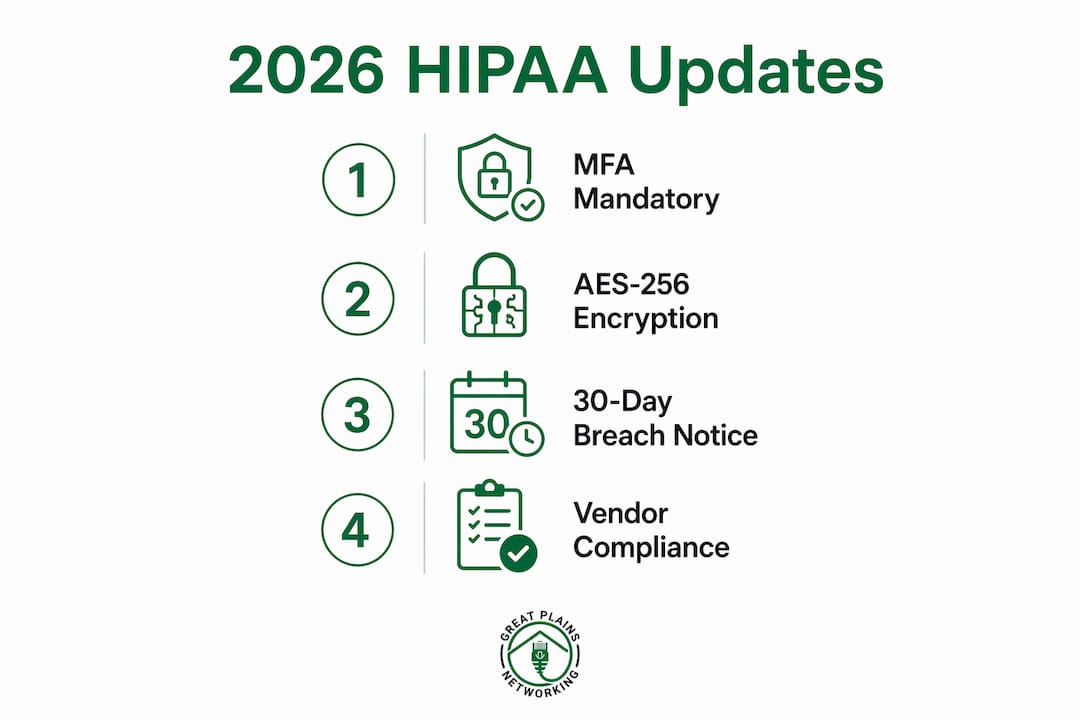
Here are the five most consequential changes for dental offices:
- MFA is now mandatory. MFA blocks over 99% of credential-based attacks and is now required for every system that accesses patient data. This is not optional for any covered entity.
- Encryption is required for ePHI at rest and in transit. AES-256 encryption must be applied to patient data stored on devices and transmitted across networks. Practices that encrypt data gain HIPAA Safe Harbor status, meaning a stolen encrypted device does not trigger mandatory breach notification.
- Breach notification window is now 30 days. The notification deadline dropped from 60 days to 30 days, which means your incident response plan must be documented, tested, and ready to execute immediately after a breach is discovered.
- Risk assessments and vulnerability scanning are mandatory. Annual risk assessments are required, along with scheduled vulnerability scanning and penetration testing to identify weaknesses before attackers do.
- Vendor BAA requirements are strengthened. Business Associate Agreements must now include annual security verification and a 24-hour vendor breach notification requirement.
| Requirement | Previous Status | 2026 Status |
|---|---|---|
| Multi-factor authentication | Addressable | Mandatory |
| AES-256 encryption for ePHI | Addressable | Mandatory |
| Breach notification window | 60 days | 30 days |
| Annual risk assessments | Required (loosely enforced) | Required with documentation |
| Vendor BAA security verification | Recommended | Annual, mandatory |
The practical implication is straightforward: compliance is no longer a matter of good intentions. Documented evidence of each control is what regulators will request during an audit.
What cybersecurity tools does every dental office need?
Dental practice cybersecurity best practices center on a layered defense model, where no single tool carries the entire burden. The following controls form the technical foundation every dental office should have in place.

MFA on every patient data system. Microsoft Authenticator, Google Authenticator, and Duo Security are all widely used options that integrate with most practice management platforms. MFA is the single highest-impact control available, and it is now required by law.
AES-256 encryption for devices and backups. Encrypted stolen devices are typically exempt from HIPAA breach notification under Safe Harbor provisions. That exemption alone makes encryption one of the most cost-effective protections a practice can implement. Apply it to laptops, workstations, external drives, and all backup media.
Managed endpoint protection. Endpoint Protection Platforms (EPP) combined with Endpoint Detection and Response (EDR) tools, such as CrowdStrike Falcon or SentinelOne, provide real-time threat detection across every device on your network. These tools go beyond traditional antivirus by identifying behavioral anomalies that signature-based tools miss.
Pro Tip: Network segmentation is one of the most overlooked cybersecurity tools dental practices need. Placing your imaging devices, patient-facing kiosks, and administrative workstations on separate network segments means a breach in one area cannot automatically spread to the others.
Backup and disaster recovery with air-gapped copies. The 3-2-1 backup rule remains the standard: three copies of data, across two different media types, with one copy offline or air-gapped. An air-gapped backup cannot be reached by ransomware, which makes it your last line of defense when everything else fails. For dental offices in Oklahoma, HIPAA-compliant backup options are available locally with tested recovery procedures.
Regular patching and software updates. Your practice management software, imaging tools, and operating systems must be patched on a defined schedule. Unpatched software is the entry point for the majority of ransomware attacks targeting dental offices.
How to set up staff cybersecurity training in dental practices
Staff cybersecurity training is the most direct way to reduce human error, which remains the leading cause of successful cyberattacks in healthcare settings. The staff cybersecurity training benefits for dental offices extend beyond compliance. Trained staff actively prevent incidents rather than accidentally enabling them.
Effective training programs for dental teams share several characteristics:
- Role-specific content. A front desk coordinator faces different threats than a dental hygienist or a billing specialist. Micro-learning training delivered in five-minute, role-specific segments improves retention significantly compared to a single annual all-staff session.
- Phishing simulation exercises. Simulated phishing campaigns send realistic fake phishing emails to staff and measure who clicks. The results are used for targeted coaching, not punishment. Practices that run regular simulations see measurable reductions in click rates over time.
- Documented training records. HIPAA auditors will ask for proof that training occurred. Every session must be logged with dates, attendees, and content covered. A spreadsheet works, but a dedicated learning management system (LMS) like TalentLMS or Absorb LMS makes documentation audit-ready.
- Refresher courses tied to real incidents. When a new phishing campaign targets dental offices, or when a policy changes due to a regulatory update, staff need a brief, focused refresher. Waiting for the annual training cycle is too slow.
- Social engineering awareness. Attackers frequently call dental offices posing as insurance representatives or software vendors to extract login credentials or patient information over the phone. Staff need to know how to verify caller identity before sharing any information.
The goal is to build a team where every member, from the receptionist to the practice manager, treats suspicious emails, unexpected calls, and unusual system behavior as signals worth reporting immediately.
How to manage vendor relationships and cybersecurity compliance
Vendor compromise is one of the most underappreciated risks in dental practice cybersecurity. When a billing platform, EHR system, or imaging software vendor is breached, that breach can cascade directly into your practice through integrated system access. Managing vendor relationships is no longer a legal formality. It is a frontline risk management discipline.
Follow these steps to bring your vendor relationships into compliance with 2026 HIPAA requirements:
- Audit all current Business Associate Agreements. Identify every vendor who handles ePHI on your behalf, including cloud storage providers, billing services, and IT support firms. Confirm that a signed, current BAA exists for each one.
- Update BAAs to include annual security verification. BAAs now require annual confirmation that vendors maintain adequate security controls and a 24-hour breach notification commitment. Any vendor unwilling to sign updated terms is a liability.
- Confirm vendor breach notification procedures. Ask each vendor directly: what happens if you are breached? Who contacts us, how quickly, and what information will you provide? Document their answers.
- Restrict and log vendor access. Vendors should only access the systems they need, only during agreed windows, and all access should be logged. Privileged access management (PAM) tools like BeyondTrust or CyberArk can automate this for larger practices.
- Prioritize vendors who meet 2026 HIPAA standards. When evaluating new software or service providers, ask specifically whether they support MFA, AES-256 encryption, and documented incident response procedures. Vendors who cannot answer those questions clearly are not ready for the current regulatory environment.
Key takeaways
Dental practices that treat cybersecurity as a core clinical operation, not a background IT task, are the ones that avoid breaches, pass audits, and maintain patient trust under the 2026 HIPAA Security Rule.
| Point | Details |
|---|---|
| MFA is now mandatory | All systems accessing patient data must use multi-factor authentication under 2026 HIPAA rules. |
| Encryption provides Safe Harbor | AES-256 encryption on devices and backups can exempt a practice from breach notification if a device is stolen. |
| Staff training must be documented | Role-specific, simulation-based training with logged records is required to satisfy HIPAA audit expectations. |
| Vendor BAAs need annual review | Business Associate Agreements must be updated annually with security verification and 24-hour breach notification terms. |
| Backups must include air-gapped copies | The 3-2-1 backup rule with one offline copy is the standard defense against ransomware encryption of your data. |
Cybersecurity is a clinical issue, not just an IT problem
I have worked with enough dental practices to recognize a pattern that consistently leads to breaches: the practice owner sees cybersecurity as something the IT person handles. That mindset is the single biggest vulnerability in most dental offices, and no firewall fixes it.
Treating cybersecurity as a clinical discipline, the same way you treat infection control, changes everything. Infection control is not delegated entirely to one person and reviewed once a year. It is embedded in every clinical workflow, every staff member's daily behavior, and every patient interaction. Cybersecurity needs the same treatment.
What I have seen work in practice is this: the most resilient dental offices appoint a designated security lead (not necessarily an IT expert, but someone accountable), conduct quarterly internal reviews of access logs and software patch status, and run phishing simulations at least three times per year. They do not wait for an incident to discover their gaps.
The 2026 HIPAA updates are not the ceiling. They are the floor. Compliance gets you to the starting line. Real security requires active management, a culture where staff feel comfortable reporting suspicious activity, and systems that are modern enough to support the controls the regulations now require. If your practice management software cannot support MFA, the answer is not a workaround. The answer is upgrading your legacy system before a breach forces the decision under far worse circumstances.
— Nicholas
How Greatplainsnetworking helps dental practices stay secure and compliant
Greatplainsnetworking provides managed IT and cybersecurity services built specifically for small businesses in Norman, Moore, and Oklahoma City, including dental practices navigating the 2026 HIPAA Security Rule changes.
Their services cover MFA implementation, AES-256 encryption, 24/7 network monitoring, patch management, and HIPAA-aligned backup and recovery. Every solution is explained in plain language, without technical jargon, so you understand exactly what is protecting your practice and why. Greatplainsnetworking offers same-day response times and no long-term contracts, making it straightforward for dental offices to get the managed IT support they need without unnecessary complexity. If you are ready to assess where your practice stands, start with a free cybersecurity audit designed specifically for Oklahoma dental offices.
FAQ
What is the role of cybersecurity in dental practices?
Cybersecurity in dental practices protects electronic patient health information from breaches, ransomware, and unauthorized access while maintaining compliance with HIPAA regulations. It covers technical controls like MFA and encryption, staff training, and vendor management.
What does the 2026 HIPAA Security Rule require from dental offices?
The 2026 updates make MFA and AES-256 encryption mandatory, reduce the breach notification window to 30 days, and require annual vendor security verification in Business Associate Agreements. Risk assessments and vulnerability scanning are also now required with documented evidence.
Why do dental staff need cybersecurity training?
Staff are the primary entry point for phishing and social engineering attacks, which deliver the majority of ransomware infections in dental offices. Role-specific, simulation-based training is the most effective way to reduce that risk and is required for HIPAA audit documentation.
What backup strategy protects dental practices from ransomware?
The 3-2-1 backup rule is the standard: three copies of data, on two different media types, with one copy air-gapped or offline. An offline backup cannot be encrypted by ransomware, making it the critical recovery option when an attack succeeds.
How often should dental practices review vendor agreements?
Business Associate Agreements must be reviewed and updated annually under 2026 HIPAA rules, with each vendor confirming their security controls and committing to 24-hour breach notification. Any vendor who cannot meet those terms should be replaced.
Recommended
Want help putting this into practice?
We'll audit your security, speed, and hardware in under an hour — no commitment, no sales pitch. Just a clear roadmap of what to fix and why.