
Law Firm Cybersecurity Audit Steps: 2026 Guide

A law firm cybersecurity audit is a systematic assessment of your firm's technical controls, policies, and staff practices to protect client data and meet legal obligations. ABA Rule 1.6(c) requires attorneys to make "reasonable efforts" to prevent unauthorized disclosure of client information. Failure to meet that standard can trigger disciplinary action, regulatory penalties, and loss of client trust. This guide walks law firm administrators and partners through every phase of the law firm cybersecurity audit steps, from scoping and prerequisites through remediation and documentation.
What are the essential prerequisites before starting a law firm cybersecurity audit?
A well-scoped audit produces findings you can act on. A poorly scoped one produces a false sense of security.
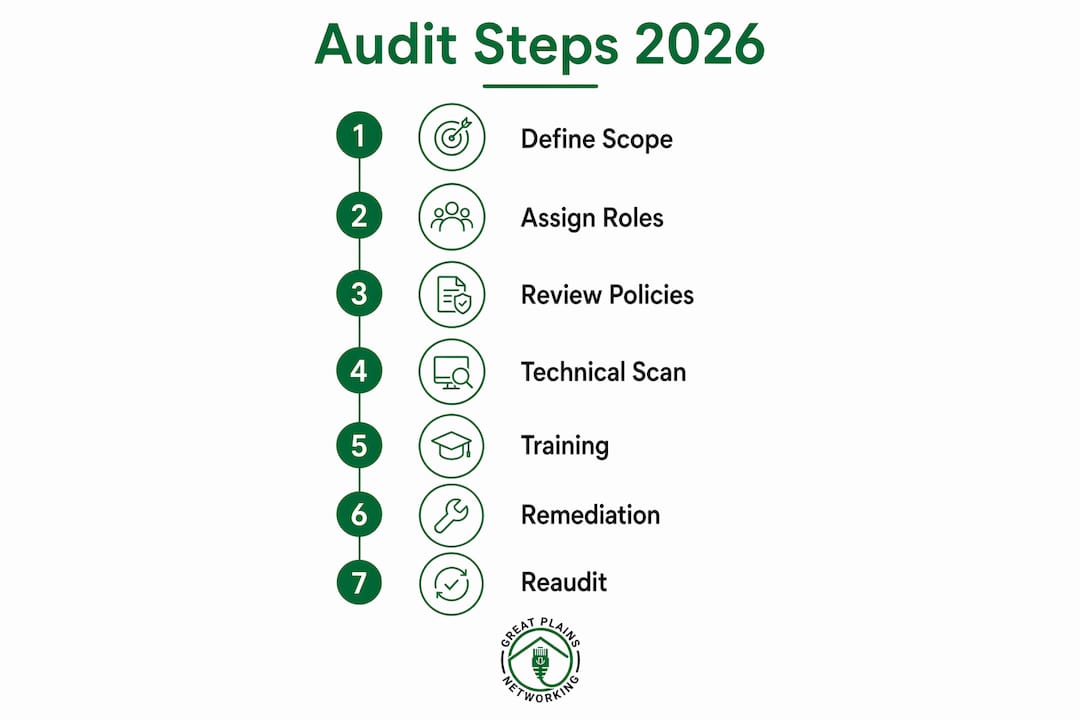
Define the audit scope
Scope defines what the audit covers and what it excludes. Your scope should include every office location, cloud applications, employee endpoints (laptops, mobile devices), remote access points, and all third-party vendors with access to client data. Leaving out a single vendor portal or a remote worker's home device creates a gap that attackers exploit.
Assign clear roles
Every audit needs four roles filled before work begins:
- Audit lead: Owns the timeline, coordinates all workstreams, and delivers the final report.
- Technical SME: Runs scans, reviews logs, and validates control configurations.
- Records custodian: Collects and organizes evidence including MFA logs, backup verification records, and vendor contracts.
- Executive sponsor: A managing partner who removes roadblocks and approves remediation budgets.
Without an executive sponsor, remediation stalls. Audit findings without budget authority behind them rarely get fixed.
Gather required evidence before day one
Collect these items before the audit begins:
- MFA enrollment and enforcement logs for all user accounts
- Endpoint detection and response (EDR) health reports
- Most recent backup test results with documented restore times
- Vendor contracts specifying data handling and breach notification obligations
- Current written information security plan (WISP)
- Access control lists for all privileged accounts
Confirm your 2026 baseline controls
Baseline "reasonable efforts" for law firms in 2026 include five core controls: mandatory multi-factor authentication (MFA), 24/7 endpoint detection, immutable backups tested quarterly, encrypted communication channels, and a written information security plan. These five controls define the minimum threshold the audit must verify. If any are missing before the audit starts, flag them as critical gaps immediately.
Pro Tip: Create a shared audit folder in your document management system before day one. Every piece of evidence collected goes there immediately. Hunting for logs after the fact wastes days and introduces errors.

How to execute the cybersecurity audit steps for your law firm
A structured 90-day roadmap covering technical infrastructure, policy review, and staff training gives law firms the clearest path to ABA Rule 1.6(c) compliance. The three phases divide the work into manageable blocks without letting any area get skipped.
Phase 1 (days 1–30): Technical infrastructure assessment
- Enforce MFA on all accounts. Verify that MFA is active on email, document management, practice management software, and any remote access tool. Accounts without MFA are the single most common entry point for attackers.
- Audit EDR health. Confirm that endpoint detection software is installed, updated, and reporting on every device in scope. Unmanaged devices are blind spots.
- Review access controls. Pull the access control list for every privileged account. Remove accounts belonging to former employees or vendors whose engagements have ended. Principle of least privilege means users get only the access their role requires.
- Verify backup integrity. Confirm that backups are immutable, stored offsite or in a separate cloud tenant, and that a restore test has been completed within the last 90 days. A backup that has never been tested is a hypothesis, not a recovery plan.
- Check email authentication. Verify that SPF, DKIM, and DMARC records are configured and enforced on your firm's email domain. Missing email authentication makes your domain easy to spoof.
Phase 2 (days 31–60): Policy and vendor review
This phase shifts from technical scans to documentation and contracts. Review your written information security plan against current operations. Policies written two years ago often describe controls that no longer exist or miss tools added since then.
Compile a complete vendor inventory. Many law firms underestimate how many third-party applications have access to sensitive client data. Map every vendor, confirm each has a signed data processing agreement, and verify that breach notification timelines meet your state bar's requirements. Check that vendor access is limited to what each engagement requires and that access is revoked when the engagement ends.
Pro Tip: Use a simple spreadsheet to track every vendor: name, data accessed, contract expiration, breach notification window, and last access review date. Update it quarterly, not annually.
Phase 3 (days 61–90): Training, exercises, and documentation
- Deliver security awareness training. All staff, including partners, complete phishing awareness and data handling training. Log completion dates and scores.
- Run a tabletop incident response exercise. Gather firm leadership and walk through a simulated ransomware or data breach scenario. Incident response plans are ineffective if not stress-tested. The exercise reveals gaps between the written plan and how people actually respond.
- Compile the compliance binder. Assemble all audit evidence: risk assessment results, training logs, MFA deployment records, vendor agreements, backup test results, and tabletop exercise notes.
- Document all findings and assign owners. Every gap identified gets a remediation owner, a target completion date, and a priority level.
Audit duration varies by firm size. A focused assessment covering a single office and a small vendor list takes one to two days. A comprehensive review of a multi-office firm with complex vendor relationships runs two to four weeks.
What common pitfalls do law firms face during a cybersecurity audit?
Most audit failures trace back to three recurring problems, not technical complexity.
Underestimating vendor risk. Vendor risk management is a major liability gap that standard audits frequently overlook. A firm may have strong internal controls and still suffer a breach through a poorly secured legal research platform or e-discovery vendor. Every vendor with data access is an extension of your attack surface.
Skipping real incident response testing. Writing an incident response plan and filing it away does not constitute readiness. Annual tabletop exercises with firm leadership consistently uncover gaps between the written plan and actual practice. Common discoveries include unclear notification chains, missing contact lists for outside counsel and cyber insurers, and staff who have never read the plan.
Incomplete or scattered documentation. Centralized documentation of audit evidence functions as the ultimate defense during formal audits and state bar inquiries. Firms that store evidence across email threads, shared drives, and individual desktops cannot produce it quickly under pressure.
Auditors and state bar committees require documented evidence of compliance stored in a centralized binder including risk assessments, training logs, MFA deployment records, vendor agreements, and incident response drill notes. This documentation is your primary defense during a regulatory inquiry, not your verbal assurances.
Pro Tip: Assign one person to own the compliance binder as a standing responsibility, not a project. That person updates it after every vendor change, training session, or policy revision.
A practical security diagnostic confirms logging completeness, incident response clarity, backup testing frequency, and vendor access reviews. Answering those questions precisely reveals your real security posture, not the posture you assume you have.
How to interpret audit results and drive remediation
Audit findings divide into two categories: critical control failures and policy gaps. Critical control failures require immediate action. Policy gaps require scheduled remediation with assigned owners.
Prioritize the highest-impact fixes first
The three controls that reduce risk most rapidly are enforcing MFA on all privileged accounts, hardening email authentication with SPF, DKIM, and DMARC, and isolating backups with tested restore procedures. Addressing these three controls can cut ransomware and data-exfiltration exposure significantly. Start there before addressing lower-priority findings.
Build your remediation register
A remediation register is a simple table tracking every finding. Each row includes the control gap, the assigned owner, the target completion date, the current status, and the evidence of completion. This register becomes part of your compliance binder and demonstrates due diligence to regulators and insurers.
| Finding category | Priority | Owner | Evidence required |
|---|---|---|---|
| MFA not enforced on all accounts | Critical | IT lead | Enforcement log showing 100% coverage |
| Email authentication incomplete | Critical | IT lead | DNS record verification screenshot |
| Backup restore untested | Critical | IT lead | Documented restore test with RTO recorded |
| Vendor contracts missing DPA | High | Records custodian | Signed data processing agreements |
| Incident response plan not tested | High | Audit lead | Tabletop exercise notes and attendance log |
Use audit results to support cyber insurance
Cyber insurance has become a requirement for law firms, and underwriters require MFA, endpoint protection, training records, and incident response plans to be in place before issuing coverage. Your completed compliance binder is the evidence package your broker needs. Firms that complete a documented audit renew policies faster and face fewer coverage disputes after a claim.
Schedule a re-audit after any significant change: a new office, a major software migration, a merger, or a breach. Annual re-audits are the minimum. Firms handling high-value litigation or regulated client data should review controls every six months. Review your legal IT continuity plan alongside audit results to confirm that recovery procedures match your current infrastructure.
Key Takeaways
A law firm cybersecurity audit requires defined scope, assigned roles, verified technical controls, and centralized documentation to satisfy ABA Rule 1.6(c) and support cyber insurance requirements.
| Point | Details |
|---|---|
| Start with scope and roles | Define every office, vendor, and endpoint in scope before collecting a single log. |
| Follow the 90-day structure | Split work across technical assessment, policy review, and staff training phases. |
| Fix MFA, email auth, and backups first | These three controls deliver the fastest reduction in breach risk. |
| Document everything centrally | A compliance binder is your primary defense during regulatory and insurance scrutiny. |
| Test your incident response plan | Annual tabletop exercises reveal gaps that written plans never expose. |
Why most law firm audits miss the point
Law firm cybersecurity audits tend to focus heavily on technology and underinvest in the human and vendor layers. I've seen firms with excellent endpoint detection get breached through a vendor's compromised credentials. The technical controls were solid. The vendor inventory was nonexistent.
The firms that handle audits well treat them as operational reviews, not compliance checkboxes. They involve partners in tabletop exercises, not just IT staff. They update vendor contracts annually, not when a breach forces the conversation. They maintain a living compliance binder that gets updated after every change, not assembled in a panic before a bar inquiry.
Leadership buy-in is the variable that separates firms that improve from firms that repeat the same audit findings year after year. When a managing partner participates in a tabletop exercise, the entire firm takes incident response seriously. When partners skip it, the plan stays theoretical.
The cybersecurity threat landscape for law firms is not getting simpler. Attackers specifically target legal practices because of the high-value, confidential data they hold. A documented, tested, and regularly updated audit process is not overhead. It is the minimum standard of care your clients expect and your bar association requires.
— Nicholas
Greatplainsnetworking supports law firm cybersecurity in Norman, Moore & OKC
Law firms in Norman, Moore, and Oklahoma City trust Greatplainsnetworking for managed IT support that covers the full scope of a cybersecurity audit and beyond.

Greatplainsnetworking provides 24/7 endpoint detection, MFA implementation, backup and recovery with tested restore procedures, and compliance documentation support tailored for legal practices. The team works in plain language, without technical jargon, so administrators and partners understand exactly what is protected and what still needs attention. Greatplainsnetworking offers same-day response and no long-term contracts, giving your firm expert cybersecurity services without the overhead of a full-time IT department. Schedule a consultation to assess your current controls and close the gaps before your next regulatory review.
FAQ
What is a law firm cybersecurity audit?
A law firm cybersecurity audit is a structured review of technical controls, written policies, and staff practices to verify compliance with ABA Rule 1.6(c) and protect confidential client data. It covers MFA enforcement, endpoint detection, backup integrity, vendor access, and incident response readiness.
How long does a law firm cybersecurity audit take?
A focused audit covering a single office takes one to two days. A comprehensive review of a multi-office firm with complex vendor relationships runs two to four weeks, depending on scope and the number of third-party integrations.
What documents does a law firm need for a cybersecurity audit?
Firms need MFA enrollment logs, EDR health reports, backup test results, vendor contracts with data processing agreements, a written information security plan, and incident response drill notes. These form the compliance binder that regulators and cyber insurers review.
How often should a law firm conduct a cybersecurity audit?
Annual audits are the minimum standard. Firms handling regulated client data or high-value litigation should review controls every six months and after any significant infrastructure change such as a merger or new software deployment.
Does a cybersecurity audit help with cyber insurance?
Yes. Underwriters require documented evidence of MFA, endpoint protection, staff training, and a tested incident response plan before issuing or renewing coverage. A completed compliance binder from your audit is the evidence package your broker needs to process your application.
Recommended
Want help putting this into practice?
We'll audit your security, speed, and hardware in under an hour — no commitment, no sales pitch. Just a clear roadmap of what to fix and why.