
Fix Exposed RDP in 24/72/30 Days: RDP Security Best Practices for SMBs

If Remote Desktop Protocol isn't essential to your operations, disable it entirely. If it is, never expose it directly to the internet: put it behind a VPN or zero-trust gateway, require multi-factor authentication, and enforce least-privilege access on every account that touches it. Blocking port 3389 from public reach is the single fastest way to cut your ransomware exposure. Everything below gives you the checklist and playbook to make that happen.
TL;DR:
- Blocking port 3389 from public exposure is the fastest way to reduce ransomware risk, but only if RDP is not necessary or is securely behind an authenticated gateway.
- Implementing multi-factor authentication, network level authentication, and account lockouts on all remote sessions significantly lowers credential-based attack success rates.
- Regularly auditing RDP hosts, patching critical vulnerabilities, and disabling unnecessary RDP ports are essential to prevent exploitation of known security flaws.
- Monitoring for unusual RDP activity, such as failed login attempts or connections from unexpected locations, helps detect attacks before they escalate.
- Small businesses should periodically review and revoke RDP access for unused or outdated accounts to minimize attack surfaces.
Table of Contents
- Following RDP Security Best Practices: A Prioritized Checklist
- Why Exposed RDP Is the Architecture Problem, Not a Configuration One
- What Identity Controls Actually Stop Credential-Based Attacks?
- Hardening Hosts and Staying Ahead of Known Exploits
- Detecting RDP Attacks Before They Become Breaches
- Building an RDP Security Playbook Small Teams Can Actually Follow
- How an MSP Approaches RDP Security in Practice
- Regularly Reviewing and Revoking Stale RDP Accounts
- An MSP's Take: Where Small Businesses Actually Get RDP Wrong
- Get a Remote Access Security Audit from Greatplainsnetworking
- Sources
Following RDP Security Best Practices: A Prioritized Checklist
Getting RDP secure isn't about doing everything at once. It's about doing the right things in the right order, because attackers exploit the gaps you leave open longest.
Here's the sequence that actually reduces risk, based on how ransomware crews operate: they scan for exposed port 3389, try stolen or weak credentials, and move laterally the moment they're in.
- Disable RDP everywhere it isn't actively needed. Every idle RDP listener is a door nobody's watching.
- Move required RDP behind an authenticated path — a VPN or zero-trust remote access gateway, never a direct internet-facing connection.
- Turn on MFA, Network Level Authentication (NLA), and account lockout policies for every remote session.
- Restrict which accounts can use RDP at all, and never allow built-in administrator accounts to log in remotely.
- Patch aggressively, close unused ports, and feed logs into monitoring so you catch attempts, not just breaches.
Following CISA's ransomware guidance, organizations that audit RDP use, close unused ports, and enforce lockouts see a meaningfully smaller attack surface than those relying on passwords alone.
Pro Tip: Run a quick internal scan for anything still listening on port 3389 before you do anything else on this list. You can't secure what you don't know is exposed, and most small businesses find at least one forgotten RDP endpoint the first time they look.
Why Exposed RDP Is the Architecture Problem, Not a Configuration One
Port 3389 is scanned constantly by automated bots looking for exactly one thing: a login prompt they can hammer with stolen credentials. CISA's ransomware guidance names RDP exposure as one of the most common initial infection vectors for ransomware, and that's not a coincidence. It's the path of least resistance.
You have three real architecture choices:
- VPN. Solid, familiar, and widely supported, but it puts an entire network segment behind one login if not configured with tight access controls.
- Zero-trust remote access gateway. Grants access to specific applications or hosts, not the whole network, and checks device posture before a session even starts.
- Bastion host (jump server). A single hardened checkpoint that brokers every RDP session, so no workstation or server ever needs a direct listener.
CISA's guide to securing remote access software recommends brokered access models specifically because they let you detect anomalous connections at a single choke point instead of across dozens of endpoints.
Direct internet exposure of RDP should never happen without documented justification, active monitoring, and a defined end date. Pair that architecture with deny-by-default firewall rules, source IP restrictions, and microsegmentation so a compromised workstation can't reach your file server just because they're on the same subnet.
What Identity Controls Actually Stop Credential-Based Attacks?
Passwords alone stop almost nothing against a determined attacker running automated credential-stuffing tools. CISA lists missing MFA on remote access paths as one of the most common misconfigurations exploited in ransomware campaigns, and RDP gateways are a primary target.
Four identity controls matter more than any password policy:
- Make MFA mandatory on every remote connection, not just for admins. Phishing-resistant methods (hardware tokens, certificate-based authentication) beat SMS codes every time.
- Enable Network Level Authentication (NLA) so a session can't even begin until the user authenticates, cutting off a huge slice of automated attack tools before they get a foothold.
- Use conditional access signals like device posture, geolocation, and time of day to flag or block sessions that don't match normal patterns.
- Restrict RDP logins to specific security groups, and never allow local admin or built-in administrator accounts to connect remotely.
Least privilege for RDP is one of the most overlooked controls in small business IT. Plenty of organizations lock down file shares carefully, then leave RDP open to any domain user by default.
Pro Tip: If a role doesn't specifically require remote desktop access, don't grant it "just in case." Every unused permission is a liability sitting quietly until someone finds it.
Hardening Hosts and Staying Ahead of Known Exploits
Identity controls stop the front door. Host hardening stops what happens if someone gets past it anyway. Weak, unpatched systems remain one of the most exploited entry points according to joint FBI guidance, and RDP-adjacent vulnerabilities get weaponized fast once disclosed.
Prioritize these host-level steps:
- Patch known-exploited vulnerabilities first, especially anything tied to RDP or remote authentication services, ahead of routine feature updates.
- Enforce strong encryption settings on RDP sessions and disable legacy protocol versions that don't support modern cipher suites.
- Configure RDP clients carefully to avoid man-in-the-middle risk. Verify server certificates rather than clicking through warning prompts.
- Use Group Policy or PowerShell to disable RDP on any host that doesn't need it, and block execution of unsolicited
.rdpfiles. CISA has flagged large-scale phishing campaigns that use.rdpattachments to spawn sessions directly. - Keep endpoint detection and response (EDR) running and current on every machine that can accept a remote connection.
Detecting RDP Attacks Before They Become Breaches
You can't stop what you can't see, and RDP logs are one of the richest detection sources most small businesses ignore. Retaining at least 90 days of connection logs gives your team enough history to spot patterns instead of isolated events.
Four things belong in every RDP monitoring setup:
- Log every connection attempt, successful or not, along with account changes and administrative actions.
- Feed those logs into a SIEM or EDR platform that can flag anomalies automatically rather than relying on someone reviewing spreadsheets.
- Watch for specific patterns: repeated failed logins, connections from unexpected geolocations, admin activity outside business hours, and brand-new accounts appearing without a change request behind them.
- When something trips an alert, isolate the host immediately, rotate every credential that touched it, verify your backups are intact, and escalate to your incident response process.
The FBI's IC3 advisory on remote access exploitation specifically recommends documenting and monitoring external connections, restricting the sources allowed to initiate them, and using network segmentation to contain any breach that does occur.
Building an RDP Security Playbook Small Teams Can Actually Follow
Small IT teams don't need a 40-page security framework. They need a sequence they can execute this week, not this quarter.
- Audit everything first. Inventory every host running RDP, document why each one needs it, and flag anything without a clear business justification for removal.
- Within 24 hours: close or restrict any public-facing RDP, enable account lockout policies, and require MFA on every gateway still in use.
- Within 72 hours: patch the highest-risk hosts, tighten which accounts can use RDP, and get monitoring alerts live so you're not flying blind while other fixes roll out.
- Within 30 days: deploy segmented access controls, confirm your backups actually restore correctly, and run a tabletop exercise simulating a compromised RDP session.
That order matters. Fixing exposure before you fix patching stops the most common attack path first, even if the underlying systems aren't perfectly hardened yet.
How an MSP Approaches RDP Security in Practice
Greatplainsnetworking's audits of small business networks in Norman, Moore, and Oklahoma City turn up the same pattern repeatedly: at least one RDP endpoint nobody remembers opening, usually tied to a vendor's old remote support session or an employee's makeshift work-from-home setup.
24/7 monitoring changes the equation, because it catches the anomalous login attempt at 2 a.m. instead of the ransomware note the next morning. Managed remote access removes public RDP exposure entirely by routing every connection through a controlled, authenticated gateway rather than leaving a listener facing the internet.
Common findings from these audits, in the order they typically get fixed:
- Exposed RDP ports with no documented business justification
- Missing MFA on gateways that do have a legitimate remote access need
- Stale accounts still holding remote login rights months after someone left
- Unpatched hosts running outdated RDP client versions
Regularly Reviewing and Revoking Stale RDP Accounts
Every account that can log in via RDP is a potential entry point, and most small businesses lose track of exactly how many exist. Someone leaves the company, a contractor's project ends, or a role changes, and the RDP permission tied to that account often outlives the reason it was granted.
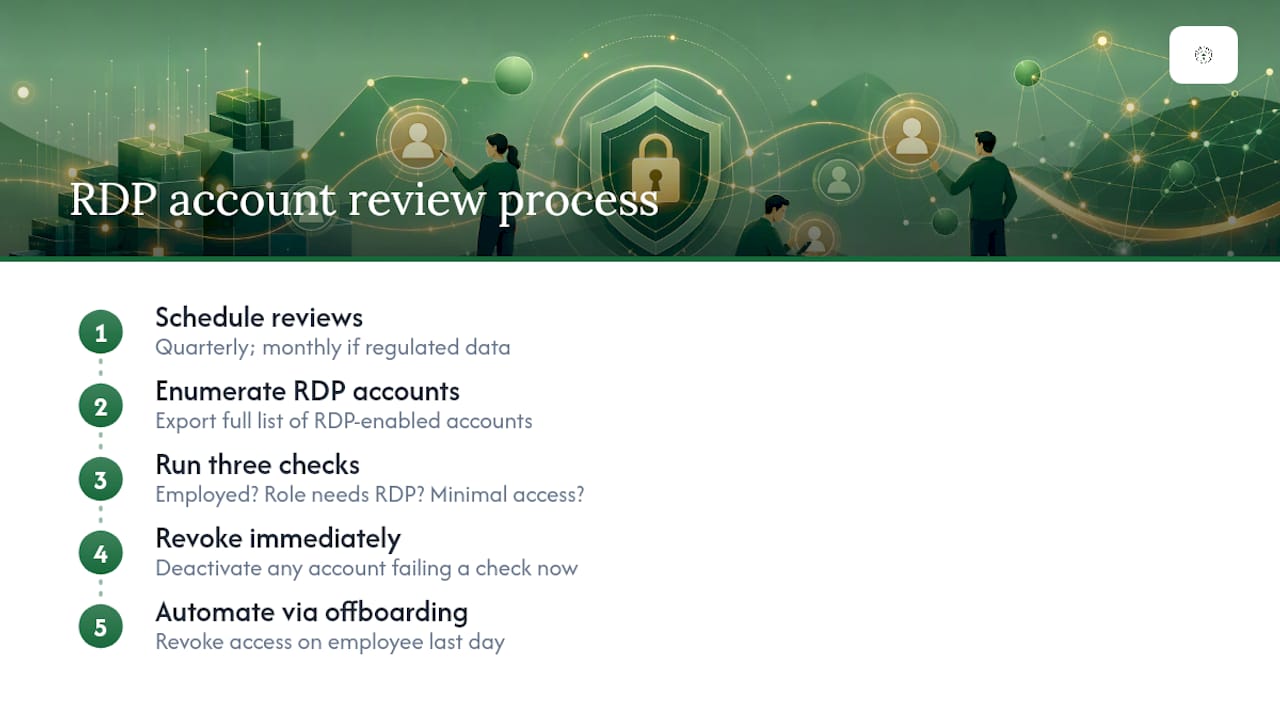
Set a recurring schedule for this. Quarterly reviews work well for most small businesses; monthly makes sense for firms handling regulated data like patient records or financial accounts. During each review, pull the full list of accounts with RDP rights and check three things: does this person still work here, does their current role still require remote desktop access, and does their access level match what they actually need.
Revoke anything that fails any of those three checks immediately, not at the next scheduled maintenance window. Stale accounts with valid credentials are exactly what attackers look for after a phishing campaign harvests a password, because nobody's actively watching an account that should have been deactivated months ago.
Tie this review into your offboarding process so it happens automatically instead of depending on someone remembering. A departing employee's RDP access should be revoked the same day as their last day, not whenever the next audit happens to catch it.
An MSP's Take: Where Small Businesses Actually Get RDP Wrong
The myth that won't die: strong passwords are enough. They're not, and every ransomware advisory from CISA and the FBI names exposed RDP with weak or single-factor authentication as a top infection vector. If you invest in exactly three things, make it hiding RDP behind a gateway, enforcing MFA everywhere, and monitoring logs continuously. Everything else matters less than getting those right first.
— Nicholas
Get a Remote Access Security Audit from Greatplainsnetworking
Greatplainsnetworking is the alternative to guessing whether your RDP setup is actually safe. Small businesses in Norman, Moore, and Oklahoma City get a security audit focused specifically on remote-access exposure, same-day response when something looks wrong, and no long-term contract locking you into a service that isn't working.

That audit checks exactly what this article walks through: exposed ports, missing MFA, stale accounts, and gaps in monitoring. Instead of piecing together VPN configuration, gateway setup, and log monitoring on your own, Greatplainsnetworking's managed IT support handles the whole architecture and watches it 24/7. If cybersecurity is the more pressing concern right now, the cybersecurity services page covers monitoring, ransomware protection, and incident response in more detail. Reach out and request a remote-access audit before your next RDP endpoint becomes someone else's way in.
Sources
- StopRansomware Guide | CISA
- IC3 / FBI advisory (CSA 2023)
- Weak security controls and practices routinely exploited for initial access (FBI joint advisory)
Recommended
Want help putting this into practice?
We'll audit your security, speed, and hardware in under an hour — no commitment, no sales pitch. Just a clear roadmap of what to fix and why.