
Remote Network Management for MSPs: A Practical Guide

Remote network management (RMM) is the centralized monitoring and control of distributed IT infrastructure from a single console, without requiring a technician to be physically on-site. For MSPs and IT teams, that translates directly into fewer emergency visits, faster mean time to repair (MTTR), and a predictable operating expense model that clients can budget around. Intel defines RMM as encompassing 24/7 health monitoring, automated patch management, script-based maintenance, and secure remote desktop access across networks, endpoints, servers, cloud workloads, and IoT devices. Greatplainsnetworking deploys this model for small businesses in Norman, Moore, and Oklahoma City, catching disk failures, security gaps, and performance degradation before they become outages.
Stat to know: Gartner forecasts worldwide IT spending to grow 9.8% in 2025, with managed services and cloud infrastructure absorbing a growing share of that budget — a signal that proactive remote management is becoming the standard, not the exception.
Table of Contents
- What remote network management actually covers
- Key features your RMM tool needs to deliver
- How remote management works: architecture and data flows
- Who benefits most from remote network management
- Benefits and ROI: what remote network management delivers
- Security risks RMM introduces and how to mitigate them
- How to choose a remote network management solution
- Typical pricing models for remote network management
- How RMM compares to NMS, MDM, SIEM, and PSA
- How Greatplainsnetworking implements RMM for SMB clients
- Key Takeaways
- Why proactive monitoring changes the math for small businesses
- Greatplainsnetworking offers proactive remote monitoring for OKC-area small businesses
- Authoritative sources and further reading
What remote network management actually covers
Remote network management is not simply "watching a dashboard." The term covers two distinct but related disciplines: monitoring (collecting metrics, generating alerts, and tracking health) and management (taking action — patching, scripting, reconfiguring, or accessing a device remotely to resolve a problem). Conflating the two is where many SMB buyers go wrong when evaluating tools.
The scope is broader than most people expect:
- 24/7 health monitoring: CPU utilization, disk capacity, memory pressure, interface errors, and service availability across every managed device.
- Alerting and escalation: Threshold-based and anomaly-based alerts routed to the right technician or ticket queue automatically.
- Automated patch management: OS and third-party application patches deployed on a defined schedule, with rollback capability.
- Script-based remediation: PowerShell, Bash, or Python scripts that run automatically when a condition is met — clearing temp files, restarting a hung service, or quarantining a process.
- Remote desktop and SSH access: Secure, audited sessions that let a technician resolve issues without driving to the site.
- Device discovery and inventory: Continuous scanning to maintain an accurate asset register, including unmanaged devices that appear on the network.
- Reporting and dashboards: Client-facing and internal reports on uptime, patch compliance, ticket volume, and SLA performance.
A practical scenario: an MSP's RMM console alerts at 2:00 AM that a client's server disk is at 88% capacity and growing at 4 GB per day. An automated script runs immediately, clearing temp and log files and reclaiming 12 GB. The alert closes, a ticket is logged, and the client's office manager receives a summary email at 8:00 AM. No one drove anywhere. That is the operational promise of remote network monitoring done correctly.
Key features your RMM tool needs to deliver
Feature lists from vendors can run to dozens of line items. What matters is whether the features map to the problems your environment actually has. Vendor feature sets typically span Windows, macOS, Linux, network devices, cloud endpoints, and automation scripting — but not every platform executes each category equally well.
Must-have features for MSP environments
- Continuous telemetry collection across all device types (servers, workstations, network gear, cloud instances).
- Automated patching with configurable maintenance windows and patch approval workflows.
- Remote access with session recording and audit logs — non-negotiable for compliance-sensitive clients.
- Alerting with escalation rules so the right person is paged, not just the first person on a list.
- Device discovery that catches unmanaged assets before they become blind spots.
- API and PSA integration to automate ticket creation and billing without manual data entry.
- Reporting that produces client-ready summaries, not just raw data exports.
Nice-to-have features worth evaluating
- Agentless monitoring for network devices via SNMP.
- Built-in scripting library with community-contributed remediation templates.
- Mobile device management (MDM) integration for endpoint coverage.
- Compliance reporting modules for HIPAA or CMMC environments.
Pro Tip: The two features that deliver the fastest operational ROI are automated patching and scripted remediation for high-volume, repeatable issues. Automate those first. Disk cleanup, antivirus scan scheduling, and service restart scripts eliminate a significant portion of routine tickets before a technician ever sees them.
How remote management works: architecture and data flows
Understanding the architecture helps you make better deployment decisions and have more credible conversations with clients about where their data goes.
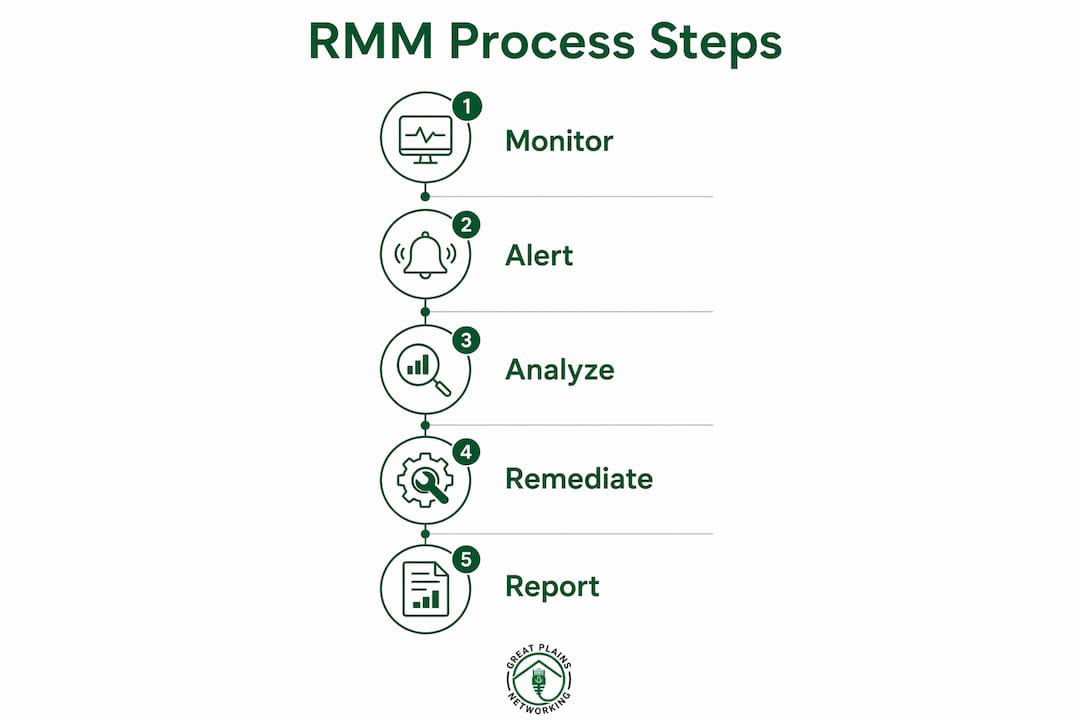
The core data flow
A device running an RMM agent continuously collects performance metrics, security events, and configuration state. That data travels over an encrypted channel (typically TLS 1.2 or 1.3) to a centralized console, which may be cloud-hosted or on-premises. The console applies alerting rules, triggers automation, and provides the technician interface for remote access. AWS describes this model as supporting both on-premises and cloud infrastructure, with cloud-native RMM pulling telemetry via cloud APIs — meaning services like Amazon CloudWatch or AWS IoT Device Management can serve as RMM components without an agent on every cloud-hosted resource.
Agent-based vs. agentless vs. cloud-native
| Deployment model | How data is collected | Best for | Key trade-off |
|---|---|---|---|
| Agent-based | Lightweight software on each device sends telemetry | Endpoints, servers, workstations | Requires agent deployment and maintenance |
| Agentless (SNMP/polling) | Console polls devices using SNMP or WMI | Network gear, printers, legacy systems | Less granular data; no remote remediation |
| Cloud-native (API) | Console pulls data from cloud provider APIs | AWS, Azure, GCP workloads | No agent overhead; limited to cloud-hosted resources |
| Hybrid | Agents on endpoints, SNMP for network, APIs for cloud | Mixed environments (most SMBs) | Most complete visibility; more complex to configure |
"Treat the management connection as a high-risk vector. Enforce ephemeral access, session recording, and rigorous third-party vendor reviews to reduce supply-chain risk. The RMM channel that gives you visibility into every device is the same channel an attacker wants to exploit." — IR.com MSP RMM Guide
Sensitive data — credentials, session recordings, audit logs — should reside in a console with documented data residency policies. For US-based SMBs, verify that your RMM vendor stores data in US data centers and can provide a data processing agreement. Uptime resilience also depends on physical infrastructure; data center fuel and power planning is a factor worth reviewing when evaluating cloud-hosted console providers.
Who benefits most from remote network management
Remote work and distributed endpoints have made centralized visibility a practical necessity rather than a luxury. The organizations that get the most from RMM share a few common traits: multiple devices, multiple locations, or uptime requirements that make reactive support unacceptably expensive.
Primary use cases:
- MSPs managing multiple clients: RMM is the operational backbone. Without it, scaling past a handful of clients requires proportional headcount growth. With it, a small team can monitor hundreds of endpoints across dozens of clients.
- Multi-branch businesses (retail, healthcare, legal): A law firm with three offices or a dental group with four locations needs consistent patch levels, unified alerting, and a single view of network health across all sites.
- Remote employee endpoint support: Distributed workforces mean devices that IT never physically touches. RMM provides the visibility and remediation capability to support those users without a truck roll.
- IoT device fleets: Manufacturing equipment, medical devices, and point-of-sale terminals all generate telemetry that RMM can aggregate and alert on.
- Cloud and on-premises hybrid environments: Organizations running workloads in AWS or Azure alongside on-premises servers need a single pane of glass, not separate monitoring tools for each environment.
A dental practice with 20 workstations, a server running practice management software, and a HIPAA compliance requirement is a textbook RMM candidate. The practice cannot afford downtime during patient hours, cannot employ a full-time IT person, and needs documented audit trails for compliance. An MSP with RMM deployed can monitor that environment continuously, patch outside business hours, and respond to alerts before the front desk staff notices anything is wrong.
Signals that an organization is ready for RMM: more than 10 managed endpoints, more than one physical location, any uptime SLA, or a compliance requirement that demands documented patch and access records.
Benefits and ROI: what remote network management delivers
The business case for RMM rests on four measurable outcomes: reduced downtime, fewer on-site visits, predictable costs, and better SLA performance.
Reduced MTTR. When an alert fires and an automated script resolves the issue before a ticket is even created, MTTR drops from hours to minutes. Automation frees technician time and reduces ticket volume — the two metrics that most directly affect MSP profitability and client satisfaction.

Fewer truck rolls. Every on-site visit has a hard cost: travel time, fuel, and an hour of billable time that could have served another client. RMM converts most routine issues into remote resolutions. For an MSP serving clients across an entire metro area, that adds up quickly.
Predictable OPEX. The primary goal of remote management is minimizing downtime, but the argument that lands with non-technical decision-makers is budget predictability. A fixed monthly fee for proactive monitoring replaces unpredictable break-fix invoices. Clients can plan IT costs the same way they plan rent. For guidance on translating this into client conversations, see how to reduce IT downtime for small businesses.
Improved SLA compliance. With continuous monitoring and automated alerting, SLA breaches become visible before they happen. Patch compliance rates, uptime percentages, and ticket resolution times are all measurable and reportable.
Metric callout: Track these four KPIs post-deployment to measure RMM impact: MTTR (target: under 4 hours for non-critical issues), patch compliance rate (target: 95%+), monthly ticket volume per endpoint, and uptime percentage per client.
MSPs achieve the fastest ROI by automating the highest-volume, repeatable remediation tasks — patching, antivirus scans, disk housekeeping — rather than focusing automation effort on low-frequency incidents that rarely recur.
Security risks RMM introduces and how to mitigate them
RMM platforms are high-value targets for attackers precisely because they provide elevated, persistent access to every managed device. A compromised RMM console is not a single breach — it is a breach of every client the MSP manages. Unmanaged elevated access can be weaponized as a legitimate management channel for ransomware deployment or data exfiltration.
Security risks to address:
- Elevated credentials stored in the console or on admin workstations.
- Persistent access tokens that do not expire.
- Supply-chain compromise of the RMM vendor itself.
- Session hijacking through stolen credentials or session cookies.
- Insider abuse by technicians with overly broad permissions.
- Lack of audit trails, making post-incident investigation difficult.
Mitigation checklist:
- Multi-factor authentication (MFA): Enforce MFA on every console login, every remote session initiation, and every API credential. No exceptions.
- Role-based access control (RBAC): Technicians see and manage only the clients and devices relevant to their role. No one gets global admin by default.
- Session recording and audit logs: Every remote session should be recorded and timestamped. Persistent audit logs are required for compliance and incident response.
- Least privilege: Grant the minimum permissions needed for each function. Separate patch approval from remote access from reporting.
- Network segmentation: The management console and its agents should operate on a segmented network path, not the same flat network as client workstations.
- Vendor security reviews: Review your RMM vendor's security posture annually — SOC 2 reports, breach history, and patch cadence for the platform itself.
- Break-glass procedures: Document and test the process for revoking access immediately if a technician account is compromised.
Pro Tip: Reduce the management surface by routing RMM connections through a bastion host or zero-trust access broker. Instead of placing full console access on every admin workstation, the bastion brokers connections and enforces ephemeral session tokens that expire after each session. This limits the blast radius if a technician's laptop is compromised.
For law firms and other compliance-sensitive clients, the security controls around RMM overlap directly with broader remote work security risks that deserve their own documented policy.
How to choose a remote network management solution
The evaluation process matters as much as the feature list. A platform with impressive specs that your team cannot operate confidently, or that your clients' environments cannot support, will underdeliver.
Evaluation criteria:
- Device coverage: Does it support Windows, macOS, Linux, network gear (via SNMP), cloud instances, and IoT endpoints? Gaps in coverage create blind spots.
- Scalability: Can the platform handle your projected endpoint count in two years without a pricing cliff?
- Security controls: MFA, RBAC, session recording, and audit log retention are table stakes. Ask for documentation, not just a checkbox.
- Automation capabilities: Evaluate the scripting engine, the library of pre-built remediation scripts, and whether automation can trigger from alert conditions.
- PSA and ITSM integration: RMM without PSA integration means manual ticket creation and billing reconciliation — a significant time drain.
- Backup and recovery integration: RMM should be able to verify backup job status and alert on failures.
- Reporting: Client-facing reports should be configurable and schedulable, not just raw data exports.
- Pricing model: Understand the per-endpoint, per-technician, or tiered structure before signing. Hidden per-agent fees are a common red flag.
- Data residency: For US-based clients, confirm that data is stored in US data centers.
Vendor questions to ask in demos:
- What is the typical agent deployment time for 50 endpoints?
- What is the agent's CPU and memory footprint on a managed device?
- Is the API fully documented and available at all pricing tiers?
- What is your SLA for platform uptime, and what is your breach history?
- Where is client data stored, and what is your data processing agreement?
Red flags:
- Vague or evasive answers about security posture or breach history.
- No session auditing or audit log export capability.
- Flat pricing that reveals per-agent fees buried in the contract.
- Poor or non-existent PSA integration.
- No documented rollback process for failed patches.
A phased deployment approach — assessment, pilot, phased rollout, optimization — reduces risk and surfaces integration problems before they affect the full client base.
Typical pricing models for remote network management
Pricing in the RMM market varies significantly by vendor, deployment model, and the features included at each tier. Understanding the pricing shape before you negotiate saves budget and prevents surprises at renewal.
Common pricing models:
- Per-endpoint/per-agent: A monthly fee per managed device. Predictable and scales linearly. Common for MSPs billing clients per device.
- Per-node (network devices): Separate pricing for network infrastructure (switches, routers, firewalls) versus endpoints. Relevant for network-heavy environments.
- Per-technician/per-seat: A flat fee per technician using the platform. Works well for larger teams managing a high endpoint-to-technician ratio.
- Flat MSP bundle: An all-in monthly fee covering a defined endpoint count and feature set. Simplifies billing but can include features you do not need.
- Feature-tiered pricing: Base monitoring at a lower price point, with automation, remote access, and compliance modules as paid add-ons.
Cost drivers to watch:
- Agent count relative to your contracted tier.
- Remote-access session minutes if billed separately.
- API access availability at your pricing tier.
- Onboarding and implementation fees (often not listed publicly).
- Compliance reporting modules (HIPAA, CMMC) as paid add-ons.
| Pricing model | Typical buyer profile | Key consideration |
|---|---|---|
| Per-endpoint | MSPs with predictable device counts | Scales cleanly; watch for network device surcharges |
| Per-technician | Larger IT teams, high endpoint-to-tech ratio | Cost-effective at scale; less predictable for growing teams |
| Flat MSP bundle | Small MSPs wanting simple billing | Verify feature inclusions; bundles often exclude compliance modules |
| Feature-tiered | Organizations adding capabilities incrementally | Base tier may lack automation or remote access |
For automated monitoring of web assets, some MSPs layer lightweight external monitoring tools on top of their RMM platform rather than paying for a premium tier — a cost-effective approach for clients with public-facing websites.
How RMM compares to NMS, MDM, SIEM, and PSA
RMM does not replace every tool in an IT operations stack. Understanding where it fits — and where it hands off to adjacent tools — prevents both gaps and redundant spending.
Tool-by-tool comparison:
- NMS (Network Management System): Focused on network infrastructure — switches, routers, firewalls, and WAN links. NMS tools like SolarWinds or PRTG go deeper on network topology, traffic analysis, and interface-level metrics than most RMM platforms. Use NMS when network performance is the primary concern; use RMM when endpoint and server management is equally important.
- MDM (Mobile Device Management): Manages smartphones, tablets, and laptops with a focus on policy enforcement, app deployment, and remote wipe. RMM and MDM overlap on laptops but MDM is the right primary tool for mobile fleets. Many RMM platforms include basic MDM features; dedicated MDM tools go deeper on mobile policy.
- SIEM (Security Information and Event Management): Aggregates and correlates security events for threat detection and compliance reporting. RMM generates logs; SIEM ingests and analyzes them. The two are complementary: RMM feeds event data to the SIEM, which applies detection rules and generates security alerts that RMM alone cannot produce.
- PSA (Professional Services Automation): Manages tickets, projects, contracts, and billing for MSPs. PSA does not monitor devices; RMM does not manage billing. The integration between the two — RMM alert creates a PSA ticket, technician resolves it, time is logged and billed automatically — is where real operational efficiency lives.
When to use each:
- RMM alone: SMBs with endpoints, servers, and basic network gear, no dedicated security operations.
- RMM + PSA: Any MSP. This integration is the operational baseline.
- RMM + SIEM: Compliance-sensitive clients (HIPAA, financial, legal) or organizations with a security operations function.
- RMM + NMS: Network-heavy environments (ISPs, large branch networks, manufacturing).
- RMM + MDM: Organizations with significant mobile or BYOD populations.
In production MSP environments, the real value comes from tuning alerts to reduce noise, building remediation playbooks, and integrating RMM with PSA to automate the full ticket lifecycle — from alert to resolution to billing.

How Greatplainsnetworking implements RMM for SMB clients
Greatplainsnetworking follows a structured implementation path for small business clients in Norman, Moore, and Oklahoma City — one that reduces deployment risk and delivers measurable value within the first 30 days.
Implementation phases:
- Pre-deployment assessment: Document all devices, operating systems, network topology, and existing monitoring gaps. Identify compliance requirements (HIPAA for dental and medical clients, IRS standards for accounting firms, CMMC for manufacturing).
- Pilot deployment: Deploy agents on a representative subset of devices — typically one location or one department. Tune alert thresholds to reduce false positives before expanding.
- Phased rollout: Expand agent deployment location by location, with client communication at each stage. Configure automation templates (patch schedules, disk cleanup scripts, backup verification checks) during rollout.
- Reporting baseline: Establish baseline metrics for uptime, patch compliance, and ticket volume so post-deployment improvement is measurable.
- Client training and handoff: Train the client's point of contact on what to expect from monitoring alerts, how to interpret monthly reports, and how to request support. Reducing alert fatigue on the client side is as important as reducing it on the technician side.
Services Greatplainsnetworking provides as part of managed RMM:
- 24/7 monitoring with same-day response for critical alerts.
- Automated patch management for OS and third-party applications.
- Secure remote access with session logging.
- Backup and recovery monitoring and verification.
- Cybersecurity controls including ransomware and phishing protection.
- Compliance support for HIPAA, IRS, and CMMC environments.
For a dental practice with several workstations and a server running practice management software, a typical deployment includes an initial assessment, a pilot deployment on a subset of devices, followed by a full rollout within a couple of weeks, and first monthly reporting thereafter. The practice owner receives a plain-language summary — no technical jargon — and a direct line to the technician who manages their account. That is the managed IT support model Greatplainsnetworking delivers across the Oklahoma City metro.
For compliance-sensitive deployments, documented audit trails, role separation, and verified backup and recovery runbooks are part of the baseline configuration, not an add-on.
Key Takeaways
Remote network management is the operational foundation that lets MSPs and IT teams deliver proactive, scalable support without proportional headcount growth — and security controls around the RMM platform itself are as critical as the monitoring it provides.
| Point | Details |
|---|---|
| Core definition | RMM combines 24/7 monitoring with remote remediation — patching, scripting, and secure access — from a single console. |
| Fastest ROI | Automate high-volume repeatable tasks first: patching, disk cleanup, and antivirus scans cut ticket volume before anything else. |
| Security is non-optional | Enforce MFA, RBAC, session recording, and least privilege on every RMM deployment — the console is a high-value attack target. |
| Selection priority | Evaluate device coverage, PSA integration, session auditing, and data residency before pricing; hidden per-agent fees are a common red flag. |
| Greatplainsnetworking | Delivers managed RMM with 24/7 monitoring, automated patching, and compliance support for small businesses in Norman, Moore, and OKC. |
Why proactive monitoring changes the math for small businesses
The conventional wisdom in IT support is that you respond when something breaks. For large enterprises with dedicated NOC teams, that model is survivable. For a 15-person law firm or a dental practice with one server, a reactive posture means a broken morning, a panicked office manager, and revenue lost while someone drives across town to diagnose a problem that a monitoring alert would have flagged three days earlier.
What most articles about RMM understate is the change management dimension. The technology is the easier part. The harder part is getting client staff to trust the process — to understand that a monthly report showing "12 alerts resolved automatically" is not a sign that their network is failing, but proof that the monitoring is working. MSPs that invest in plain-language client communication, regular reporting reviews, and a named point of contact for each account retain clients longer and generate fewer escalations.
Alert tuning deserves more attention than it typically gets. An RMM deployment that fires 40 alerts a day trains technicians to ignore alerts. The first 60 days after deployment should be spent aggressively tuning thresholds — raising them where the environment is noisy, lowering them where the stakes are high. A well-tuned alert profile is worth more than any additional feature the vendor sells.
The MSPs that get the most from remote network management are the ones who treat it as an operational discipline, not a product. The platform is the tool. The playbooks, the automation templates, the client communication cadence, and the security controls around the console — those are what actually determine whether RMM delivers on its promise.
Greatplainsnetworking offers proactive remote monitoring for OKC-area small businesses
Small businesses in Norman, Moore, and Oklahoma City get a concrete alternative to break-fix IT with Greatplainsnetworking's managed monitoring and support. The service covers 24/7 network and endpoint monitoring, automated patch management, cybersecurity protection, and backup and recovery verification — all delivered with same-day response and no long-term contract requirement.

For practices and firms with compliance obligations — HIPAA for healthcare, IRS standards for accounting, CMMC for manufacturing — Greatplainsnetworking configures RMM deployments with documented audit trails and role-separated access from day one, not as an afterthought. The cybersecurity controls and backup and recovery services are integrated into the monitoring stack, not sold separately.
If your business has more than 10 devices, more than one location, or any uptime requirement you cannot afford to miss, the right next step is a free IT assessment. Contact Greatplainsnetworking to schedule yours and get a clear picture of your current monitoring gaps before they become outages. Start with managed IT support built for small businesses in the Oklahoma City metro.
Authoritative sources and further reading
The following sources informed this article and provide reliable starting points for deeper research:
-
What Is Remote Monitoring and Management (RMM)? — Intel — Intel's technical definition of RMM, covering core functions, agent architecture, and use cases. A solid reference for explaining RMM to stakeholders.
-
What is RMM? — AWS — AWS's overview of RMM with specific coverage of cloud-native telemetry, agent vs. agentless models, and services like Amazon CloudWatch and AWS IoT Device Management.
-
MSP RMM Solutions: A Full Guide — IR.com — Comprehensive MSP-focused guide covering security risks, implementation best practices, phased deployment, and vendor evaluation criteria.
-
Remote Infrastructure Management — Netdata Academy — Practical coverage of automation, efficiency gains, and ROI measurement for remote infrastructure management.
-
N-central Features Summary — N-able — Vendor feature reference for understanding what a full-featured RMM platform covers across OS types, network devices, and automation capabilities.
-
Advantages and Disadvantages of Remote Access — MSP360 — Balanced analysis of remote access security trade-offs, including the risk of management channels being weaponized.
-
Gartner IT Spending Forecast 2025 — Authoritative market data on IT spending growth and the shift toward managed services and cloud infrastructure.
-
SNMP Monitoring — Pandora FMS Blog — Technical reference on SNMP polling, MIB structures, and agentless network device monitoring — useful for understanding the agentless RMM model.
Recommended
Want help putting this into practice?
We'll audit your security, speed, and hardware in under an hour — no commitment, no sales pitch. Just a clear roadmap of what to fix and why.