
How to Segment Your Office IT Networks Safely in OKC

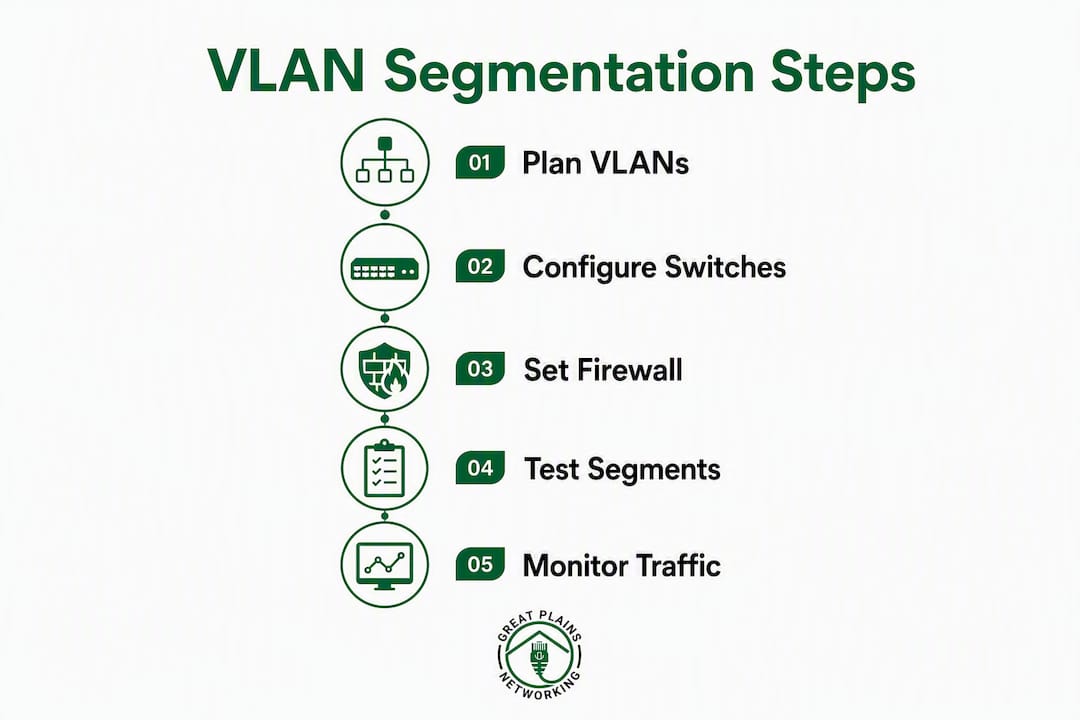
A 3–5 VLAN model with default-deny inter-VLAN firewall rules is the fastest, lowest-disruption way for Norman, Moore, and Oklahoma City small businesses to stop lateral movement and protect POS terminals, printers, and servers. The industry term for this approach is network segmentation, and it works by dividing your single flat network into isolated logical zones. Here is what to do right now, in order:
- Inventory every device on your network before touching anything
- Isolate guest Wi-Fi to its own VLAN today (no access to staff resources)
- Move cameras, smart TVs, and badge readers to a dedicated IoT VLAN
- Create Staff, POS, and Management VLANs in that order
- Apply default-deny firewall rules between all VLANs; add only the minimal allows your business needs (workstation to file server; POS to payment processor outbound)
- Enable logging on inter-VLAN traffic from day one
- Test POS, VoIP, and printing before full rollout
- Roll out in phases so the office keeps running
Discovery routinely surfaces 30–50% more devices than expected, including forgotten contractor laptops and unpatched IoT gear. Budget extra time for that step. If you want the work done reliably in the OKC metro, a managed IT engagement with 24/7 monitoring and documented rule sets is the right call. Greatplainsnetworking provides exactly that, locally.
Table of Contents
- How do you stop unauthorized lateral movement between VLANs?
- How do you integrate wireless networks into VLAN segmentation safely?
- What should staff know to support your segmentation effort?
- Troubleshooting common VLAN issues during rollout
- Key Takeaways
- Why the simple approach works better than you might expect
- Greatplainsnetworking handles your segmentation project locally
How do you stop unauthorized lateral movement between VLANs?
The answer is a Layer 3 firewall enforcing a default-deny policy between every VLAN pair. Block all inter-VLAN traffic at the firewall or Layer 3 switch, then write explicit allow rules only for flows your business actually requires.
Practical allow rules for most small offices:
- Staff VLAN → file server (TCP 445/SMB or your NAS port)
- Staff VLAN → cloud apps outbound (TCP 443)
- POS VLAN → payment processor outbound (TCP 443) only
- Management VLAN → all VLANs inbound (admin access only)
- All other inter-VLAN traffic: deny and log
Never manage switches or firewalls from a general staff workstation. Restrict all administrative access to a dedicated Management VLAN and, where possible, an admin jump host. A staff laptop compromised by ransomware should have zero path to your firewall's management interface.
How do you integrate wireless networks into VLAN segmentation safely?
Each SSID maps to exactly one VLAN. Your access points broadcast separate SSIDs for Staff, Guest, and IoT, and the AP tags traffic with the correct VLAN ID before it reaches the switch. Consumer-grade access points often cannot do this. Business-grade APs from Ubiquiti, Cisco Meraki, or Aruba handle per-SSID VLAN tagging reliably and are worth the investment for any office running POS or VoIP.
Pro Tip: Disable inter-VLAN routing on the wireless controller entirely and let the firewall handle all zone-to-zone decisions. This keeps your rule set in one place and prevents wireless-specific bypass paths.
Guest Wi-Fi should have client isolation enabled so guests cannot see each other's devices, and it should have no route to any internal VLAN.
What should staff know to support your segmentation effort?
Segmentation contains a breach; it does not prevent the initial one. Staff behavior remains the most common entry point. Cover these points in a short, plain-language session:
- Never plug personal devices into office Ethernet ports
- Connect personal phones to the Guest SSID, not Staff Wi-Fi
- Report unfamiliar devices or new network prompts to IT immediately
- Recognize phishing as the most common way attackers get their first foothold
For deeper foundational material, the network security basics guide covers endpoint protection and access controls in plain language suited to non-technical staff.
Troubleshooting common VLAN issues during rollout

| Symptom | Likely cause | Fix |
|---|---|---|
| Printer unreachable after VLAN move | Printer on IoT VLAN, no allow rule to Staff | Add allow rule: Staff VLAN → printer IP on TCP 9100/631 |
| POS terminal cannot reach processor | Missing outbound allow on POS VLAN | Add: POS VLAN → payment processor IP, TCP 443 |
| VoIP calls dropping | Voice traffic competing with data on same VLAN | Create a Voice VLAN; enable QoS tagging (DSCP EF) |
| Device gets wrong IP | DHCP scope not tied to correct VLAN | Verify DHCP helper/relay points to the right scope per VLAN |
| Staff cannot reach file server | Allow rule missing or wrong subnet | Confirm subnet ranges match; check firewall rule order |
A phased setup approach catches most of these issues before they affect the whole office, because you test each VLAN in isolation before moving the next group of devices.
Key Takeaways
Proper network segmentation for a small office requires a 3–5 VLAN model, default-deny firewall rules, and a phased rollout that keeps the business running throughout.
| Point | Details |
|---|---|
| Start with IoT and Guest | Isolating these two zones first delivers the biggest security gain with the least user disruption. |
| Default-deny is the rule | Block all inter-VLAN traffic by default; add only the specific allow rules your business flows require. |
| Discovery surprises are normal | Plan for 30–50% more devices than expected; schedule migration windows with that buffer in mind. |
| Document everything | Documented segmentation supports cyber insurance applications and simplifies future audits. |
| Greatplainsnetworking | Provides local MSP engagements in Norman, Moore, and OKC with 24/7 monitoring and documented rule sets. |
Why the simple approach works better than you might expect
Most small offices in the OKC metro do not need microsegmentation or a zero-trust identity platform on day one. They need a clear, documented VLAN boundary between their POS terminal and their staff laptops. That single boundary, enforced by a default-deny firewall rule, contains a compromised device to one zone so the rest of the business keeps running while you respond.
Segmentation also reduces broadcast traffic congestion, which directly improves VoIP call quality and POS transaction reliability. Those are tangible, day-one operational benefits, not just security theory.
The insurance angle matters too. Cyber insurers and compliance frameworks increasingly ask whether a network is segmented between user, server, guest, and IoT zones. A documented segmentation design submitted with an insurance application often expands coverage or reduces premiums compared with an undocumented flat network. For a dental practice or law firm in Norman, that is a real financial return on the project cost.
The tradeoff is hardware. Most consumer ISP routers do not support VLANs. A business-grade firewall and at least one managed switch are prerequisites. For a small office, that hardware investment is modest and can be phased across quarters to spread cost. The configuration work, not the hardware, is where most offices need help.
Greatplainsnetworking handles your segmentation project locally
Flat networks are the default for most small offices in Norman, Moore, and Oklahoma City, and they are also the fastest path to a ransomware outbreak that takes down every system at once. Greatplainsnetworking gives you a done-for-you segmentation engagement with no long-term contract and same-day response when something needs attention.

A typical engagement covers device discovery and inventory, VLAN and firewall design, switch and AP configuration, testing with a rollback plan, and full documentation of every rule set. Ongoing 24/7 monitoring and cybersecurity management means rule drift and new unauthorized devices get flagged before they become incidents. Compliance guidance for HIPAA and PCI is included for practices and retailers that need it.
To get started, have a rough list of your critical systems, any existing network diagrams, and your preferred maintenance window ready. Then reach out through the managed IT support page to schedule a discovery call with the local team.
Recommended
Want help putting this into practice?
We'll audit your security, speed, and hardware in under an hour — no commitment, no sales pitch. Just a clear roadmap of what to fix and why.