
How to Set Up Business Network Security in 2026

Small businesses are not small targets. Attackers know that most lack the layered defenses that larger organizations maintain, which makes them easier to compromise and more likely to pay ransoms quickly. If you want to set up business network security that actually holds up, you need more than a router and an antivirus subscription. This guide walks you through the foundational knowledge, step-by-step configuration, and ongoing practices that give your network real protection, not just the appearance of it.
Table of Contents
- Key takeaways
- Setting up business network security: the fundamentals first
- Step-by-step guide to configuring your network security
- Ongoing management and maintenance of your security posture
- Common pitfalls when establishing network security measures
- What you gain from strong business network protection
- My take on what small businesses consistently get wrong
- Protect your network without doing it alone
- FAQ
Key takeaways
| Point | Details |
|---|---|
| Layered defense is non-negotiable | Relying on a single device or tool leaves gaps that attackers exploit; stack prevention, detection, and response. |
| Firewall quality matters | A default ISP router is not a business firewall; deploy a stateful appliance with logging and alerting enabled. |
| MFA closes the biggest door | Enforcing multi-factor authentication on all accounts dramatically reduces credential-based breach risk. |
| Security requires ongoing routines | Initial setup is only the start; weekly log reviews, patching, and access audits keep your posture from degrading. |
| Segmentation limits breach damage | Isolating network zones means a compromised device cannot freely reach your financial data or patient records. |
Setting up business network security: the fundamentals first
Before you configure a single device, you need a clear picture of what network security actually means and what components you will need. Network security protects confidentiality, integrity, and availability — the three properties that keep your data private, unaltered, and accessible when you need it.
The critical concept here is layered defense. No single tool stops every threat. A firewall blocks unauthorized traffic at the perimeter, but it cannot stop a phishing email that tricks an employee into handing over credentials. That is why Microsoft, NIST, and every credible security framework emphasize stacking controls across multiple layers.
The NIST Cybersecurity Framework 2.0 is worth knowing by name. It is designed specifically to give small businesses a scalable, non-technical roadmap for managing cyber risk. You do not need to implement every control on day one. The framework uses maturity tiers, so you can start with the highest-priority protections and build from there. Greatplainsnetworking has a practical breakdown of how to apply the NIST framework to small business network configurations if you want a local-context walkthrough.
Here is a summary of the core components you will need to establish network security measures that cover all three layers:
| Component | Function | Priority |
|---|---|---|
| Business-grade firewall | Filters inbound and outbound traffic with stateful inspection | Critical |
| Secure Wi-Fi with segmentation | Separates guest, staff, and sensitive device traffic | Critical |
| VPN with MFA | Encrypts remote access and verifies user identity | Critical |
| Antivirus and anti-malware | Detects and removes malicious software on endpoints | High |
| IDS/IPS and NDR tools | Identifies suspicious activity and responds to threats in real time | High |
| Network segmentation | Limits lateral movement if a breach occurs | High |
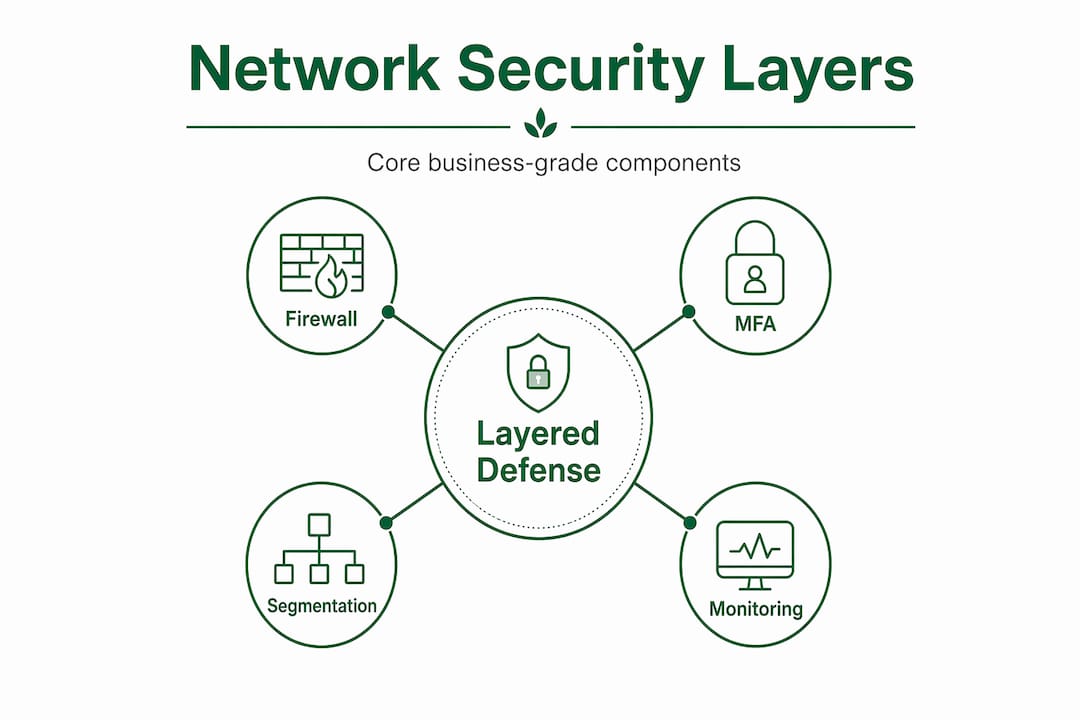
Zero Trust principles reinforce why all of these components work together. Zero Trust means no implicit trust inside your network. Every user and device must verify its identity before accessing resources, regardless of whether it is on-site or remote.
Step-by-step guide to configuring your network security
With the right components identified, here is how to configure business network security in a logical, prioritized sequence.
-
Deploy a business-grade firewall. Your ISP router has a basic firewall built in, but enterprise-grade firewall appliances provide stateful inspection, fine-grained rule management, logging, and alerting that default hardware simply cannot match. Configure rules to block all inbound traffic by default and allow only what your business explicitly needs. Enable logging from day one.
-
Secure your Wi-Fi and segment it. Use WPA3 encryption on all wireless networks. Create at least three separate SSIDs: one for staff, one for guests, and one for any smart devices or point-of-sale systems. Network segmentation limits lateral movement so that a compromised guest device cannot reach your accounting system. Never let printers, cameras, or IoT devices share a network with sensitive business data.
-
Set up a VPN with mandatory MFA. Remote work is a permanent reality for most small businesses. VPNs with encryption and MFA are the baseline for securing remote connections. Treat remote access as an identity and authorization problem, not just a connectivity one. Require MFA on every account that touches business systems, not just the VPN login.
-
Install and configure endpoint protection. Deploy antivirus and anti-malware software on every device that connects to your network, including employee laptops used at home. Set it to update definitions automatically and schedule weekly full scans. Do not rely on Windows Defender alone for business use; a managed endpoint protection platform gives you centralized visibility across all devices.
-
Implement network segmentation beyond Wi-Fi. Use VLANs (virtual local area networks) to separate your internal network into zones. Finance systems, HR data, and customer records should each sit in their own segment with access controls limiting who can reach them. This is the backbone of business network defense because it contains breach impact to one zone rather than letting it spread.
-
Configure monitoring tools: IDS, IPS, and NDR. An intrusion detection system (IDS) watches for suspicious patterns. An intrusion prevention system (IPS) can automatically block threats it recognizes. Network detection and response (NDR) tools go further, using behavioral analysis to catch threats that signature-based tools miss. Greatplainsnetworking covers the role of IDS and NDR tools in proactive small business security if you want more detail on these tools.
Pro Tip: When you configure your firewall rules, document every rule you create and the business reason behind it. Six months from now, you will not remember why a specific port was opened, and undocumented rules are the ones that create vulnerabilities.
Ongoing management and maintenance of your security posture
Setting up your network security is not a one-time event. Security requires repeatable routines for patch management, log reviews, and access audits to stay effective. Most small businesses do the initial setup and then let their posture degrade quietly over months.
Here is what an ongoing maintenance schedule should include:
- Weekly log reviews. Check firewall and endpoint logs for unusual traffic, failed login attempts, or unexpected outbound connections. You do not need to review every line. Set up alerts for high-priority events so anomalies surface automatically.
- Monthly patch cycles. Apply operating system and firmware updates on a defined schedule. Unpatched software is the most common entry point for attackers. Automate updates where possible and verify they applied correctly.
- Quarterly access audits. Review who has access to what, especially after staff changes. Role-based access controls and MFA should be verified after any employee departure or role change. Accounts that no longer need access should be disabled immediately.
- Employee security awareness training. Your team is both your first line of defense and your greatest vulnerability. Run phishing simulations and brief training sessions at least twice a year. Employees who recognize social engineering attacks stop breaches before they start.
- Regular tested backups. A backup that has never been tested is a hypothesis, not a recovery plan. Schedule monthly restore tests and keep at least one copy offsite or in immutable cloud storage. Greatplainsnetworking's guide on business data backup practices covers the specifics of building a resilient backup strategy.
- Annual penetration testing. Hire a qualified professional to attempt to breach your network and document what they find. Evidence-based audits and configuration reviews aligned with frameworks like CIS Controls give you documented proof that your controls are working.
Pro Tip: Keep a simple security log: a spreadsheet or shared document that records every patch applied, every access review completed, and every training session held. This documentation becomes your compliance evidence and your institutional memory when staff turns over.
Common pitfalls when establishing network security measures
Even well-intentioned setups fail in predictable ways. Knowing these pitfalls in advance saves you from discovering them during an incident.
- Relying only on perimeter defense. A firewall at the edge is not enough. Attackers who get past it through phishing or a compromised credential have free rein inside a flat network. Layers matter.
- Skipping MFA because it feels inconvenient. MFA blocks the vast majority of credential-based attacks. The inconvenience is real but minor compared to the cost of a breach.
- Neglecting firmware and software updates. Outdated firmware on routers, switches, and access points is a known attack vector. CIS Controls specifically prioritize secure configuration and patch management for network devices.
- No network segmentation. A flat network means one compromised device can reach everything. Segmentation is not optional for businesses handling sensitive data.
- Ignoring log reviews. Logs are your early warning system. Attackers often spend days or weeks inside a network before triggering visible damage. Regular reviews catch them earlier.
"Small businesses cannot prevent every cyber incident, but they can build resilient cybersecurity programs aligned with business goals focused on risk management." — NIST
When you hit configuration problems, start with your firewall logs. Most issues trace back to a rule that is too permissive or too restrictive. If you are consistently seeing alerts you cannot interpret, or if your team lacks the time to review them reliably, that is a clear signal to consider managed IT services.
What you gain from strong business network protection
The benefits of a properly configured network are concrete and measurable. Reduced exposure to ransomware and data breaches is the most obvious gain, but effective network security for SMBs also means improved operational continuity. When threats are detected and contained early, downtime is minimized.

Regulatory compliance becomes significantly easier when your controls are documented and verified. Whether you are subject to HIPAA, state privacy laws, or cyber insurance requirements, an auditable security posture demonstrates that your business takes data protection seriously. That matters to customers, partners, and insurers alike. The cost of preventing an incident is almost always a fraction of the cost of recovering from one.
My take on what small businesses consistently get wrong
I have worked with enough small businesses to say this plainly: the setup is rarely the hard part. Most owners can get a firewall configured, MFA enabled, and Wi-Fi segmented within a reasonable timeframe. What consistently breaks down is the after.
I have seen businesses that did everything right on day one and then went 18 months without reviewing a single log or running a patch cycle. The network they set up was solid. The network they were running 18 months later was full of unpatched vulnerabilities and stale admin accounts for employees who had left.
My experience is that security needs to be treated like a business process, not a project. It has recurring tasks, assigned owners, and scheduled reviews. When I talk to business owners about this, the ones who succeed are the ones who build security into their operations calendar the same way they schedule payroll or tax filings.
I also think small businesses underestimate how much security complexity they can offload without losing control. You do not need to become a network engineer. You need verified, documented, tested controls and someone accountable for maintaining them. That is a solvable problem.
— Nicholas
Protect your network without doing it alone
Running a business in Norman, Moore, or Oklahoma City means you have real options for local, hands-on IT support that speaks plain language.

Greatplainsnetworking provides managed IT services built specifically for small businesses, including 24/7 network monitoring, proactive threat response, and customized security configurations. No long-term contracts, no jargon, and same-day response when something needs attention. If you are a dental practice or law firm managing sensitive client data, Greatplainsnetworking also offers a free cybersecurity audit to identify gaps before they become incidents. Whether you are starting from scratch or strengthening an existing setup, the team at Greatplainsnetworking can build and maintain a security posture that fits your business.
FAQ
What is the first step to set up business network security?
Start by deploying a business-grade firewall with stateful inspection and logging. A default ISP router does not provide the rule management or alerting that a business network requires.
How does MFA improve business network protection?
MFA requires users to verify their identity through a second factor beyond a password, blocking most credential-based attacks even when passwords are stolen or guessed.
How often should small businesses review their network security?
Log reviews should happen weekly, patches should be applied monthly, and access controls should be audited quarterly. Annual penetration testing validates that all controls are working as intended.
What is network segmentation and why does it matter?
Network segmentation divides your network into isolated zones so a compromised device cannot freely access other systems. It limits the damage from any single breach and is a core best practice for network security for small businesses.
When should a small business consider managed IT services for security?
If your team cannot consistently perform log reviews, patch management, and access audits, managed IT services fill that gap with expert oversight and 24/7 monitoring so threats are caught before they cause damage.
Recommended
Want help putting this into practice?
We'll audit your security, speed, and hardware in under an hour — no commitment, no sales pitch. Just a clear roadmap of what to fix and why.