
Zero-Trust Security for Law Firms: A Practical Guide

Zero-trust security for law firms means treating every access request to client matter data, billing systems, and internal documents as untrusted by default, regardless of whether the request originates inside or outside your network. The model, formally defined in NIST SP 800-207 as "never trust, always verify," shifts protection from the network perimeter to the resource itself, requiring verified identity and device posture for every single connection. For a law firm, that means a partner logging in from the office faces the same identity check as a paralegal connecting from home.
Three actions you can take this week:
- Enable multi-factor authentication (MFA) on every email, billing, and matter management account. This single control blocks the majority of credential-based attacks.
- Inventory your highest-risk matter data. Know which systems hold active litigation files, settlement figures, and client PII before you build any access policy.
- Enforce conditional access for all remote connections. Require a compliant, managed device before granting access to any client-facing system.
Pro Tip: Start with identity controls on your two or three most sensitive systems, not your entire environment. Firms that try to enforce zero-trust policies everywhere on day one create so much friction that attorneys find workarounds, which defeats the purpose entirely.
Table of Contents
- Why your law firm's security perimeter is already broken
- Which controls should law firms prioritize first?
- A practical 30/90/180-day roadmap for law firms
- Costs, staffing, and whether to outsource zero-trust implementation
- Common implementation challenges and how to handle them
- Ethics, client expectations, and compliance obligations for U.S. law firms
- A worked 90-day starter plan for a 10-user law firm
- Key Takeaways
- Why small firms should start small and consider a managed partner
- Greatplainsnetworking helps law firms implement zero trust without the complexity
- Authoritative sources and further reading
Why your law firm's security perimeter is already broken
The traditional security model assumes that anything inside the network can be trusted. That assumption collapsed the moment law firms adopted cloud-based matter management, remote work, and third-party eDiscovery portals. Today, a single compromised attorney credential can give an attacker unrestricted lateral movement across every client file on the network, because the perimeter model grants broad access once someone is "inside."
Two scenarios illustrate how quickly this plays out in practice:
- A partner's VPN credentials are phished through a spoofed client email. The attacker logs in, appears as a trusted internal user, and spends days quietly exfiltrating settlement documents before anyone notices. A perimeter-based system sees nothing unusual because the credentials are valid.
- A contract attorney is granted temporary network access for a document review project. The engagement ends, but no one revokes the account. Months later, that dormant credential is compromised, giving an attacker access to matters the contractor never worked on.
Legacy VPNs are particularly inadequate for hybrid cloud environments because they grant broad network access rather than per-application, per-session access. Zero-trust network access (ZTNA) replaces that broad tunnel with a narrow, verified connection to a specific resource, and it revokes that connection the moment the session ends or the device falls out of compliance.
The ABA's 2023 cybersecurity tech report makes clear that law firms remain high-value targets precisely because of the sensitive, privileged data they hold. Understanding why law firms attract cybercriminals is the first step toward building defenses proportional to that risk. Zero trust reduces lateral movement risk by ensuring that even a successfully compromised account can only reach the specific resources that account is authorized to access at that moment.
Which controls should law firms prioritize first?
The tenets above are principles. These are the specific controls that enforce them in practice, mapped to the systems attorneys actually use every day.
- Identity and access management (IAM) — A centralized directory, such as Microsoft Entra ID, governs who can access what. Every user, device, and application has a verified identity before any resource is reachable.
- Conditional access. Microsoft Entra Conditional Access evaluates identity, device compliance, location, and risk level before granting access. A non-compliant personal device attempting to open a client file is blocked automatically.
Zero-trust controls support secure collaboration across matter systems, finance, HR, and external portals by enforcing access at the resource level rather than relying on network boundaries. For law firms, that means technical ethical walls can be enforced automatically based on matter assignments, eliminating the risk of manual permission errors.
A practical 30/90/180-day roadmap for law firms
Zero trust is a staged program, not a product you install once. The plan below is realistic for a small-to-mid-size firm with limited internal IT resources.
30-day goals: visibility and baseline hardening
- Run a data and asset inventory. Identify every system that holds client matter data, PII, financial records, and HR files. A law firm cybersecurity audit is the structured way to do this.
Roles: IT lead executes; managing partner sponsors and communicates the change to staff.
180-day goals: architecture expansion and continuous monitoring
Roles: IT lead or MSSP manages SIEM; managing partner reviews incident response plan; practice admin maintains matter-access records.
Budget guidance by phase:
- 30-day phase: — MFA licensing and conditional access tools typically range from $3–$6 per user per month within Microsoft 365 Business Premium or equivalent bundles. Patching and inventory require staff time, not additional licensing.
Costs, staffing, and whether to outsource zero-trust implementation
Most small law firms do not have a dedicated security engineer on staff, and they should not need one to begin implementing zero trust. The practical staffing models break down as follows.
A firm with an internal IT generalist can handle the 30-day phase independently, using vendor documentation and existing Microsoft 365 tooling. The 90-day and 180-day phases, particularly EDR deployment, SIEM integration, and policy tuning, typically require either a part-time security consultant or an ongoing managed security service provider (MSSP).

A fully managed partner handles deployment, monitoring, and policy updates on a predictable monthly fee, which converts a large capital project into an operating expense. The tradeoff is that the firm must retain clear ownership of matter-access policies and ethical walls. A managed provider can enforce the technical controls, but the firm's practice administrators must define which attorneys have access to which matters.
What to expect at each budget level:
- NIST SP 800-207: Zero Trust Architecture
- Zero Trust Architecture (NIST SP 800-207) — Final publication
- Microsoft: Zero Trust (security guidance)
- Conditional Access overview — Microsoft Entra
- Cybersecurity tech report — American Bar Association (2023)
- How zero‑trust security supports secure collaboration across law firm systems — sa.global LegalTech
- Why Is Zero Trust Replacing Legacy VPNs in Law Firms? — Security Curated
- The Unseen Threat Lurking in Every Network: Best Practices for Implementing Zero‑Trust Security in Law Firms — Steele Fortress
Cyberinsurance premiums are also directly affected by which controls are in place. Cybersecurity insurance for law firms increasingly requires documented MFA, EDR, and incident response plans as conditions of coverage, making zero-trust investment directly relevant to insurability.
Common implementation challenges and how to handle them
Zero trust creates real friction if it is deployed without attention to how attorneys actually work. These are the obstacles that derail most implementations, along with practical mitigations.
- Attorney resistance and workarounds. When MFA or conditional access blocks a partner from accessing a file at 11 PM from a personal iPad, the instinct is to demand an exemption. Mitigation: use step-up authentication for high-risk actions rather than blocking access entirely. A second verification prompt is far less disruptive than a hard block, and it still satisfies the zero-trust requirement.
- Legacy on-premises applications. Older practice management systems or document management platforms may not support modern authentication protocols. Mitigation: deploy an identity proxy or application gateway in front of legacy apps to enforce authentication without requiring a full system replacement.
- Data classification effort. Zero-trust policies require knowing where sensitive data lives. Many firms have years of unclassified files across shared drives, email archives, and cloud storage. Mitigation: start classification with active matters and new files only. Retroactive classification is a long-term project, not a prerequisite for beginning.
- Integration complexity. Connecting IAM, EDR, CASB, and SIEM tools requires careful configuration. Mitigation: use a platform that integrates these controls natively, such as Microsoft 365 Business Premium, which bundles many of these capabilities and reduces integration overhead.
- Court deadline exemptions. Attorneys filing under deadline cannot wait for an IT ticket to resolve a device compliance issue. Mitigation: establish a documented exemption workflow with a 4-hour SLA, so attorneys have a clear path that does not involve disabling security controls permanently.
Measuring success matters as much as deploying controls. Track mean time to detect (MTTD) for suspicious access events, the number of over-privileged accounts reduced each quarter, and helpdesk tickets related to access friction. Declining friction tickets over time signal that policies are calibrated correctly.
Ethics, client expectations, and compliance obligations for U.S. law firms
Zero trust is not just a technical decision. The ABA's cybersecurity guidance ties the duty of competence under Model Rule 1.1 and the duty of confidentiality under Model Rule 1.6 directly to reasonable cybersecurity measures. Implementing documented, identity-centric controls is increasingly how firms demonstrate that they are meeting those obligations. Beyond ethics, corporate clients and government contractors now routinely include security questionnaires in outside counsel RFPs, and legal industry compliance requirements are growing more specific each year.
Cyberinsurance underwriters have moved in the same direction. Firms without MFA, EDR, and documented incident response plans face higher premiums or coverage exclusions.
Client documentation checklist — what clients commonly request:
- Written MFA policy covering all user accounts and remote access
- Identity and access management summary (who has access to what, and how it is reviewed)
- Incident response plan with notification timelines
- Evidence of endpoint protection (EDR) deployment
- Encryption policy covering data at rest and in transit
- Access log retention policy and audit trail availability
- Third-party vendor access controls and review process
- Documented ethical wall procedures for conflict-sensitive matters
Maintaining a law firm security policy that maps each of these items to a specific control makes RFP responses faster and more credible. Firms that can produce this documentation on request have a measurable competitive advantage in enterprise client relationships.
For guidance on ABA obligations specifically, ABA cybersecurity guidance for attorneys provides a plain-language breakdown of what the ethical rules require and how to document compliance.
A worked 90-day starter plan for a 10-user law firm
This example assumes a 10-attorney firm with one part-time IT contact and no dedicated security staff. The firm uses Microsoft 365 for email and documents, a cloud-based matter management system, and a mix of firm-issued and personal devices.
Roles and responsibilities
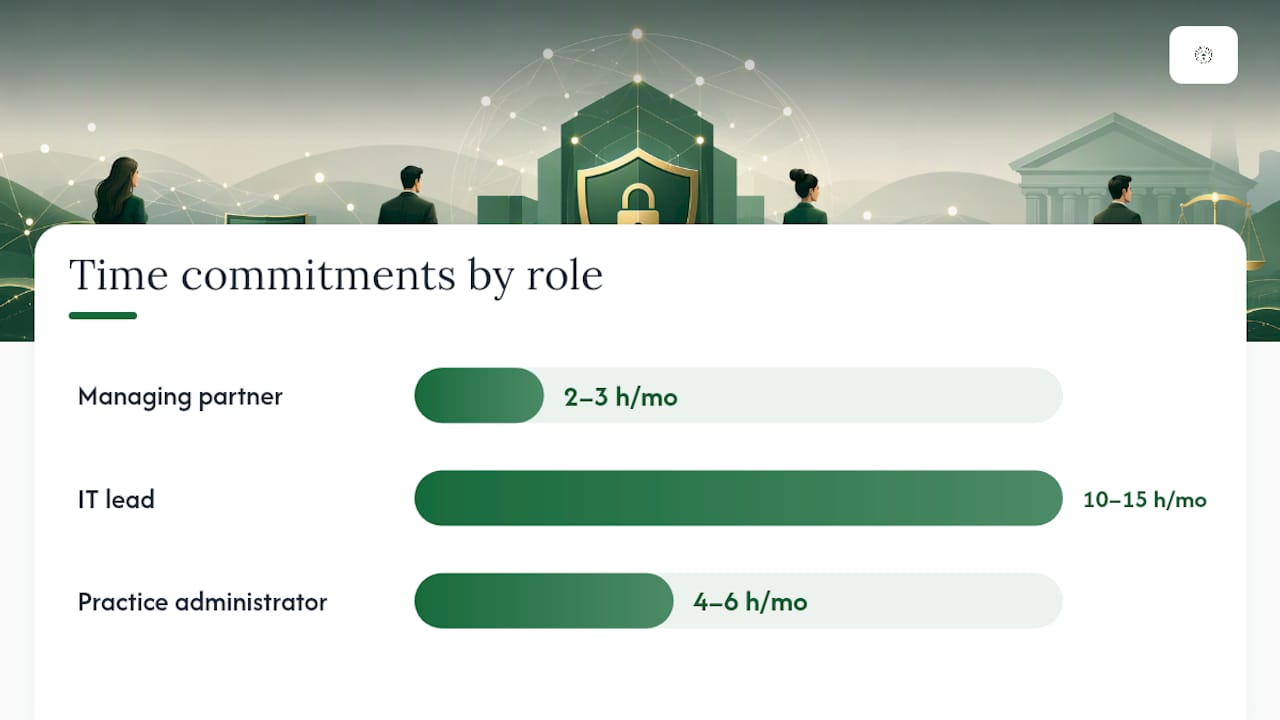
| Role | Responsibility | Time Commitment |
|---|---|---|
| Managing partner | Sponsor; communicates policy changes to staff; approves budget | 2–3 hours/month |
| IT lead (internal or MSSP) | Configures controls; monitors alerts; manages helpdesk tickets | 10–15 hours/month |
| Practice administrator | Maps matter assignments; maintains access records; runs quarterly reviews | 4–6 hours/month |
| External MSSP (optional) | SIEM monitoring, EDR management, incident response support | Ongoing, per contract |
Week-by-week task breakdown
Weeks 1–2 (Days 1–14):
- IT lead runs asset and data inventory; identifies all systems holding client data
- Managing partner communicates MFA rollout to all staff with a 7-day deadline
- IT lead enables MFA on Microsoft 365 for all accounts
- Practice admin documents current matter assignments and access permissions
Weeks 3–4 (Days 15–30):
- IT lead configures conditional access policy: block non-compliant devices from matter management and email
- IT lead patches all internet-facing systems
- Practice admin identifies and flags dormant accounts for review
- Managing partner reviews and approves access permission changes
Weeks 5–12 (Days 31–90):
- IT lead deploys EDR on all firm endpoints (estimated 2–4 hours of configuration per device batch)
- Practice admin scopes matter management access to assigned matters only; removes over-broad permissions
- IT lead pilots ZTNA for the matter management system
- IT lead or MSSP begins log collection and basic alerting
- Practice admin runs first quarterly access review; revokes dormant and over-privileged accounts
- All staff complete a 30-minute phishing awareness training session
Expected outcomes at 90 days:
- MFA active on 100% of accounts
- All remote access through compliant, managed devices
- Matter access scoped to assigned attorneys and staff
- EDR deployed on all endpoints
- Basic alerting in place for failed logins and anomalous access
Pro Tip: Set your initial conditional access policies to "report only" mode for the first two weeks before enforcing them. This shows you exactly which devices and accounts would be blocked, so you can resolve legitimate issues before the policy goes live and avoids a flood of helpdesk calls on day one.
Key Takeaways
Zero-trust security for law firms starts with verified identity and least-privilege access on your highest-risk systems, then expands through a phased 30/90/180-day plan that any small firm can follow.
| Point | Details |
|---|---|
| Start with identity controls | Enable MFA and conditional access on email, billing, and matter management before anything else. |
| Follow the NIST framework | NIST SP 800-207's "never trust, always verify" principle maps directly to matter-level access and ethical walls. |
| Use a phased roadmap | The 30/90/180-day plan lets small firms build zero-trust controls incrementally without disrupting legal work. |
| Budget realistically | Entry-level managed zero-trust support for small firms typically runs $500–$1,500/month; mid-range adds SIEM and ZTNA for $1,500–$4,000/month. |
| Greatplainsnetworking as your managed partner | Greatplainsnetworking provides MFA deployment, EDR, 24/7 monitoring, and cybersecurity services for law firms in Norman, Moore, and Oklahoma City. |
Why small firms should start small and consider a managed partner
The firms that struggle most with zero trust are the ones that treat it as a single large project with a defined end date. The ones that succeed treat it as a continuous program that starts with two or three high-priority controls and expands from there. For a 10-attorney firm in Oklahoma City, that usually means beginning with MFA and conditional access, getting those working well, and then layering in EDR and access reviews over the following quarter.
Greatplainsnetworking works with small law firms in Norman, Moore, and Oklahoma City that are at exactly this starting point. The most common situation is a firm that knows it needs better security but does not have the internal staff to configure and monitor it. A managed partner handles the technical implementation while the firm's practice administrators retain control of matter assignments and ethical wall decisions.
If your firm is ready to assess where it stands, a straightforward readiness review is the right first step. It identifies which controls are already in place, which gaps carry the most risk, and what a realistic implementation timeline looks like for your specific environment.
Greatplainsnetworking helps law firms implement zero trust without the complexity
Law firms in Norman, Moore, and Oklahoma City that need to move from a perimeter-based model to verified, identity-first security have a practical local option. Greatplainsnetworking provides managed cybersecurity services that map directly to the 30/90/180-day plan above: MFA and IAM deployment in the first 30 days, EDR and access policy configuration through the 90-day phase, and SIEM monitoring and DLP integration by the 180-day mark.

There are no long-term contracts, and the firm's practice administrators stay in control of matter assignments and ethical wall definitions throughout. The 24/7 monitoring service means that anomalous access events surface immediately rather than days later. For firms that need to respond to client RFP security questionnaires or cyberinsurance requirements, Greatplainsnetworking can also document the controls in place and map them to specific questionnaire items.
To discuss a readiness assessment for your firm, contact Greatplainsnetworking through the managed IT support page or reach out directly at greatplainsnetworking.com.
Authoritative sources and further reading
These are the primary sources worth reading directly, listed in the order most useful for a law firm decision-maker.
- NIST SP 800-207: Zero Trust Architecture — Start here for the formal definition of zero-trust tenets and the "never trust, always verify" principle. The core reference for any zero-trust program.
- NIST SP 800-207 Final Publication — The NIST landing page includes deployment models and migration roadmap guidance. Useful for the 90-day and 180-day planning phases.
- Microsoft Zero Trust guidance — The most practical implementation reference for firms already using Microsoft 365. Shows how identity, device, network, and data controls work together.
- Microsoft Entra Conditional Access — Detailed documentation on configuring policy-based access controls. Read this before configuring conditional access for remote logins.
- ABA Cybersecurity Tech Report 2023 — The ABA's own data on law firm breach prevalence and ethical obligations. Required reading for the ethics and compliance section of any firm security program.
- Zero trust and secure collaboration in law firms — A law-firm-specific walkthrough of how zero trust applies to matter systems, ethical walls, and external collaboration.
- Why ZTNA is replacing legacy VPNs in law firms — Explains the specific limitations of VPN-based access for hybrid cloud environments and the case for ZTNA.
- Zero-trust best practices for law firms — Covers behavioral analytics, microsegmentation, third-party access scoring, and compliance automation trends relevant to the 180-day phase.
Recommended
Want help putting this into practice?
We'll audit your security, speed, and hardware in under an hour — no commitment, no sales pitch. Just a clear roadmap of what to fix and why.