
What Is a Help Desk Service? A Guide for SMBs

A help desk service is defined as a centralized IT support function that receives, logs, and resolves technical issues to keep business operations running without interruption. For small to mid-sized businesses, this means having a dedicated system to handle everything from password resets and software errors to hardware failures and access problems. The industry term most professionals use today is "IT service desk," a broader concept formalized under ITIL 4 frameworks, though "help desk" remains the widely recognized label for frontline technical support. Understanding what a help desk service does, and how it differs from simply calling a tech-savvy employee, is the first step toward making a sound IT investment.
What is a help desk service and how does it work?
A help desk service operates through a structured workflow that turns a chaotic tech problem into a tracked, resolved ticket. Every request gets logged, assigned a priority level, routed to the right technician, and tracked through to resolution. That process sounds simple, but it eliminates the most common failure in small business IT: issues that fall through the cracks because no one owns them.
Modern help desks go well beyond answering phone calls. They include 24/7 monitoring, remote desktop support, and self-service portals where your team can submit tickets or find answers without waiting on hold. Remote desktop tools let technicians fix most issues without ever setting foot in your office, which cuts resolution time significantly.

Pricing for managed help desk support typically follows a per-user or per-device monthly fee. That fee usually covers monitoring, security patches, and backups, not just break-fix repairs. This model gives you a predictable monthly cost instead of an unpredictable repair bill every time something breaks.
Pro Tip: Ask any prospective help desk provider to walk you through exactly what happens from the moment a ticket is submitted to the moment it is closed. If they cannot describe that process clearly, their support will reflect that same lack of clarity.
Help desk vs. break-fix: a direct comparison
| Feature | Managed help desk | Traditional break-fix |
|---|---|---|
| Issue detection | Proactive, 24/7 monitoring | Reactive, after failure occurs |
| Cost structure | Predictable monthly fee | Variable, per-incident billing |
| Security coverage | Patches, MFA, backups included | Typically not included |
| Response time | Defined SLA, often same-day | Depends on technician availability |
| Documentation | Runbooks created during onboarding | Rarely documented |
What are the main types of help desk services?
The two foundational categories are reactive help desks and proactive service desks, and the difference between them has real consequences for your business.
A reactive help desk operates on a break-fix model. Something breaks, you call, a technician fixes it, and you pay for that incident. This model works for very small operations with minimal IT complexity, but it scales poorly. Every outage costs you twice: once in the repair bill, and again in lost productivity while you wait.
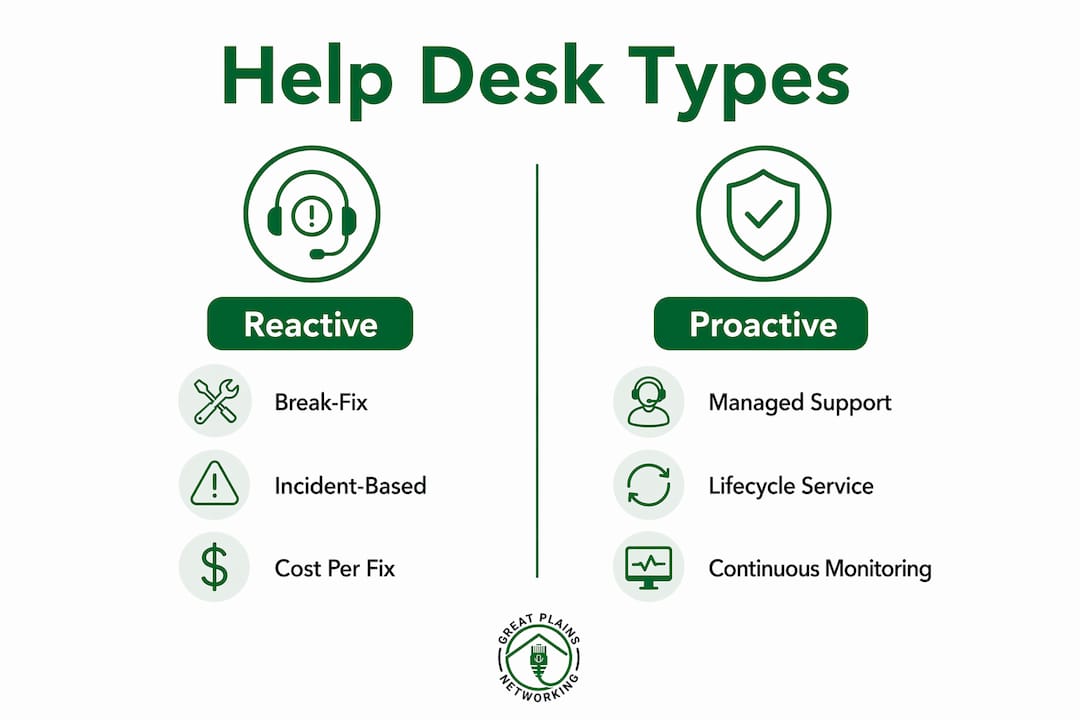
A proactive service desk, formalized under ITIL 4 frameworks, manages the full IT service lifecycle. That includes asset tracking, compliance monitoring, patch management, and strategic planning. The distinction matters because proactive disaster recovery planning costs 60–80% less than emergency response after a major incident. Prevention is not just better than cure. It is dramatically cheaper.
Service type comparison
| Service type | Key characteristic | Best suited for |
|---|---|---|
| Reactive break-fix | Pay per incident, no monitoring | Businesses with minimal IT needs |
| In-house help desk | Internal staff, limited hours | Mid-sized firms with IT budgets |
| Outsourced managed help desk | 24/7 coverage, fixed monthly fee | SMBs needing full coverage |
| Virtual/cloud-based help desk | Remote-only support, self-service portal | Distributed or remote teams |
Managed IT help desks, like the proactive IT support model Greatplainsnetworking uses, sit in the outsourced managed category. They monitor your systems continuously and address issues before they become outages. For businesses with 10 to 20 or more employees, this model removes the single-point-of-failure risk that comes with relying on one internal IT person.
What benefits do help desk services provide for SMBs?
The most direct benefit is reduced downtime. Help desk support restores workflows faster when users face login failures, software bugs, or hardware problems, because there is already a defined escalation path and a technician assigned to the issue. Without that structure, a single login problem can consume an hour of a staff member's day.
The financial case is equally clear. Managed IT services reduce total IT spend over 24 months compared to ad-hoc break-fix costs. The monthly fee model replaces unpredictable repair bills with a fixed, budgetable expense. Many SMB owners underestimate the productivity tax of downtime: the hours lost waiting for repairs, the security gaps left unpatched, and the compounding cost of deferred fixes.
Security is the third major benefit, and it is often the most overlooked. A quality managed help desk includes patch management, multi-factor authentication (MFA) setup, and verified backups as part of the standard service. These are not add-ons. They are the baseline that keeps your business off the list of ransomware victims.
A managed help desk does not just fix problems. It prevents the conditions that create them, giving your business a documented, repeatable IT process instead of a series of one-off repairs.
Pro Tip: Request a copy of your provider's documentation policy before signing. The best providers create detailed runbooks during onboarding that record your unique IT setup. If you ever switch providers, that documentation is yours to keep.
What should you consider when choosing a help desk service?
Choosing the right help desk service starts with evaluating scope, not price. A low monthly fee that excludes security, backups, or after-hours support is not a bargain. It is a gap in your coverage that will cost you more when something goes wrong.
- Define your service level agreement (SLA) requirements. Know what response time you need for critical issues. Same-day response is the standard for most SMBs. Anything slower than that creates real operational risk.
- Evaluate the onboarding process. A provider that skips documentation during onboarding creates long-term problems. Detailed runbooks that record your IT environment are the foundation of consistent, quality support.
- Understand the full cost structure. A predictable monthly fee per user or device should include monitoring, patching, and security. Ask specifically what is excluded.
- Assess the risk of internal-only IT. The hidden cost of a full-time internal IT employee, including benefits, training, insurance, and the risk of a single point of failure, often exceeds managed service costs once all overhead is factored in.
- Check for contract flexibility. Long-term contracts with heavy exit penalties are a red flag. Providers confident in their service offer month-to-month or short-term agreements.
Reducing downtime is a direct result of choosing the right provider and structure. For a deeper look at how to approach that, the guide on reducing IT downtime for small businesses covers the operational steps in detail. Understanding your IT support contract terms before you sign is equally critical.
Pro Tip: Run a one-month test before committing. Submit a mix of simple and complex tickets and measure actual response times against the SLA you were promised. Real performance data beats any sales pitch.
Key Takeaways
A managed help desk service is the most cost-effective way for small to mid-sized businesses to maintain reliable IT, predictable costs, and strong security without depending on a single internal employee.
| Point | Details |
|---|---|
| Help desk definition | A centralized support function that logs, prioritizes, and resolves technical issues to maintain productivity. |
| Proactive beats reactive | Managed help desks prevent outages; break-fix models only respond after damage is done. |
| Cost predictability | A fixed monthly fee per user or device replaces unpredictable repair bills and hidden downtime costs. |
| Documentation is non-negotiable | Runbooks created during onboarding protect your business if you ever change providers. |
| Security is included, not optional | Patch management, MFA, and verified backups should be standard, not add-ons. |
Why I think most SMBs wait too long to make this move
The businesses I see struggle most with IT are not the ones that made a bad technology choice. They are the ones that delayed making any choice at all. They relied on a part-time contractor, or one employee who "knows computers," until a ransomware attack or a server failure forced their hand. By then, the cost of recovery far exceeded what years of managed support would have cost.
The shift from break-fix to a documented, managed help desk process changes how a business operates at a fundamental level. You stop reacting to fires and start running a predictable IT environment. Staff stop losing hours to tech problems. Owners stop getting emergency calls on weekends. The managed IT support benefits are real, but they only materialize when the decision is made proactively, not after a crisis.
The other thing I have learned is that documentation separates good providers from great ones. Any technician can fix a problem. Only a disciplined provider will document your system, create runbooks, and hand you something of lasting value. That documentation is your insurance policy. Demand it from day one.
— Nicholas
How Greatplainsnetworking supports your IT help desk needs
Greatplainsnetworking delivers managed IT support built specifically for small businesses in Norman, Moore, and Oklahoma City. Their service includes 24/7 monitoring, same-day response, patch management, cybersecurity, and verified backups, all at a predictable monthly cost with no long-term contracts required.

Dental practices, law firms, and other local businesses rely on Greatplainsnetworking to keep their systems running and their data protected. If your current IT setup depends on reactive fixes or a single internal contact, this is a practical, low-risk way to move to a documented, proactive model. Reach out to Greatplainsnetworking to find out what a managed help desk looks like for your specific business.
FAQ
What is the help desk service definition in plain terms?
A help desk service is a dedicated IT support system that receives and resolves technical problems, such as login failures, software errors, and hardware issues, to keep your business running without interruption.
What does a help desk do on a daily basis?
A help desk logs incoming support requests, assigns them to technicians, tracks progress, and confirms resolution. Modern help desks also monitor systems continuously to catch problems before users notice them.
What are the main types of help desk services?
The main types are reactive break-fix support, in-house help desks, outsourced managed help desks, and virtual or cloud-based help desks. Each differs in coverage hours, cost structure, and the level of proactive monitoring provided.
How does a help desk service reduce costs for small businesses?
Managed IT services reduce total IT spend over 24 months compared to break-fix models by replacing unpredictable repair bills with a fixed monthly fee that includes monitoring, security, and backups.
What is the difference between a help desk and a service desk?
A help desk handles tactical, reactive support such as fixing individual user problems. A service desk, as defined under ITIL 4 frameworks, covers the full IT service lifecycle including strategic planning, asset management, and compliance.
Recommended
Want help putting this into practice?
We'll audit your security, speed, and hardware in under an hour — no commitment, no sales pitch. Just a clear roadmap of what to fix and why.