
IT Support Contract Explained for Small Business Owners

Signing an IT support contract without fully understanding what's in it is one of the most common and costly mistakes small business owners make. The language is technical, the pricing models vary widely, and the fine print often determines whether your business gets protected or left exposed. This IT support contract explained guide cuts through the confusion. You'll learn what these agreements actually cover, what the key components look like, how pricing works, and what red flags to watch for before you sign anything.
Table of Contents
- Key takeaways
- What an IT support contract is and why it matters
- Key contract components to understand before signing
- IT support pricing models compared
- How to evaluate and negotiate IT support contracts
- Real-world scenarios that illustrate contract implications
- My take on what SMBs consistently overlook
- Reliable IT support with clear contracts from Greatplainsnetworking
- FAQ
Key takeaways
| Point | Details |
|---|---|
| Know what's covered | IT support contracts define specific service inclusions and exclusions that directly affect your technology reliability and costs. |
| Tiered support matters | Contracts should clearly document escalation paths from Tier 0 self-service through Tier 4 vendor support for efficient issue resolution. |
| Pricing models differ significantly | Managed service agreements provide predictable monthly costs while break/fix support creates unpredictable billing tied to failures. |
| Renewals need active review | Contract renewals are renegotiation opportunities, especially as providers add AI and data liability clauses that shift risk to clients. |
| Transparency prevents surprises | Clarity on what triggers additional charges is as critical as knowing what is included in your base agreement. |
What an IT support contract is and why it matters
An IT support contract is a written agreement between your business and a technology service provider that defines what services will be delivered, at what quality level, and under what terms. Think of it as the rulebook for your entire technology relationship. Without one, you're operating on assumptions, and in IT, assumptions get expensive fast.
Most IT service agreements cover some combination of the following:
- Help desk access: Phone, email, or chat support for day-to-day technology problems your staff encounters
- Routine maintenance: Software updates, patch management, and hardware monitoring to keep systems running
- Cybersecurity protections: Antivirus management, firewall monitoring, and sometimes security audits
- Escalation procedures: A defined path for how serious issues get routed and resolved
- Data backup and recovery: Scheduled backups and a documented plan for restoring data after a failure
The scope and escalation process must be documented in writing so both parties know exactly what is expected. Verbal promises about response times or coverage areas carry no weight when something goes wrong.
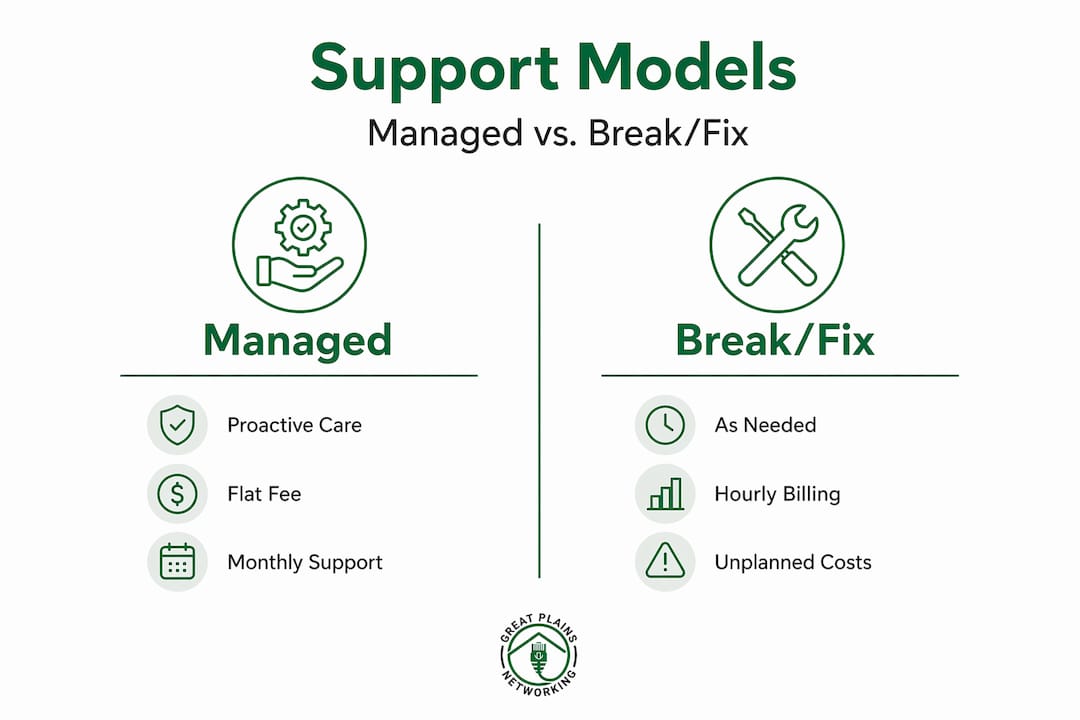
There are two fundamentally different models you'll encounter: managed services and break/fix support. Managed services operate on a proactive model where the provider monitors your systems continuously and addresses problems before they escalate. Break/fix support is reactive. You call when something breaks, they fix it, and you pay for that time. The difference is significant for proactive IT support value, and your contract model directly shapes your business risk exposure.
Key contract components to understand before signing
Understanding IT support contracts means knowing which specific elements define your coverage and where gaps can appear. A well-structured contract will include these core components:
-
Service scope: A detailed list of what the provider will and will not handle. The exclusions list is just as important as the inclusions. Many SMB owners mistakenly assume "managed" services cover everything, but hardware replacements, vendor-specific software issues, and project work are frequently excluded.
-
Service Level Agreement (SLA): The SLA defines response time targets, resolution time targets, and availability commitments. A response time of four hours means the provider acknowledges your issue within four hours. It does not mean the problem is solved. Resolution time is a separate figure, and both should be documented.
-
Escalation tiers: IT support is structured from Tier 0 through Tier 4. Tier 0 is self-service, such as a knowledge base. Tier 1 handles basic troubleshooting. Tier 2 addresses more technical problems. Tier 3 involves senior engineers or specialists. Tier 4 is external vendor support, such as Microsoft or your internet service provider. Your contract should define who manages Tier 4 relationships and what that process looks like.
-
Pricing model: Fixed monthly fee, hourly rates, or block hours. Each carries different budget implications, covered in detail in the next section.
-
Data security and backup clauses: Cloud backup and disaster recovery provisions protect your business from ransomware and hardware failure. Contracts should specify backup frequency, offsite storage location, and tested recovery procedures.
-
Term length and termination: Most contracts run month-to-month or annually. Know your notice period for cancellation and whether there are early termination penalties.
Pro Tip: Ask every provider directly: "What specifically falls outside this agreement and would trigger a separate invoice?" Their answer reveals more about the real scope of service than anything in their marketing materials.
IT support pricing models compared
Cost is where SMBs often get caught off guard. The pricing model embedded in your contract determines whether you can budget predictably or whether technology expenses fluctuate every month.

Managed IT services for SMBs typically cost between $99 and $500 per user per month, while reactive break/fix support runs $100 to $250 per hour. That hourly rate sounds manageable until a server failure consumes 12 hours of emergency labor on a Friday afternoon.
Here is a direct comparison of the three most common pricing structures:
| Pricing model | How it works | Advantages | Drawbacks |
|---|---|---|---|
| Flat monthly fee | Fixed cost per user or device per month | Predictable budgeting, proactive coverage included | Higher upfront monthly commitment |
| Hourly / break/fix | Pay per incident at an hourly rate | Low cost when systems run smoothly | Unpredictable bills, no proactive monitoring |
| Block hours | Prepay for a set number of support hours per period | Some cost predictability, flexible use | Unused hours may not roll over; overages billed separately |
Break/fix support may initially seem like the lower-cost option, but the total cost calculation changes when you factor in downtime, lost productivity, and emergency repair rates. A dental practice losing access to patient records for three hours pays far more in lost appointments than a flat monthly managed service fee.
Bundling services in a single contract, such as combining cybersecurity monitoring, help desk access, and backup management, typically reduces the hourly equivalent cost compared to purchasing those services separately or calling reactively.
A few additional factors that affect your monthly costs:
- User count: Most managed service pricing scales per seat. Adding employees midterm may trigger prorated charges.
- Device count: Some contracts price by device rather than user, which matters for businesses with multiple machines per employee.
- On-site vs. remote support: Contracts that include on-site visits may carry a premium over remote-only agreements.
How to evaluate and negotiate IT support contracts
Choosing the right IT support provider is not just about finding the lowest monthly rate. It's about verifying that the contract terms actually deliver the reliability your business depends on.
Start with these evaluation steps:
- Verify local support capability. A provider with technicians in your area can respond on-site when remote support isn't sufficient. This matters significantly for hardware failures and network issues.
- Test SLA specificity. Vague SLA language like "best effort response" is a red flag. You need documented numeric commitments with defined escalation triggers if those targets are missed.
- Read the exclusions thoroughly. Contract exclusions can include items like hardware procurement, software licensing, and infrastructure upgrades. Know what you are buying before you sign.
- Check termination and renewal terms. Automatic renewals with short cancellation windows can lock you into unfavorable terms. Negotiate for at least a 30-day written notice period.
- Review AI and data usage provisions. IT agreements increasingly include clauses about AI tool usage and data liability provisions that can affect your compliance posture. If your provider uses AI-assisted monitoring or ticketing tools, understand what data those systems access and retain.
- Ask about out-of-scope triggers. Asking about additional invoice triggers before signing prevents billing disputes later. Project work, infrastructure migrations, and emergency after-hours calls are frequently billed separately from managed service fees.
Pro Tip: Treat your contract negotiation like any vendor relationship. Request a 90-day performance review clause so you can formally assess whether SLA commitments are being met before you're locked in for a full year.
Real-world scenarios that illustrate contract implications
Abstract contract language becomes very concrete when something goes wrong. Here are scenarios that reflect what SMBs actually experience:
Scenario 1: The break/fix trap A law firm in a mid-size city relied on hourly break/fix IT support for three years. When their server failed on a Monday morning, they paid 14 hours of emergency labor at $200 per hour, totaling $2,800 in one incident. Meanwhile, client files were inaccessible for six hours. A managed services agreement covering monitoring and backup would have likely caught the hardware degradation signals days earlier and cost less annually than that single emergency.
Scenario 2: The managed contract that held up A small accounting firm signed a managed IT agreement with clearly documented response times and a verified backup schedule. When ransomware encrypted their workstations in March, their IT provider restored operations within four hours using a verified offsite backup. The contract's disaster recovery clause specified the recovery time objective, and the provider met it. The firm lost less than half a business day.
Common pitfalls SMBs face when contracts lack clarity include:
- Assuming cybersecurity is included when it is listed as an add-on
- Discovering that on-site support requires separate scheduling and additional fees
- Finding that project work like moving to a new server or migrating to cloud storage is billed at hourly project rates not covered by the monthly fee
"The clearest indicator of a good IT support contract isn't the list of services included. It's the precision of what's excluded and how disputes are resolved."
Benefits of IT infrastructure services become fully realized only when the underlying contract clearly defines management boundaries for routine maintenance, project work, and emergency fixes.
My take on what SMBs consistently overlook
I've worked with small businesses in Oklahoma long enough to know that the biggest contract mistakes aren't made by careless owners. They're made by careful owners who trusted polished sales conversations more than the actual document in front of them.
The phrase "all-inclusive" is the most misleading term in IT support agreements. In practice, it almost always means "all-inclusive within a defined scope," and that scope document is where the real terms live. I've seen business owners sign agreements that excluded hardware support entirely, then discover this only when a workstation failed.
Contract renewals deserve far more attention than they typically receive. Providers often quietly introduce updated liability terms, AI data-processing clauses, or revised SLA targets at renewal. SaaS agreement renewals should be treated like new contracts, because in many practical ways they are. Reading a renewal as carefully as you read the original agreement protects your compliance position and your budget.
What I advocate for consistently is this: ask your provider to walk you through the exclusions list verbally before signing. Their comfort or discomfort with that conversation tells you something about how transparent the working relationship will be.
And one more thing. The businesses I've seen get the most value from IT support agreements are the ones that treat the contract as a living document, not a formality. They review performance quarterly, they ask questions at renewal, and they renegotiate when their business grows or changes. That posture gets results.
— Nicholas
Reliable IT support with clear contracts from Greatplainsnetworking

If reading this guide revealed gaps in your current IT agreement or raised questions you haven't been able to answer, that's worth acting on. Greatplainsnetworking provides managed IT services for small businesses across Norman, Moore, and Oklahoma City with contracts designed around transparency, not complexity. There are no long-term lock-ins, no vague all-inclusive claims, and no surprise invoices. Every engagement starts with a clear conversation about what's covered, what isn't, and what it costs.
Whether you run a dental practice, a law firm, or a retail operation, Greatplainsnetworking delivers same-day response times, 24/7 monitoring, and cybersecurity protections documented in plain language. Contact Greatplainsnetworking today to review your current IT agreement or get a customized service plan built around your actual business needs.
FAQ
What is an IT support contract?
An IT support contract is a written agreement between a business and an IT provider that defines the services delivered, response time commitments, pricing, and escalation procedures. It establishes legal and operational expectations for both parties.
What should an IT support contract include?
A complete IT support contract should include a defined service scope, SLA response and resolution targets, escalation tiers, pricing model details, data backup provisions, and clear termination terms.
How much does managed IT support typically cost for small businesses?
Managed IT services for SMBs typically cost between $99 and $500 per user per month, depending on the services bundled and the size of the organization.
What is the difference between managed IT services and break/fix support?
Managed IT services provide proactive, continuous monitoring under a fixed monthly fee, while break/fix support is reactive and billed hourly only when problems occur. Managed services typically deliver lower total costs when downtime and productivity losses are factored in.
What should I watch for at contract renewal?
At renewal, review any new AI data-processing clauses, revised SLA terms, or updated liability provisions. IT agreement renewals increasingly introduce terms that shift data risk to the client if left unreviewed.
Recommended
Want help putting this into practice?
We'll audit your security, speed, and hardware in under an hour — no commitment, no sales pitch. Just a clear roadmap of what to fix and why.