
Multi-Site Law Office Network Management Guide

The right approach to multi-site law office network management is a centralized, policy-driven model built on SASE or Zero Trust Network Access (ZTNA), paired with 24/7 NOC monitoring and matter-level access controls enforced inside your document management system. Start here before anything else:
- Treat every new or acquired site as untrusted. Isolate it from the parent network until a full forensic inventory and baseline hardening are complete. Day-one connection of an unhardened site is the single most common cause of cross-firm incidents.
- Enforce firm-wide MFA immediately. Apply conditional access policies through Microsoft Entra ID (formerly Azure AD) before any site joins the shared tenant.
- Enable continuous monitoring and centralized logging. Every site, every endpoint, every admin action needs to feed a single SIEM or NOC console from day one.
- Verify backups and test recovery. Confirm immutable backups exist for every site and that your RTO and RPO targets are documented and tested, not assumed.
- Run a site-by-site asset inventory. Map every device, service account, and third-party integration before you consolidate anything.
The NIST Cybersecurity Framework (CSF) provides the baseline control structure. ABA Model Rule 1.6(c) and the ABA's cloud computing guidance set the ethical obligations. For law firms in Norman, Moore, and the Oklahoma City metro, Greatplainsnetworking provides local managed IT support, 24/7 monitoring, and compliance-ready documentation to support this model. Request a day-one hardening assessment before your next site goes live.
Table of Contents
- Why do multi-site law firms need specialized network management?
- What core managed-network services does every multi-site firm need?
- What security controls and compliance requirements apply specifically to law firms?
- How do SASE, SD-WAN, and site-to-site VPN compare for multi-site law firms?
- What does a realistic rollout look like, and what will it cost?
- How should you structure co-managed IT governance across offices?
- Key Takeaways
- A local MSP perspective on where multi-site law firms get into trouble
- How Greatplainsnetworking supports multi-site law firms in Oklahoma
- Authoritative sources and further reading
Why do multi-site law firms need specialized network management?
Multi-site legal operations carry a specific category of risk that single-office firms simply do not face. Each office develops its own habits: different local admins, undocumented service accounts, aging hardware, and shadow IT that nobody catalogued when the lease was signed. Operational complexity, not firm size, is the actual tipping point where informal IT stops working and starts creating liability.
The risk is asymmetric. Your weakest office is the breach path into your strongest one. A ransomware infection at a satellite office with lax patch management can encrypt shared drives at headquarters within hours.
The business consequences are concrete. Downtime at any office stops billable hours firm-wide when attorneys cannot access the document management system (DMS) or case files. Poor access controls create ethical violations under ABA Model Rule 1.6 if client matter data bleeds across practice groups or offices. M&A integrations amplify every one of these risks: when a firm absorbs a lateral group or acquires a regional practice, the acquired office's network history is unknown, its credentials may be compromised, and its systems are almost certainly not hardened to the parent firm's standards.
A concrete example: a firm acquires a three-attorney satellite office and, on day one, connects that office's workstations directly to the parent domain to give attorneys file access. That single action exposes the parent firm to whatever malware, credential theft, or misconfiguration existed at the acquired site. Survey data shows cybersecurity and business continuity are the top technology challenges for law firms, and 38% of firms have already moved to a co-managed IT model to address the depth of expertise this complexity demands.

What core managed-network services does every multi-site firm need?
The services below are not optional extras. Each one maps directly to a billable-hour continuity risk or an ethical obligation.
Critical (Day One)
- 24/7 NOC monitoring and alerting: Every site feeds a single monitoring console. Alerts for outages, anomalous logins, and policy violations must reach a human within minutes, not hours.
- Identity and access management (IAM): Microsoft Entra ID with MFA and conditional access policies applied firm-wide. Role-based access tied to matter assignments, not just office location.
- Endpoint detection and response (EDR/MDR): Managed detection on every endpoint, including remote attorney laptops and mobile devices. Unmanaged endpoints are breach paths.
- Managed immutable backups and recovery: Backups that cannot be deleted or encrypted by ransomware, with documented RTO/RPO and tested restores. See Greatplainsnetworking's backup and recovery services for what a verified recovery program looks like in practice.
- Centralized logging and SIEM: Log retention sufficient for audit and eDiscovery requests. Logs must be tamper-evident and accessible to the firm's legal team on demand.
High Priority (First 30–60 Days)
- Unified policy engine (SASE/Firewall-as-a-Service): A single console enforcing web filtering, firewall rules, and access policy across all sites. SASE consolidation eliminates the configuration drift that occurs when each office manages its own firewall.
- Secure remote access (ZTNA): Zero Trust Network Access replaces legacy VPN for remote attorneys. Access is granted per application, per session, based on verified identity and device posture.
- DMS integration support: iManage, NetDocuments, or your chosen DMS must be configured with matter-level permissions and audit trails. File-share permissions alone do not satisfy ethical wall requirements.
- M365 governance: Tenant configuration, conditional access, data loss prevention (DLP) policies, and Teams/SharePoint governance applied across the consolidated tenant.
Medium Priority (60–90 Days)
- MDM/UEM for BYOD and mobile: Mobile device management policies for attorney-owned devices that access client data.
- Vendor and service liaison: A single point of contact managing your DMS vendor, cloud providers, and court filing services, with SOC 2 Type II reports on file for each.
Pro Tip: When negotiating an SLA with any managed IT provider, insist on three specific commitments: a critical-incident response window of 15 minutes or less for NOC alerts, forensic-ready log retention of at least 12 months with firm-controlled access, and a documented patch cadence with verification reporting. A provider that cannot commit to these in writing is not ready for legal-industry clients.
| Service | Priority | Primary Risk Addressed |
|---|---|---|
| 24/7 NOC monitoring | Critical | Downtime, breach detection |
| MFA / Entra ID / conditional access | Critical | Credential theft, unauthorized access |
| EDR/MDR | Critical | Ransomware, lateral movement |
| Immutable backups and tested recovery | Critical | Billable-hour loss, ransomware |
| SASE / unified policy engine | High | Policy drift, multi-site misconfiguration |
| ZTNA / secure remote access | High | Remote attorney breach paths |
| DMS integration and audit trails | High | Ethical wall violations, eDiscovery |
| M365 governance | High | Data leakage, tenant misconfiguration |
| MDM/UEM for BYOD | Medium | Mobile device exposure |
What security controls and compliance requirements apply specifically to law firms?
Matter-level access and ethical walls
Ethical wall enforcement requires technical controls configured inside your DMS and practice-management system, not just Windows file permissions. A folder permission that restricts access at the share level does not create an auditable record of who attempted access, when, and from which device. Your DMS must log every document open, edit, and export at the matter level, and those logs must be producible on demand for bar inquiries or eDiscovery. Test this quarterly. If your IT team cannot pull a matter-level access report in under 10 minutes, your ethical wall is not functioning as a control.
Must-have technical controls
Practical compliance controls for law firms include unique user accounts for every attorney and staff member (no shared credentials), role-based access tied to matter assignments, MFA on every system that touches client data, and immediate access revocation when an attorney departs. Data encryption at rest and in transit is required for any system storing client files, including cloud storage, email, and backup repositories.
Secure printing controls matter more than most firms acknowledge. Uncollected print jobs containing client documents are a physical data breach. Managed print solutions with pull-printing (badge-release) eliminate this exposure across all offices.
For BYOD, a mobile device management (MDM) policy must enforce device encryption, remote wipe capability, and app-level containerization so that client data on a personal iPhone is isolated from personal apps. Attorneys who resist MDM enrollment should not have access to client matter systems from personal devices.
Regulatory and ethical framework
The compliance picture for most multi-site firms overlaps several frameworks simultaneously. ABA Model Rule 1.6(c) requires reasonable measures to prevent unauthorized disclosure of client information. The ABA's cloud computing guidance maps that obligation to specific technical controls. NIST CSF provides a vendor-neutral baseline for those controls. Firms handling health-related matters layer HIPAA on top, which adds encrypted storage, access logging, and a 60-day breach notification requirement to HHS when 500 or more individuals are affected. State breach notification laws add further obligations: most states require notification within 30–90 days, and firms with multistate client bases face overlapping regimes after a single incident.
For a detailed mapping of these controls to specific legal industry compliance examples, Greatplainsnetworking maintains current guidance aligned to ABA and NIST standards.
Pro Tip: Segregate your highest-risk matters (active litigation, M&A targets, healthcare clients) into separate DMS workspaces with tighter access controls and more frequent log reviews. Run a simulated eDiscovery pull on those workspaces at least twice per year to confirm your audit trail is complete and producible.
A one-line note on breach notification: if client data is exposed, your incident response plan must include a legal-analysis step that maps reporting obligations against your practice areas, client jurisdictions, and the specific data involved before any notification goes out. This is general information only; confirm current obligations with qualified legal counsel for your firm's specific situation.
How do SASE, SD-WAN, and site-to-site VPN compare for multi-site law firms?
SASE / ZTNA
Pros: Single policy console for all sites and remote users; identity-aware access per application; eliminates VPN sprawl; scales to new offices without hardware procurement; materially reduces security operating costs after consolidation. Cons: Vendor lock-in risk if you choose a proprietary platform; latency sensitivity for on-premises DMS systems; requires careful planning for legacy RPC-dependent applications.
SD-WAN with cloud-managed firewall
Pros: Improves WAN performance and reliability across sites; supports hybrid cloud and on-premises workloads; integrates with SASE platforms for a layered model. Cons: Still requires per-site hardware; policy management is more complex than pure SASE; does not inherently solve the remote-user access problem without a ZTNA overlay.
Traditional site-to-site VPN
Pros: Familiar, widely understood, lower initial cost. Cons: Flat trust model once inside the tunnel; difficult to enforce matter-level access; does not scale cleanly beyond three or four sites; no per-session identity verification.
Recommended default for most mid-market law firms: A centralized SASE/ZTNA model for remote attorneys and branch offices, with SD-WAN or Firewall-as-a-Service providing site connectivity. This gives you a single policy plane that covers in-office users, remote attorneys, and cloud-hosted DMS systems simultaneously.
Visualize it this way: your SASE platform sits between every user (office-based or remote) and every resource (DMS, M365, case management software). No user reaches a resource without passing through identity verification and policy enforcement at the SASE layer. Sites connect to the SASE cloud edge via SD-WAN links, and the DMS lives either in the SASE-protected cloud or behind a SASE-connected on-premises segment. Every access event is logged at the policy layer, not just at the endpoint.
One trade-off to plan for: RPC and administrative protocols are high-risk lateral-movement vectors, but blanket RPC blocking breaks domain authentication. Apply selective filtering of high-risk RPC functions rather than broad blocks, and test domain services thoroughly before and after any firewall rule change.
What does a realistic rollout look like, and what will it cost?
Phased rollout
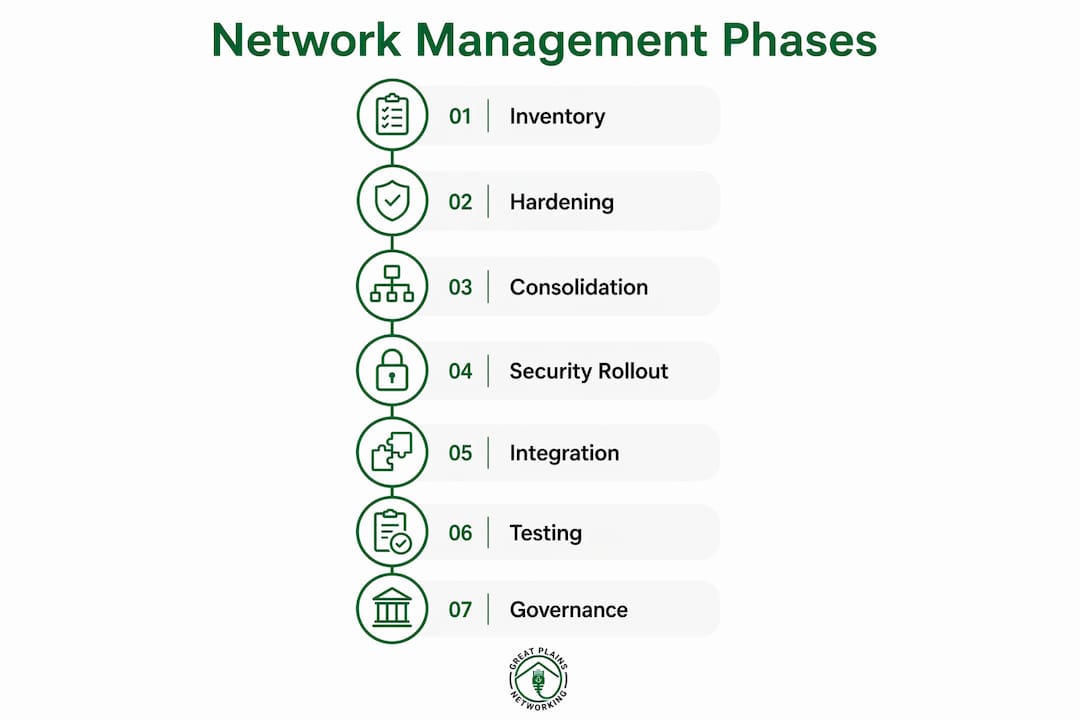
Phase 1: Inventory and discovery (Weeks 1–2). Document every device, service account, cloud subscription, and third-party integration at every site. This phase cannot be skipped or compressed; undocumented assets are the primary source of post-migration surprises.
Phase 2: Day-one hardening (Weeks 2–3). Isolate any new or acquired sites. Apply MFA firm-wide. Revoke stale credentials and shared accounts. Patch critical vulnerabilities before any site joins the consolidated environment.
Phase 3: Identity baseline and tenant consolidation (Weeks 3–5). Consolidate to a single Microsoft 365 tenant. Establish Entra ID as the identity provider. Apply conditional access policies. Treat mergers and lateral hires as a security project with phased discovery: identity consolidation and inventory must come before any domain trusts or shared accounts are created.
Phase 4: Security tooling and monitoring rollout (Weeks 4–7). Deploy EDR/MDR to all endpoints. Connect all sites to the NOC. Configure SIEM with log retention policies. Enable DLP in M365.
Phase 5: DMS and practice management integration (Weeks 6–10). Configure matter-level permissions and audit trails in iManage or NetDocuments. Integrate with case management software. Test eDiscovery log pulls.
Phase 6: Test and cutover (Weeks 8–12). Validate backup restores, test failover, confirm audit log completeness, and conduct a tabletop incident response exercise before declaring the environment production-ready.
Phase 7: Ongoing governance. Quarterly security reviews, patch verification reports, and annual penetration testing.
Timeline and cost drivers
| Driver | Typical Range | Notes |
|---|---|---|
| Overall onboarding (around 100 users) | 30–90 days | Standardized environments: 30 days; legacy: 60–90 days |
| DMS migration (per office) | — | Includes data migration, configuration, and training |
| SASE licensing | Varies by platform and seat count | Often offset by consolidating per-site firewall and VPN costs |
| Hardware refresh | Varies by site age and count | Older satellite offices frequently require full refresh |
| M&A integration professional services | Project-based | Scope depends on acquired firm's documentation quality |
Pro Tip: Reduce onboarding time by preparing standardized device images before rollout begins, sequencing sites by risk level (highest-risk first), and using a co-managed model where your internal IT team handles asset documentation while the MSP handles hardening and policy deployment. This parallel-track approach commonly cuts total onboarding time by two to three weeks.
How should you structure co-managed IT governance across offices?
Roles and responsibilities
The co-managed model works when roles are explicit and documented before the engagement begins. Internal IT or the office manager owns asset inventory, user onboarding/offboarding requests, and day-to-day helpdesk triage for non-security issues. The MSP or security operations team owns monitoring, incident response, patch management, policy enforcement, and audit log delivery. Overlap is where incidents happen: define in writing who has authority to make firewall rule changes, who approves new vendor integrations, and who holds the break-glass admin credentials.

Many law firms already operate under a co-managed model, which reflects how rarely a small internal IT team has the depth to cover NOC monitoring, EDR response, and compliance documentation simultaneously. The co-managed structure preserves internal control and institutional knowledge while adding the 24/7 depth that a two-person internal team cannot sustain.
SLA and KPI checklist
Negotiate these commitments in writing before signing any managed-service agreement:
- Critical incident response: NOC alert to human acknowledgment within 15 minutes.
- Detection-to-containment time: documented MTTR target for ransomware or credential compromise events.
- Patch cadence: critical patches applied within 72 hours of release; verification report delivered to the firm.
- Audit log delivery: logs available to the firm's legal team within 24 hours of a written request.
- Quarterly security reviews: written summary of findings, remediation status, and open risks delivered to firm leadership.
Governance practices and onboarding checklist
Implement a tiered admin model: global admin credentials held in escrow with the firm's managing partner, not solely with the MSP. Change control requires written approval for any firewall rule, tenant configuration, or DMS permission change. Vendor accounts (DMS, cloud providers, court filing services) are inventoried and reviewed annually.
Before the MSP engagement begins, internal IT should complete: credential escrow documentation, a full service-account inventory, consolidation of shared or generic accounts, and a written list of all third-party vendors with access to client data. This handover package is the foundation the MSP builds on. Without it, the first 30 days of onboarding are spent discovering what should have been documented already.
Key Takeaways
Effective multi-site law office network management requires a centralized, policy-driven model with 24/7 monitoring, matter-level access controls, and phased hardening that treats every new site as untrusted until verified.
| Point | Details |
|---|---|
| Treat new sites as untrusted | Isolate every acquired or new office and complete a forensic inventory before domain join. |
| SASE is the recommended default | A unified SASE/ZTNA model eliminates policy drift and covers remote attorneys and office users on one console. |
| Onboarding takes 30–90 days | Standardized firms stabilize in 30–45 days; legacy or undocumented environments commonly need 60–90 days. |
| Audit trails must be DMS-level | File-share permissions alone do not satisfy ethical wall obligations; matter-level logs must be producible on demand. |
| Greatplainsnetworking for OKC-area firms | Provides 24/7 NOC monitoring, co-managed IT, and compliance-ready documentation for law firms in Norman, Moore, and Oklahoma City. |
A local MSP perspective on where multi-site law firms get into trouble
The failure point that shows up most consistently in multi-site law firm engagements is not the technology. It is the assumption that because the firm has been operating for years without a major incident, the network is reasonably secure. What that assumption misses is that multi-site complexity hides problems until they cause cross-office incidents. Undocumented service accounts, stale admin credentials from a departed IT contractor, and a satellite office running an end-of-life firewall are not visible risks until they become active ones.
The single most concrete operational tip: before any new site, acquired practice, or lateral hire group connects to your network, require a written inventory and a minimum 48-hour isolation period with active monitoring. This is not a bureaucratic step. It is the difference between a contained discovery and a firm-wide incident. The inventory does not need to be perfect; it needs to exist. A documented, imperfect asset list is infinitely more useful than an undocumented environment that looks clean.
How Greatplainsnetworking supports multi-site law firms in Oklahoma
Law firms in Norman, Moore, and Oklahoma City managing multiple offices need more than a generic IT provider. They need a partner who understands billable-hour continuity, matter-level access controls, and the audit documentation that bar compliance requires.

Greatplainsnetworking delivers managed IT support built specifically for small and mid-size law firms: 24/7 NOC monitoring with same-day response commitments, co-managed IT that works alongside your internal team, M365 governance and tenant configuration, DMS integration support for iManage and NetDocuments, EDR/MDR endpoint protection, and immutable backup and recovery with tested restores. Every engagement includes audit-ready log retention and compliance documentation your managing partner can hand to a bar examiner or cyber insurer without preparation.
No long-term contracts. No jargon. A local team that can be onsite in the Oklahoma City metro when remote support is not enough. To schedule a day-one hardening assessment for your next office location, visit Greatplainsnetworking's law firm IT page or contact the team directly to discuss your firm's current environment.
Authoritative sources and further reading
These references provide the standards, controls, and policy detail that underpin the guidance in this article.
- NIST Cybersecurity Framework (CSF): The vendor-neutral baseline for identifying, protecting, detecting, responding, and recovering. Maps directly to ABA ethical obligations and provides audit evidence for cyber insurers.
- ABA Model Rules of Professional Conduct, Rule 1.6: The primary ethical authority on client confidentiality and the reasonable-measures standard for technology controls.
- CISA Cybersecurity Resources: Incident response playbooks, ransomware guidance, and zero-trust architecture references applicable to professional services firms.
- ABA Formal Opinion 477R (Cloud Computing): Practical guidance on using cloud-based services for client data, including due diligence requirements for vendor selection.
- HHS HIPAA Security Rule: Required reading for any firm handling health-related client matters; sets the technical safeguard standard and breach notification obligations.
- IT Compliance Checklist for Law Firms (Lockbaud): A practical starting-point checklist covering MFA, encrypted backups, vendor assessment, and annual audit requirements across overlapping compliance frameworks.
Recommended
Want help putting this into practice?
We'll audit your security, speed, and hardware in under an hour — no commitment, no sales pitch. Just a clear roadmap of what to fix and why.