
Why IT Issues Hurt Small Businesses More Than You Think

Most small business owners treat technology problems as minor irritants, the kind of thing that gets fixed eventually and forgotten. That assumption is expensive. Understanding why IT issues hurt small businesses requires looking past the surface-level inconvenience at the cascading financial, operational, and reputational damage these disruptions cause. The reality, backed by 2026 research, is that IT downtime is now classified as a systemic business crisis, not a technical hiccup. For small businesses in particular, the structural disadvantages compound every outage into something far more damaging than the same event would be at a large enterprise.
Table of Contents
- Key takeaways
- Why IT issues hurt small businesses financially
- How IT failures damage customer trust
- Cybersecurity risks and operational disruption
- Operational asymmetry: why small businesses take the hardest hit
- Practical steps to reduce IT risk
- My take: the small things add up in ways you do not expect
- How Greatplainsnetworking protects Oklahoma small businesses
- FAQ
Key takeaways
| Point | Details |
|---|---|
| Downtime costs scale fast | Even minutes of IT outage translate to measurable revenue loss, missed sales, and customer frustration. |
| Customer churn follows disruptions | Over 50% of SMBs report losing customers after supply chain or technology failures. |
| Small businesses lack recovery buffers | Limited redundancy and smaller teams mean IT failures hit harder and resolve slower. |
| Cybersecurity costs are disproportionate | A single breach can cost millions, an amount that can end a small business entirely. |
| Proactive monitoring changes outcomes | Identifying IT problems before they escalate is the most cost-effective form of protection available. |
Why IT issues hurt small businesses financially
The phrase "IT downtime" sounds technical and contained. It is neither. According to Cisco and Splunk's 2026 research, downtime now costs organizations an average of $15,000 per minute. That figure applies to enterprises with significant revenue volume, but the underlying math is no less brutal for a small business billing $500,000 a year. An hour of lost access to your point-of-sale system, customer database, or scheduling software is not a minor delay. It's lost transactions, interrupted workflows, and staff hours spent managing the crisis rather than serving customers.
The Cisco/Splunk data also shows that downtime costs increased 50% over the previous two years, with publicly traded companies seeing an average 3.4% stock price drop following a significant outage. Small businesses do not have stock prices, but they do have customer confidence, referral networks, and Google reviews. Those assets erode just as quickly.
The hidden costs are often larger than the immediate revenue loss. Recovery expenses include:
- Emergency IT labor or contractor fees
- Data restoration from backups (assuming backups exist and work)
- Staff overtime to catch up on delayed work
- Customer service resources spent managing complaints
- Potential regulatory fines if sensitive data was involved
Pro Tip: Track your actual cost per hour of IT downtime before an outage occurs. Multiply your average hourly revenue by lost productivity hours, then add estimated recovery labor. Most business owners are shocked by the number, and that's exactly the motivation needed to invest in prevention.
How IT failures damage customer trust
Revenue loss during an outage is visible and measurable. The damage to customer relationships is slower, quieter, and often permanent. When technology failures delay orders, make booking impossible, or cause data errors, customers do not typically call to ask what happened. They leave.
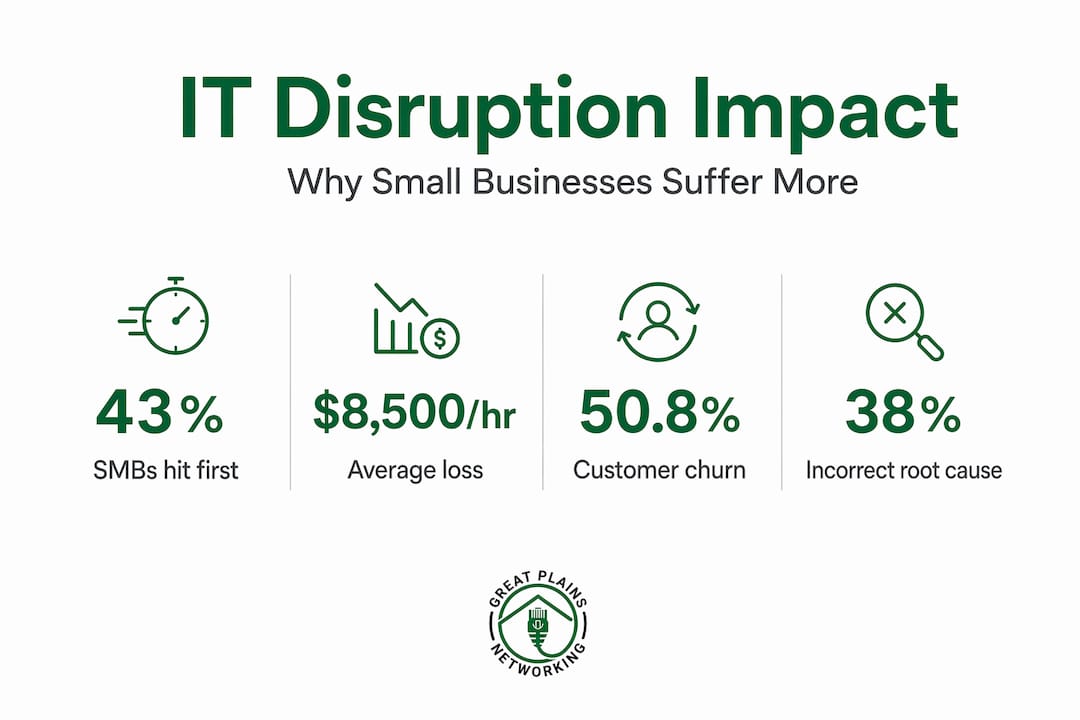
Research on small business supply chain and technology disruptions found that 62% of SMBs reported losing revenue or missing sales due to operational disruptions, with 50.8% experiencing customer churn as a direct result. A two-week shipping delay caused by a fulfillment software failure, for example, is enough to push a first-time customer permanently toward a competitor. For small businesses, that lost customer rarely comes back.
"Customers don't distinguish between a software problem and a service problem. If your technology fails them, your business failed them."
The digital presence element compounds this. If your website goes offline, your booking system throws errors, or your email stops responding during an outage, the message customers receive is one of unreliability. Small businesses that depend on local IT support to maintain consistent digital availability protect far more than uptime. They protect trust built over years of repeat business.
Here is what technology-related customer dissatisfaction commonly looks like in practice:
- A dental office whose scheduling software crashes loses appointment slots and calls patients too late, who have already booked elsewhere
- A law firm whose email goes down during a client deadline misses critical communications and damages a professional relationship
- A retail business whose payment terminal fails during a busy Saturday loses sales that cannot be recovered later
Each of these is a real scenario. Each could be prevented or resolved faster with the right IT infrastructure and response plan in place.
Cybersecurity risks and operational disruption

Cybersecurity incidents are a specific category of IT problem, but they deserve separate attention because their operational impact extends far beyond any single system going offline. According to IBM's 2024 data breach report, the global average cost of a breach reached $4.88 million, representing a 10% year-over-year increase. More revealing is the finding that 70% of breached organizations reported significant operational disruption, meaning the damage extended well past data theft into the core functioning of the business.
For small businesses, the cybersecurity risk profile looks like this:
| Risk Factor | Impact on SMBs |
|---|---|
| Average breach cost | $4.88 million (often exceeds annual revenue) |
| Recovery time | Over 100 days for many organizations |
| Staffing shortage premium | Adds approximately $1.76 million to breach costs |
| Ransomware payout average | Now $40 million, tripled since 2024 |
| Regulatory fines | Average $51 million per organization |
Ransomware payouts tripled since 2024 and the average payout now sits at $40 million. Even scaled down to small business context, a ransomware attack that encrypts your files, locks your systems, and threatens to publish your customer data is an existential threat, not an IT inconvenience. With 56% of security leaders reporting increased SaaS-related downtime since 2024, the attack surface continues to expand.
Pro Tip: Multi-factor authentication (MFA) and verified, tested data backups are the two controls that consistently reduce both the likelihood of a successful attack and the recovery time that follows. Neither requires a large budget. Both require consistent practice.
Operational asymmetry: why small businesses take the hardest hit
There is a structural reason why the same IT failure hurts a ten-person company more than a thousand-person company: operational asymmetry. Large enterprises have redundant systems, dedicated IT departments, vendor service-level agreements with teeth, and alternative workflows they can activate within minutes. Small businesses generally have none of those buffers.
A single outage at a small business commonly cascades across payment processing, CRM access, compliance documentation, and customer communications simultaneously. This happens because small business IT environments often run on integrated stacks where one failure triggers failures elsewhere. There is no isolation. There is no fallback role with specialized knowledge to step in. There is usually one generalist, if anyone at all, trying to diagnose a problem while also answering phones and managing the customer-facing fallout.
Research confirms SMBs lose sales faster from disruptions compared to larger competitors because their customer relationships are more personal and their service delivery is less diversified. If your single fulfillment pathway goes down, there is no secondary warehouse to absorb the volume.
The root cause identification problem makes this worse. Only 38% of tech executives consistently identify the correct root cause of downtime. At a large organization, that still means trained engineers working the problem. At a small business, it means extended downtime while the business owner calls multiple vendors, none of whom claim responsibility, and the issue compounds. Understanding the signs your IT needs attention before failure occurs is one of the most practical steps any small business owner can take.
Practical steps to reduce IT risk
Awareness of the problem is necessary but not sufficient. The good news is that the highest-impact prevention strategies are not prohibitively expensive. They require consistency and planning more than large budgets.
- Implement proactive monitoring. Waiting for something to break is the most expensive IT strategy. Real-time monitoring identifies failing hardware, unusual network activity, or software errors before they cause outages. This is the foundation of any resilient IT setup and the core of what managed IT services deliver for small businesses.
- Test your backups, not just your backup process. Many businesses run backups but never verify that the data restores correctly. A backup you have never tested is a hypothesis, not a plan. Follow documented data backup best practices and schedule verified restoration tests at least quarterly.
- Stage software updates rather than applying them all at once. A major update that breaks a critical integration can bring operations down just as effectively as an external attack. Applying updates in phases gives you a chance to catch problems before they affect everything.
- Document an incident response protocol. Research shows that 51% of SMBs have untested disruption protocols. Writing down who is responsible for what during an IT crisis, and rehearsing that plan, dramatically reduces recovery time when the real event occurs.
- Partner with a local IT provider who knows your systems. Remote-only support has its place, but a local provider who already understands your specific setup resolves issues faster and provides context that generic help desks cannot match.
Pro Tip: When evaluating IT support options, ask specifically about mean time to resolution (MTTR) and same-day response commitments. A provider who cannot answer those questions clearly is not optimized for small business needs.
My take: the small things add up in ways you do not expect
I have worked with enough small businesses to know that the most damaging IT problems are rarely the dramatic ones. They are the recurring slow issues: the backup that never quite finishes, the antivirus that quietly stopped updating six months ago, the aging server running one degree too warm in a back office. None of those feel urgent until they do.
What I find consistently underestimated is the compounding cost of tolerated problems. A business owner who accepts two hours of sluggish performance every Monday morning has normalized roughly 96 hours of degraded productivity per year. At $50 in lost billable output per hour across the team, that is $4,800 a year in invisible waste. The outage that follows the neglected server? That gets attention and a budget. The slow drain that precedes it rarely does.
My honest advice is this: treat your IT infrastructure the way you treat your cash flow. You would not ignore accounts receivable for six months and hope it works out. Do not do that with your technology either. The businesses I have seen weather IT disruptions best are not the ones with the biggest budgets. They are the ones with the most documented, verified, and consistently maintained systems. That is a discipline issue more than a financial one, and it is entirely within reach for any small business willing to take it seriously.
— Nicholas
How Greatplainsnetworking protects Oklahoma small businesses

Greatplainsnetworking was built specifically for small businesses in Norman, Moore, and Oklahoma City that cannot afford to treat IT problems as acceptable operating costs. Their managed IT services include 24/7 system monitoring, same-day response, comprehensive cybersecurity, and verified data recovery, all delivered without long-term contracts or technical jargon. Whether you run a dental practice, a law firm, or a retail operation, Greatplainsnetworking builds a customized IT plan around your actual workflow and risk profile. If you want to know where your current setup is vulnerable, start with a conversation. The cost of prevention is always lower than the cost of recovery.
FAQ
What is the average financial cost of IT downtime for small businesses?
While large enterprises face costs averaging $15,000 per minute, small businesses experience proportionally significant losses tied to missed transactions, lost productivity, and emergency recovery expenses that can exceed thousands of dollars per incident.
How do IT problems lead to customer loss?
Research shows 50.8% of SMBs experience customer churn following technology disruptions. Customers who encounter service failures, errors, or unavailability during a purchase or booking typically move to a competitor rather than wait for resolution.
Why are small businesses more vulnerable to IT issues than large companies?
Small businesses lack redundant systems, dedicated IT staff, and fallback workflows. This operational asymmetry means a single failure cascades across payment, communication, and fulfillment systems simultaneously, with no isolation or backup personnel to contain the damage.
What is the most cost-effective way to prevent IT disruptions?
Proactive monitoring combined with tested, verified data backups consistently delivers the highest return. Both controls reduce downtime frequency and cut recovery time significantly when incidents do occur.
How do cybersecurity incidents differ from general IT downtime?
Cybersecurity breaches create operational disruption across the entire organization beyond the initial breach, affecting workflows, customer service, and compliance obligations. Recovery often exceeds 100 days, making prevention far more practical than response.
Recommended
Want help putting this into practice?
We'll audit your security, speed, and hardware in under an hour — no commitment, no sales pitch. Just a clear roadmap of what to fix and why.