
TechSoup for Nonprofits: What It Is and How It Works

TechSoup is a nonprofit technology platform that gives eligible U.S. nonprofits and public libraries access to donated software, deeply discounted licenses, hardware, and professional services from major corporate partners. Think of it as a verified procurement channel sitting between donors like Microsoft, Adobe, and Intuit and the organizations that need their tools but cannot afford retail pricing.
Here is what that means in practice for your organization:
- Donated licenses for software your team likely already uses or needs
- Discounts up to 90% off retail pricing on products from well-known technology brands
- Training and professional services including webinars, community forums, and consulting
- Verification and fulfillment handled by TechSoup so donors can trust their contributions reach legitimate nonprofits
TechSoup's membership claims a network of 1.6 million nonprofits saving on technology, which signals the scale of the platform and the breadth of its partner relationships.
Key Takeaways
TechSoup gives eligible U.S. nonprofits verified access to donated and discounted technology from major partners, but procurement alone does not guarantee impact without proper implementation and compliance.
| Point | Details |
|---|---|
| What TechSoup is | A verified procurement platform connecting eligible nonprofits to donated and discounted software, hardware, and services. |
| Who typically qualifies | U.S. 501(c)(3) public charities and public libraries; group exemptions and fiscally sponsored projects qualify under specific conditions. |
| Membership cost | Core membership is free; TechSoup Plus costs $200/year and includes tech audits and one-on-one consultations. |
| Watch for eligibility gaps | Donor partners set offer-specific rules; being validated by TechSoup does not guarantee eligibility for every product. |
| Greatplainsnetworking | Provides hands-on managed IT support in Norman, Moore, and OKC to deploy and secure tools acquired through TechSoup. |
Table of Contents
- How does TechSoup actually work?
- Who qualifies for TechSoup, and what gets misunderstood?
- What kinds of offers can you access through TechSoup?
- What does TechSoup actually cost?
- How to get started with TechSoup step by step
- How to get real value from TechSoup offers
- When TechSoup may not meet your needs
- Staying compliant after you receive TechSoup products
- Real-world impact: how nonprofits use TechSoup effectively
- How TechSoup compares to other nonprofit technology resources
- Why TechSoup's value depends on what happens after you click "request"
- Nonprofits in Norman, Moore, and OKC: hands-on help after TechSoup procurement
- Sources
How does TechSoup actually work?
TechSoup verifies nonprofits and connects them to partner-donated or discounted offers. Donor partners set the eligibility terms and pricing; TechSoup handles the verification and distribution.
The typical flow works like this:
- Your organization creates a TechSoup account and submits documentation to validate its nonprofit status.
- TechSoup reviews and validates your organization against IRS records and eligibility criteria.
- You browse the catalog and find an offer that fits your needs.
- The donor partner's eligibility rules apply. TechSoup checks whether your validated organization meets that specific partner's criteria (size, mission, location, budget).
- TechSoup processes the request and collects any administrative fee the donor requires.
- The license, key, or product is delivered to your account's administrative email or through the vendor's own portal.
One critical distinction: TechSoup's role is verification and distribution, not blanket approval. Being validated by TechSoup does not mean you automatically qualify for every product in the catalog. Donor partners set their own eligibility criteria, and those criteria can vary by organization size, annual budget, geographic location, or mission type.
Pro Tip: Before requesting any offer, click the "Eligibility Rules" tab on that product's page. Eligibility can differ product-by-product even within the same donor's portfolio, and reading it first saves you a declined request.
Who qualifies for TechSoup, and what gets misunderstood?
Most U.S. TechSoup offers require a validated 501(c)(3) public charity or a public library. Group exemptions and certain other structures can qualify under defined conditions, but the 501(c)(3) public charity status is the most common path.
Primary eligibility rules to know:
- 501(c)(3) public charities are the standard qualifying entity for most U.S. partner programs.
- Public libraries qualify for many of the same offers.
- Group exemptions can qualify if the subordinate organization is covered under a parent organization's IRS group ruling.
- Fiscally sponsored projects face stricter scrutiny; the fiscal sponsor's status and the project's own documentation both matter.
- Account ownership rule: The organization that owns the TechSoup account must be the one requesting and using the offers. Products for organizations with mixed nonprofit/for-profit structures are restricted to nonprofit activities only.
The most common misconception is that TechSoup approval equals universal eligibility. TechSoup explicitly distinguishes "validated/qualified" status from "eligible" status for a specific offer. Your organization can be fully validated and still be ineligible for a particular partner's program because that partner restricts offers by annual budget or mission focus. When that happens, it reflects the donor's program rules, not a judgment about your organization's legitimacy.
If your organization is ineligible for a specific offer, check whether an alternative donor offers a comparable product, or contact TechSoup support to request an eligibility review.
Pro Tip: Keep your organization profile current: address, EIN, mission statement, and website. Outdated information is one of the most avoidable reasons for eligibility problems.
What kinds of offers can you access through TechSoup?
Offers span donated licenses, steep nonprofit discounts, professional services, and training resources. The catalog covers most of what a small-to-midsize nonprofit needs to run its operations.
Common product and service categories include:
- Productivity and collaboration: Microsoft 365 for nonprofits, including email, Teams, and cloud storage
- Accounting: QuickBooks nonprofit editions for financial management and grant tracking
- Creative tools: Adobe Creative Cloud for design, video, and communications work
- Security: Endpoint protection, antivirus, and identity management tools
- Cloud services: Storage, backup, and infrastructure from major cloud providers
- Hardware: Discounted computers, networking equipment, and peripherals
- Training and consulting: Webinars, self-paced courses, and professional services engagements
| Offer Type | Example Product | Typical Fulfillment |
|---|---|---|
| Donated license | Microsoft 365 | Electronic delivery via vendor portal |
| Discounted subscription | Adobe Creative Cloud | Reduced-price subscription coupon |
| Discounted software | QuickBooks | Electronic license key |
| Hardware discount | Dell computers | Vendor-direct purchase at nonprofit pricing |
| Training resource | TechSoup webinars | Online access through TechSoup platform |
Microsoft, Adobe, and Intuit are among the named partners in TechSoup's catalog, which is why Microsoft 365, Adobe Creative Cloud, and QuickBooks appear consistently as representative offers. These are not the only options, but they illustrate the caliber of donors participating in the program.
What does TechSoup actually cost?
Core membership is free. TechSoup Plus is a paid tier at $200 per year that bundles personalized tech audits, one-on-one consultations, deeper discounts on courses, and access to premium resources.
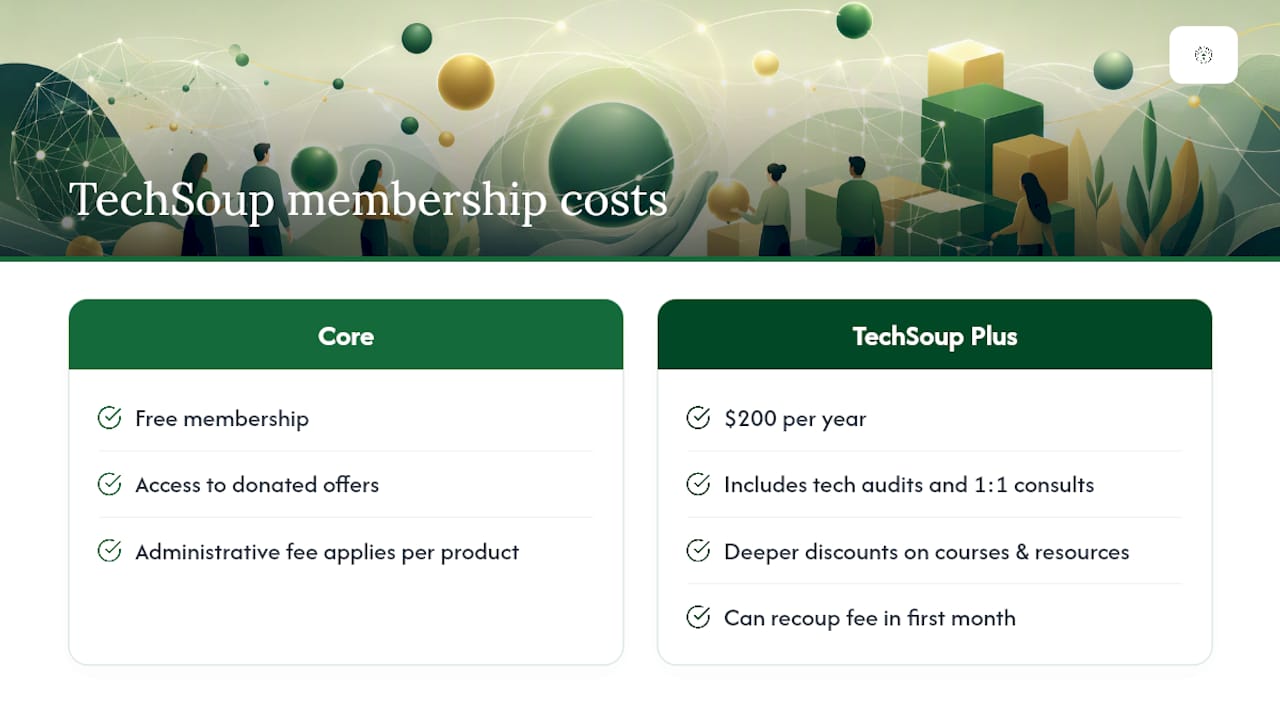
Beyond membership, most donated or discounted offers carry an administrative fee. This fee covers TechSoup's costs for verifying eligibility, processing the request, and managing the distribution relationship with the donor. It is not the retail price of the software; it is typically a fraction of it.
Pro Tip: Weigh the $200 Plus fee against what a single tech audit could reveal. TechSoup Plus audits commonly surface redundant subscriptions and immediate cost-saving opportunities. For a resource-strapped nonprofit, eliminating one unused SaaS subscription can recover that fee in the first month.
How to get started with TechSoup step by step
Sign up at techsoup.org, add and validate your organization, then browse and request offers. The full process takes most organizations a few days to a week, depending on how quickly documentation is assembled.
- Create your account at techsoup.org using an organization-managed email address, not a personal one.
- Add your organization and designate an account owner. This person will be responsible for requesting and managing offers.
- Submit validation documents: your EIN, IRS determination letter, organization address, mission statement, and website or supporting documentation.
- Wait for validation. TechSoup reviews submissions and confirms your organization's status.
- Browse the catalog and identify offers that match your needs.
- Check the Eligibility Rules tab on each offer before submitting a request.
- Submit your request and pay any applicable administrative fee.
- Receive fulfillment. Electronic licenses typically arrive within a few business days after payment; physical goods take longer. Fulfillment notices and license keys go to the account's administrative email.
Documents to have ready before you start:
- IRS 501(c)(3) determination letter
- Employer Identification Number (EIN)
- Organization's legal name, address, and website
- Mission statement or program description
- Contact information for the account owner
Pro Tip: Set your administrative email to an organization-managed inbox, not a personal address. License keys and fulfillment instructions route there, and a stale or personal email causes delays that are entirely preventable.
How to get real value from TechSoup offers
Buying at a discount does not guarantee impact. A donated Microsoft 365 license sitting unused because no one configured it is not a win; it is a missed opportunity and a compliance liability.
Best practices for turning procurement into capacity:
- Run a tech audit before requesting offers. Know what you already have, what is redundant, and what gaps actually exist.
- Check compatibility with your existing systems before committing to a new platform.
- Budget for administrative and fulfillment fees so requests do not stall waiting for approval.
- Assign a single account owner and keep that person's contact information current.
- Track license expirations and compliance requirements. Some donor programs require annual reporting or restrict how licenses are used.
- Bundle training with software requests. TechSoup's webinars and community forums cover implementation for many of its catalog products.
TechSoup positions itself as a capacity-building resource, not just a discount store. Use the webinars and community forums actively, especially when deploying tools like Microsoft 365 or Adobe Creative Cloud for the first time. Your validation status can also serve as a credibility signal during grant applications or procurement workflows with other vendors.
For deeper guidance on pairing TechSoup tools with a practical IT plan, the IT support plan for nonprofits on a limited budget walks through how to combine discounted software with low-cost managed services.
When TechSoup may not meet your needs
TechSoup is a strong procurement channel, but it is not a full-service implementer. Organizations that need deployment support, security configuration, or ongoing helpdesk coverage will need to look beyond the catalog.
Common limitations to plan around:
- Not every organization qualifies for every offer. Donor partners can restrict availability by annual budget, mission type, organization size, or geography.
- Physical goods have variable fulfillment timelines. Hardware orders are not as predictable as electronic licenses.
- Implementation support is limited. TechSoup provides training resources, but it does not configure your systems, migrate your data, or manage your network.
- Some offers have no returns and limited post-purchase support from the donor.
- Geographic restrictions apply to some partner programs, particularly for international or multi-site organizations.
When to consider a local managed IT firm instead of, or alongside, TechSoup:
- Complex Microsoft 365 migrations with existing data and user accounts
- Cybersecurity compliance requirements (HIPAA, IRS Publication 4557, CMMC)
- Tight service-level agreements for uptime or response time
- Staff who need ongoing helpdesk support, not just software licenses
Nonprofits without internal IT staff are especially vulnerable after procurement. A discounted security tool that is never properly configured offers little real protection. Pairing TechSoup procurement with a local managed IT provider for setup, integration, and ongoing monitoring tends to produce better long-term outcomes than procurement alone. For a practical starting point, the nonprofit cybersecurity checklist covers 15 controls that matter regardless of which tools you source.
Staying compliant after you receive TechSoup products
Receiving a donated or discounted product through TechSoup is not the end of the process. Most donor programs carry ongoing obligations that your organization is responsible for maintaining.
Key compliance and reporting practices:
- Use products only for nonprofit activities. Donor agreements typically prohibit using TechSoup-sourced licenses for commercial or for-profit activities, even within a hybrid organization.
- Maintain records of what you received. Keep documentation of each offer, the administrative fee paid, and the license terms in a central location.
- Renew validation status on schedule. TechSoup requires periodic re-validation. Letting your status lapse can interrupt access to offers and create gaps in your software coverage.
- Report usage honestly if required. Some donor programs include annual usage attestations or require confirmation that licenses are actively deployed.
- Audit license assignments annually. Confirm that licenses are assigned to current staff and that departed employees' accounts are deactivated.
Compliance failures are rarely intentional, but they can result in loss of TechSoup access or donor program eligibility. Treating each TechSoup offer like an individual procurement with its own terms, rather than a blanket entitlement, keeps your organization on solid footing.
Real-world impact: how nonprofits use TechSoup effectively
TechSoup's scale, with over 1.6 million nonprofits in its network, reflects consistent, practical use across a wide range of organization types. The patterns that produce the best outcomes share a few common traits.
Small community organizations frequently use TechSoup to access Microsoft 365 at nonprofit pricing, replacing a patchwork of free consumer tools with a unified platform for email, file sharing, and video calls. The shift reduces IT complexity and improves data security without requiring a large capital investment.

Nonprofits with communications and fundraising functions often access Adobe Creative Cloud through TechSoup to produce professional-quality materials. Design work that previously required outsourcing moves in-house, which reduces costs and shortens production timelines.
Accounting and financial management is another consistent use case. QuickBooks at a nonprofit discount gives smaller organizations the same financial visibility that larger entities take for granted, which matters when grant reporting requires detailed expense tracking.
The organizations that extract the most value share one habit: they treat TechSoup as a starting point, not a finish line. They pair software procurement with staff training, assign clear ownership of each tool, and revisit the catalog annually as their technology needs evolve.
How TechSoup compares to other nonprofit technology resources
TechSoup is the largest and most widely recognized nonprofit technology donation platform in the United States, but it is not the only route to discounted or donated technology.
Direct vendor nonprofit programs offer another path. Microsoft, Google, and Adobe each run their own nonprofit pricing programs that operate independently of TechSoup. In some cases, these programs offer comparable or identical pricing to what TechSoup provides; in others, TechSoup's administrative process adds a layer of verification that the vendor's own program does not require. The practical difference is that TechSoup aggregates many vendors in one place, while direct programs require managing separate applications with each vendor.
Nonprofit technology consultants and capacity-building organizations, such as regional nonprofit support centers, sometimes offer technology assessments, group purchasing arrangements, or subsidized consulting that complements what TechSoup provides. These are particularly useful for organizations that need guidance on what to buy, not just access to discounts.
Local managed IT firms fill a different gap entirely. They do not provide discounted software, but they handle the implementation, security configuration, and ongoing support that TechSoup's catalog cannot. For nonprofits in Norman, Moore, and Oklahoma City, pairing TechSoup procurement with local managed IT support addresses both the procurement and the deployment sides of the equation.
The right combination depends on your organization's internal capacity. A nonprofit with a dedicated IT staff member can likely manage TechSoup procurement independently. An organization where the executive director is also the de facto IT person needs more than a discount catalog.
Why TechSoup's value depends on what happens after you click "request"
TechSoup solves a real problem: the price gap between what nonprofits need and what they can afford. But the platform's value is frequently undersold in one direction and oversold in another.
It is undersold as an educator. The webinars, community forums, and professional services TechSoup offers are genuinely useful, and most nonprofits ignore them entirely after getting their first license. The organizations that treat TechSoup as a learning resource, not just a procurement channel, tend to deploy their tools more effectively and avoid the common trap of paying administrative fees for software that never gets properly configured.
It is oversold as a complete solution. A donated Microsoft 365 license does not come with a migration plan, a security baseline, or a helpdesk. For a small nonprofit without internal IT capacity, the gap between "we have the license" and "our staff can use it securely and reliably" is real and often underestimated. That gap is where local managed IT support earns its keep.
The practical advice: use TechSoup for what it does well, which is verified, discounted procurement at scale. Then be honest about what your organization needs to actually deploy those tools. If you lack the internal capacity to configure, secure, and maintain what you procure, budget for outside help before you submit the first request.
Nonprofits in Norman, Moore, and OKC: hands-on help after TechSoup procurement
TechSoup handles the procurement side. What it does not cover is the work that comes after: configuring Microsoft 365 for your team, setting up cybersecurity protections, ensuring your backup and recovery systems are tested, and keeping your helpdesk running when staff hit problems.

Greatplainsnetworking provides managed IT support for nonprofits in Norman, Moore, and Oklahoma City with no long-term contracts and same-day response times. Whether your organization just acquired Microsoft 365 through TechSoup and needs a proper migration, or you need ongoing cybersecurity monitoring and backup and recovery that meets HIPAA or IRS standards, Greatplainsnetworking handles the implementation so your staff can focus on your mission. Request a nonprofit-focused tech consultation to find out exactly where your current setup has gaps.
Sources
- TechSoup – Technology for nonprofits, charities, and libraries
- TechSoup Membership
- Eligibility Restrictions and Requirements for Nonprofit Programs – TechSoup
Recommended
Want help putting this into practice?
We'll audit your security, speed, and hardware in under an hour — no commitment, no sales pitch. Just a clear roadmap of what to fix and why.