
IT Support Plan for Nonprofits on a Limited Budget

An IT support plan for nonprofits with a limited budget is defined as a structured, managed technology program that delivers help desk support, cybersecurity, and network monitoring at a cost aligned with mission-driven spending. Nonprofit IT budgets typically fall between $100 and $250 per user per month for small teams of 10–25 staff. That range is not arbitrary. It reflects what organizations actually need to stay operational, secure, and compliant without draining program funds. The industry term for this approach is managed IT services, and when structured correctly, it replaces unpredictable repair bills with a fixed monthly cost your board can plan around.
What does an IT support plan for a limited nonprofit budget include?
A well-structured nonprofit IT support plan covers four core service categories: help desk support, network monitoring, cybersecurity, and data backup. Each category addresses a distinct operational risk. Skipping any one of them creates a gap that typically costs far more to fix reactively than to prevent proactively.
Here is how those categories break down in practice:
- Help desk support: Staff submit tickets or call when something breaks. Response time and resolution speed determine how much productivity your organization loses per incident.
- Network monitoring: A managed IT provider watches your systems around the clock, catching failures or intrusions before they affect operations.
- Cybersecurity: This includes antivirus, multi-factor authentication (MFA), email filtering, and endpoint protection. Nonprofits hold sensitive donor and client data, making them real targets.
- Data backup and recovery: Tested, verified backups protect your organization from ransomware and accidental deletion. Recovery time objective (RTO) and recovery point objective (RPO) are the two metrics that define how fast you get back online and how much data you can afford to lose.
- Cloud services and software licenses: Microsoft 365 or Google Workspace, donor management platforms, and cloud storage all carry recurring costs that belong in your IT budget.
Most nonprofits should allocate 3–6% of their annual operating budget toward IT services and infrastructure. That percentage covers both the managed services above and the hardware refresh cycle most organizations ignore until equipment fails.
A co-managed IT model is worth understanding here. In this arrangement, your organization retains one internal IT generalist while a managed services provider handles specialized functions like cybersecurity monitoring and after-hours support. Co-managed IT reduces cost compared to a fully outsourced model while giving your internal staff a knowledgeable partner. For nonprofits with 15–50 staff, this hybrid approach often delivers the best value per dollar spent.
Technology training accounts for roughly 1% of nonprofit technology budgets, yet it is one of the highest-return investments available. Tools your staff cannot use confidently become expensive shelf items.

How to assess your nonprofit's technology needs and budget constraints
Start with a technology audit before you contact a single vendor. A technology audit is a documented review of every tool, license, subscription, and device your organization currently pays for, mapped against actual usage.
Follow these steps to conduct a basic audit:
- List every software subscription. Pull your credit card and bank statements for the past 12 months. Identify every recurring technology charge, including tools staff signed up for individually.
- Count active users per tool. A license paid for 20 users but used by 8 is a direct waste. Document the gap.
- Identify critical systems. Which platforms would stop your programs if they went offline for 24 hours? Those systems need the highest level of protection and uptime guarantees.
- Estimate hidden costs. Staff time spent on manual workarounds, IT troubleshooting, and onboarding new tools all carry real dollar values. A staff member spending 3 hours per week on IT issues at $25 per hour costs your organization $3,900 per year in lost productivity.
- Document your hardware inventory. Note the age and condition of every computer, server, and network device. Equipment older than 5 years typically costs more in downtime and repairs than replacement.
A professional tech stack audit costing $2,500 can uncover $8,000 or more in annual savings for organizations under 25 staff. That return comes from eliminating redundant tools and claiming nonprofit discounts that were never applied.
Pro Tip: Ask your IT provider to run a software license reconciliation as part of any onboarding process. Most nonprofits discover at least two or three paid subscriptions with free nonprofit equivalents available through programs like Microsoft Nonprofits or Google for Nonprofits.
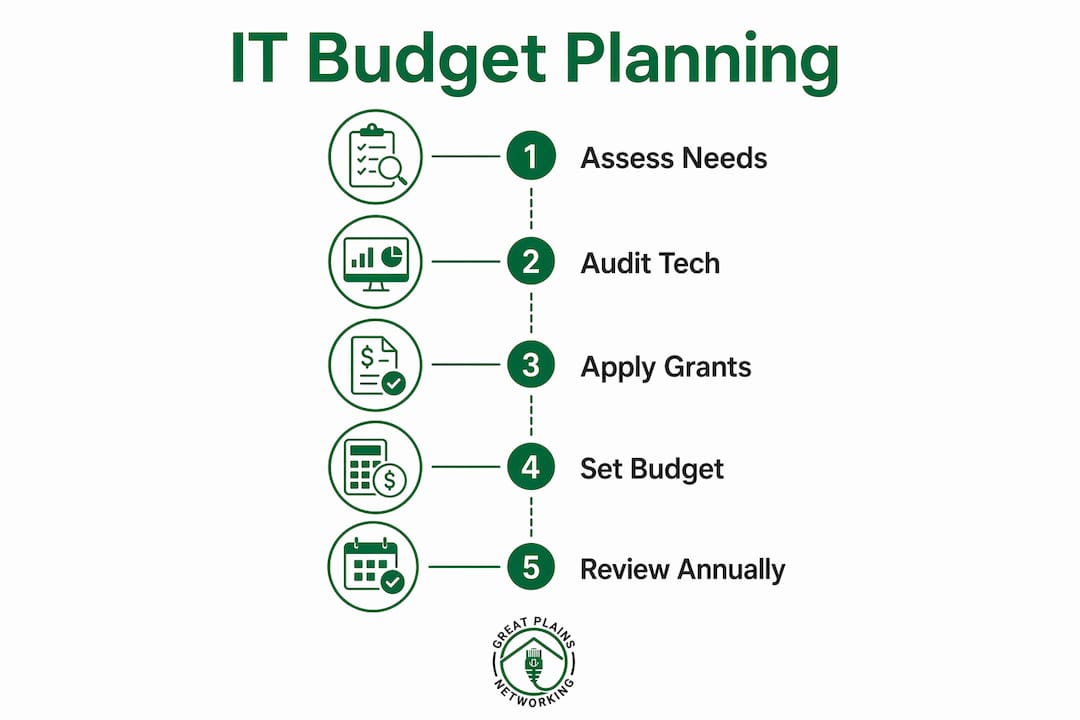
Technology debt is the accumulated cost of deferred IT decisions. Every year you delay replacing aging hardware or upgrading unsupported software, the eventual fix gets more expensive and the operational risk grows. Nonprofits with fewer than 25 staff accumulate this debt fastest because reactive purchasing, buying tools as crises arise rather than planning ahead, creates overlapping systems with no central oversight.
What strategies help nonprofits build cost-effective IT support plans?
The most effective nonprofit IT plans share three characteristics: they are built on documented needs, they use available discounts and grants, and they include regular review cycles.
- Use a scoring matrix for vendor selection. Nonprofits that choose platforms based on flashy features rather than documented organizational needs consistently overspend on unused capabilities. A scoring matrix forces you to rank vendors against your actual pain points, not their marketing materials.
- Apply for nonprofit software discounts before purchasing anything. Microsoft, Google, Cisco, and Adobe all offer significant discounts or free licenses to verified 501(c)(3) organizations. These programs can reduce software costs by 50–80% compared to commercial pricing.
- Choose a co-managed IT model if you have internal staff. Supplementing one internal generalist with a managed services provider costs less than full outsourcing while maintaining institutional knowledge inside your organization.
- Negotiate contract terms actively. Month-to-month or annual contracts with clear service-level agreements (SLAs) protect your organization better than multi-year commitments. Greatplainsnetworking, for example, operates without long-term contracts, giving nonprofits flexibility as their needs change.
- Build cybersecurity into the base plan, not as an add-on. A low-cost cybersecurity setup that includes MFA, endpoint protection, and email filtering costs far less than recovering from a breach.
- Review vendor contracts annually. Technology pricing changes. A contract signed two years ago may now have a better nonprofit equivalent at lower cost.
Pro Tip: Set a calendar reminder every october to review all IT vendor contracts before your fiscal year budget cycle closes. Renegotiating before auto-renewal gives you real leverage.
Strategic IT planning for nonprofits between 25 and 200 staff requires addressing cybersecurity, network monitoring, and hybrid workforce management as distinct line items, not bundled afterthoughts. Organizations in this size range face the most complex IT environments relative to their budget capacity.
How can nonprofits use 2026 grant programs to stretch IT budgets?
Two grant programs in 2026 directly address nonprofit technology costs and are worth building into your budget planning cycle.
| Grant Program | Award Amount | What It Covers | Key Eligibility |
|---|---|---|---|
| AWS Imagine Grant | Up to $200,000 cash + $100,000 cloud credits | AI and cloud innovation projects | Registered nonprofits with cloud-ready programs |
| Zendesk Tech for Good Awards | $5,000–$50,000 + free AI-powered software | Community impact and tech education programs | Nonprofits serving underserved communities |
The AWS Imagine Grant targets organizations ready to use cloud infrastructure for mission-driven AI projects. The $100,000 in cloud credits alone can offset years of cloud hosting costs for a small nonprofit. Applications require a clear project narrative tied to measurable community outcomes.
The Zendesk Tech for Good Awards are more accessible for smaller organizations. The free AI-powered software component has standalone value even for nonprofits that receive the minimum $5,000 cash award. Zendesk's customer service platform, donated at no cost, replaces paid ticketing systems many nonprofits currently fund out of their operating budget.
Preparing a competitive grant application requires three things: documented current technology gaps, a clear connection between the requested funding and your mission outcomes, and a realistic implementation timeline. Vague applications rarely succeed. Reviewers want to see that your organization has already done the work of understanding its own technology needs, which is exactly why the technology audit described earlier matters so much.
Grant awards do not replace a managed IT support plan. They fund specific projects or infrastructure upgrades. Think of them as capital investments that reduce your ongoing IT costs, not as a substitute for monthly managed services.
Key Takeaways
Nonprofits that build IT support plans around documented needs, available grants, and fixed managed service contracts consistently spend less and experience fewer disruptions than those that purchase reactively.
| Point | Details |
|---|---|
| Budget benchmark | Allocate $100–$250 per user per month and 3–6% of your annual operating budget for IT. |
| Start with an audit | A technology audit uncovers redundancies and unclaimed discounts before you commit to any vendor. |
| Use grant funding | The 2026 AWS Imagine Grant and Zendesk Tech for Good Awards provide cash and software to offset IT costs. |
| Vendor selection discipline | Score vendors against documented organizational needs, not features, to avoid overspending on unused tools. |
| Training is not optional | Budget at least 1% of your IT spend for staff training to protect the return on every tool you purchase. |
What I've learned from watching nonprofits get IT wrong
Most nonprofit IT problems I've seen are not technology problems. They are planning problems. An organization buys a donor management platform because another nonprofit recommended it, then spends 18 months paying for features no one uses while staff work around the system in spreadsheets. That pattern repeats across help desk tools, cloud storage, and cybersecurity software.
The audit step is where most organizations resist spending money, and it is exactly where the money is. A $2,500 audit that returns $8,000 in annual savings is not an expense. It is the highest-return investment your technology budget will ever make. The organizations that skip it are the ones calling me two years later with a $15,000 ransomware recovery bill.
The other mistake I see constantly is treating IT as a cost to minimize rather than a function to manage. Nonprofits that align IT investments directly with mission outcomes spend more intentionally and waste less. When your board understands that the $150 per user per month managed services contract is what keeps donor data secure and staff productive, it stops looking like overhead and starts looking like mission infrastructure.
Partner with an IT provider who has worked with nonprofits specifically. The budget constraints, the grant cycles, the board approval processes, and the mission-first culture are all different from a for-profit business. A provider who understands that context will structure your plan accordingly, not just hand you a commercial template with a nonprofit discount applied.
— Nicholas
How Greatplainsnetworking supports nonprofits with limited IT budgets
Nonprofits in Norman, Moore, and Oklahoma City have access to managed IT support through Greatplainsnetworking, built specifically for organizations that cannot afford downtime or unpredictable repair costs.

Greatplainsnetworking delivers 24/7 network monitoring, help desk support, cybersecurity, and data backup under flexible plans with no long-term contracts. Every plan is structured around your organization's actual needs, not a commercial template. If your nonprofit is ready to move from reactive IT spending to a documented, mission-aligned support plan, Greatplainsnetworking provides the local expertise and same-day response times to make that transition straightforward. Learn more about nonprofit IT support options available in the Oklahoma City metro area.
FAQ
What is a realistic IT budget for a small nonprofit?
Small nonprofits with 10–25 staff should budget $100–$250 per user per month for managed IT support. As a percentage of operations, 3–6% of your annual operating budget is the standard planning benchmark.
What does managed IT support include for nonprofits?
Managed IT support typically includes help desk access, 24/7 network monitoring, cybersecurity tools like MFA and endpoint protection, and data backup with tested recovery procedures. Some plans also cover cloud services management and software license oversight.
How can a nonprofit reduce IT costs without cutting services?
Start with a technology audit to identify redundant subscriptions and unclaimed nonprofit discounts. Then apply for programs like the AWS Imagine Grant or Zendesk Tech for Good Awards to offset infrastructure costs with grant funding.
What is co-managed IT and is it right for nonprofits?
Co-managed IT pairs your internal IT generalist with a managed services provider that handles specialized functions like cybersecurity monitoring and after-hours support. It costs less than full outsourcing and works well for nonprofits with 15–50 staff who already have some internal IT capacity.
How do nonprofits choose the right IT vendor?
Build a scoring matrix that ranks vendors against your documented organizational pain points, not their feature lists. Vendor selection based on actual needs reduces overspending on unused capabilities and produces better long-term outcomes.
Recommended
Want help putting this into practice?
We'll audit your security, speed, and hardware in under an hour — no commitment, no sales pitch. Just a clear roadmap of what to fix and why.