
Auditable USB Device Control Policy for SMBs, HIPAA and CMMC Ready

Adopt a default-deny stance for removable media and enforce it technically, not just on paper. Allow only company-issued, encrypted USB devices through a documented exception process, and enforce that decision with Group Policy or Microsoft Intune paired with Microsoft Defender for Endpoint. Where spoofing risk or compliance requirements run high, favor Device Instance ID allowlisting over broader class-based or VID/PID rules, and capture every attach, mount, and file-transfer event in a log you can hand an auditor without editing it first.
TL;DR:
- Using device instance ID allowlisting provides better protection against spoofing than class-based or VID/PID allowing, but requires manual inventory and ongoing updates.
- Enforcement should leverage a combination of GPO, Intune, and Defender for Endpoint, with each layer covering different aspects and reporting capabilities.
- Policies must produce auditable evidence, including device registers, exception logs, and transfer records, stored centrally to satisfy HIPAA, CMMC, or similar standards.
- Implement exception workflows that include formal requests, approvals, asset tagging, and regular review to prevent unauthorized workarounds.
- Roll out USB control policies gradually, starting with audit mode, testing on a small group, and applying continuous monitoring to maintain compliance and operational stability.
Table of Contents
- What Belongs in a USB Device Control Policy
- Enforcing the Policy: GPO, Intune, and Defender for Endpoint
- Choosing an Allowlisting Tier: Class, VID/PID, or Device Instance ID
- Mapping USB Controls to HIPAA and CMMC Audit Requirements
- Running the Exception Workflow Without Losing Control
- Rolling Out the Policy Without Breaking Production
- What Actually Breaks USB Policy Rollouts
- Resolving Non-Compliant Devices Without Halting Operations
- An Auditable Policy Beats a Strict One
- Turning This Policy Into a Managed, Monitored Reality
- Sources
What Belongs in a USB Device Control Policy
A written USB device control policy only works if it names who owns it, what it covers, and what evidence proves it was followed. Too many organizations write a paragraph banning "unauthorized USB drives" and call it done. Auditors and incident responders need far more structure than that, and so does your IT team when a support ticket comes in at 4:45 on a Friday.
Start with scope. Define which systems the policy covers (all endpoints, or just those touching regulated data), and which data classes trigger stricter controls. A dental practice handling ePHI or a defense contractor handling CUI needs tighter removable media rules than a marketing team's shared workstation. Scope should also name user roles: standard employees, IT administrators, and any third-party contractors who touch your network.
Every policy needs a Media Control Owner, typically someone on the IT or security team, who approves exceptions and reviews the allowlist. Without a named owner, exception requests pile up, get approved informally over Slack, and disappear the moment that employee leaves the company.
The policy body should spell out, in plain terms:
- Approved media: company-issued, encrypted USB drives only, tracked by serial number in an asset register.
- Prohibited media: personal USB drives, unencrypted external drives, and any device not on the current allowlist.
- Exception process: how a user requests temporary access, who approves it, and how long access lasts before automatic expiration.
- User obligations: reporting a lost device immediately, never bypassing device control software, and never plugging in unknown hardware found in a parking lot (yes, that scenario is a documented attack vector).
Finally, list the artifacts your policy generates and where they live: the device asset register, exception tickets with serial numbers attached, centralized logs, and a retention schedule for all of it. Under 45 CFR § 164.312, HIPAA-covered entities need technical safeguards for device and media controls that produce retrievable evidence, not just a policy PDF sitting in a shared drive. If your policy doesn't generate evidence, it doesn't satisfy the regulation, no matter how well it reads.
Enforcing the Policy: GPO, Intune, and Defender for Endpoint
Writing the policy is the easy part. Enforcing it consistently across a mixed fleet of Windows machines, and increasingly Mac and Linux endpoints, is where most rollouts stall.
Start by separating two distinct control types that get conflated constantly: device installation restrictions govern whether Windows lets a device driver install at all, while removable media controls govern read/write/execute behavior on devices that already have a driver and present as a disk with a drive letter. Microsoft's device control framework in Defender for Endpoint specifically targets devices that create that drive letter entry, so a device that doesn't mount as removable storage falls outside its scope and needs a different control layer. That distinction trips up a lot of admins who assume one tool covers everything.
Here's how the three primary enforcement layers stack up in practice:
- Group Policy (GPO): Use the Removable Storage Access ADMX templates to deny read/write access by device class, or use Device Installation Restriction policies keyed to hardware IDs. GPO is fast to deploy in an existing Active Directory environment and works well for class-based blocking, but it lacks centralized reporting on its own.
- Microsoft Intune: Build an Endpoint security profile using reusable settings groups for device control, particularly useful for hybrid or cloud-only fleets with no on-premises domain controller. Intune profiles push consistently to remote and traveling laptops, which GPO can't reach until they connect to the corporate network.
- Defender for Endpoint device control: This layer adds granular read, write, and execute permissions per device group, plus centralized reporting and advanced hunting queries you can run against attach and file-transfer events. Microsoft's own documentation recommends combining OS-level controls with Defender for Endpoint specifically because GPO and Intune alone don't generate the audit-ready logs a compliance review needs.
One practical wrinkle: a single physical USB device can register multiple hardware entries in Windows. If you grant access to only one entry, the device may still fail to function correctly, and your helpdesk will hear about it within the hour.
Pro Tip: Before rolling out a Defender for Endpoint device control policy fleet-wide, run it in audit mode for two weeks. You'll see exactly which legitimate devices would have been blocked, which saves you from a wave of "my scanner stopped working" tickets on day one.
For organizations running mixed operating systems, don't overlook macOS and Linux. On macOS, Jamf Pro combined with FileVault encryption gives you comparable device restriction and encryption enforcement. On Linux endpoints, udev rules provide device-level blocking, though they require more manual scripting than either Intune or Jamf offer out of the box. If your compliance framework covers the whole fleet, your USB device management strategy has to cover all three operating systems, not just Windows.
If you're already managing device compliance profiles in Intune for other purposes, this walkthrough on deploying and enforcing Intune compliance policies is a useful companion for building out the removable media piece within the same console.
Choosing an Allowlisting Tier: Class, VID/PID, or Device Instance ID
Not every allowlist is built the same way, and the tier you choose determines how well your policy holds up against a determined attacker versus a curious employee.
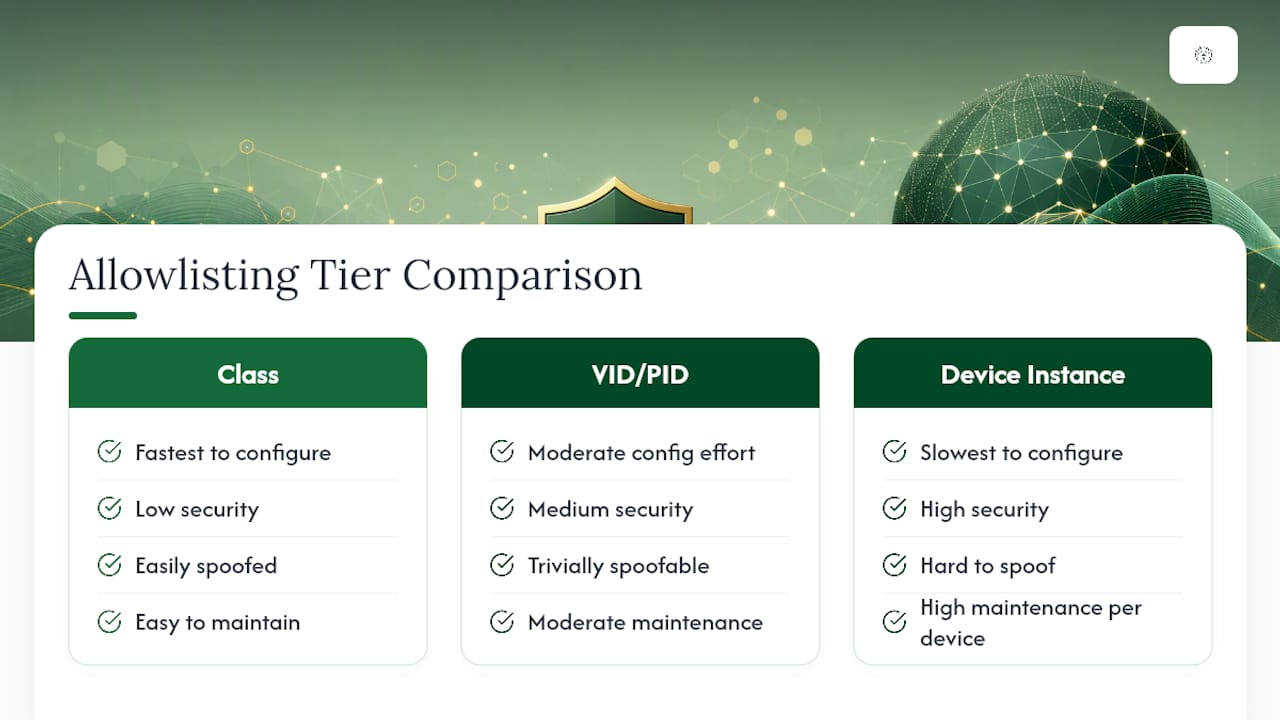
Class-based allowlisting blocks or permits entire categories of devices, such as "all USB mass storage." It's the fastest to configure and the easiest to maintain, but it's also blunt: it can't distinguish your company-issued encrypted drive from an attacker's identical-looking thumb drive. Use it as a baseline deny-all layer, not your final control.
VID/PID allowlisting filters by Vendor ID and Product ID, the manufacturer and model codes baked into a device. This tier is more precise than class-based rules and works well for approving a specific brand and model of encrypted drive across your fleet. The problem is that VID/PID values are trivially easy to spoof. A malicious USB device (a BadUSB-style attack tool, for instance) can present itself with the VID/PID of an approved keyboard or drive, walking straight past your allowlist.
Device Instance ID allowlisting ties permission to a unique, serial-number-based identifier tied to the specific physical unit, not just its make and model. Testing from SANS found that Device Instance ID allowlisting blocked Rubber Ducky style spoofing attacks that class-based and VID/PID rules missed entirely, because the attack tool couldn't replicate the exact serial-bound identifier of an approved device.
That protection comes with real operational cost. Every device on a Device Instance ID allowlist needs to be individually inventoried, and Windows encodes some device serials in formats (ASCII hexadecimal in certain cases) that require testing in your specific environment before you build the rule. Lose a device, issue a replacement, and you're updating the allowlist by hand rather than just re-approving a model number.
The practical answer for most small-to-midsize organizations is a hybrid model: deny-by-default at the class level, then maintain a small, tightly managed Device Instance ID allowlist covering only the handful of devices that genuinely need access, such as backup drives used by IT or encrypted transfer devices used by a compliance officer. That keeps your highest-risk exceptions on the strongest control tier while avoiding the maintenance burden of serializing every keyboard and mouse in the building.
Mapping USB Controls to HIPAA and CMMC Audit Requirements
A USB device control policy that can't produce evidence on demand doesn't help you in an audit, no matter how well it's enforced technically. Auditors want to see the paper trail behind the technology.
Under HIPAA's Device and Media Controls standard, covered entities must implement policies governing the receipt and removal of hardware and electronic media containing ePHI, along with retrievable records of that movement. 45 CFR § 164.312 requires the technical safeguards behind those records, not just a written procedure. NIST SP 800-171 and CMMC Level 2 go further, expecting authorization controls for removable media, encryption of anything permitted, and a maintained device inventory with logged attachment events. Implementation guidance for NIST SP 800-171 and CMMC 2.0 shows that small organizations can meet these requirements without enterprise-grade licensing, using Intune, BitLocker, and Defender for Endpoint together with centralized logging.
An auditor reviewing your USB policy will typically ask for a specific evidence bundle:
| Artifact | What it proves |
|---|---|
| Device asset register with encryption status | Every approved device is accounted for and encrypted |
| Exception tickets with serial number, user, and expiration | Access was authorized, time-limited, and documented |
| Attach/mount and file-transfer logs | Device activity is monitored and retrievable |
| Sanitization or decommissioning logs | Retired devices were wiped before disposal |
| Log retention schedule | Records are kept long enough to satisfy audit windows |
Centralize those logs in a SIEM rather than leaving them scattered across individual endpoints. A SIEM integration turns thousands of disconnected event logs into a searchable timeline you can hand to an auditor or an incident responder within minutes, rather than pulling logs endpoint by endpoint under deadline pressure. If you're already documenting retention practices elsewhere in your Microsoft 365 environment, the same discipline applied to email retention policies is a good template for how long to keep USB device logs before archiving or purging them.
Healthcare practices in particular should treat this evidence bundle as a living document rather than something assembled the week before an audit. Our free HIPAA and cyber insurance audit for Oklahoma dental practices walks through exactly which artifacts examiners ask for first.
Running the Exception Workflow Without Losing Control
The exception process is where most USB policies quietly fall apart. A policy that's airtight on paper but generates fifty informal, unlogged exceptions a month isn't actually enforcing anything.
- Capture the request properly. Every exception ticket needs the device serial number, the requesting user, a stated business purpose, and a hard expiration date. Vague justifications like "needed for work" should bounce back to the requester for specifics.
- Route it through an actual approver. The Media Control Owner or a designated backup reviews and signs off, ideally inside your existing ticketing system so the approval trail lives alongside every other IT request.
- Issue and tag corporate devices deliberately. Encrypted USB drives should be labeled with an asset tag tied to the register, and their lifecycle (issue date, assigned user, return date) tracked the same way you'd track a laptop.
- Set monitoring rules that catch drift. Alert on any non-allowlisted device attachment attempt, unusually large file transfers to removable media, or a device reporting that its protections (like BitLocker) have been disabled.
- Review the allowlist on a set cadence. Quarterly revalidation catches devices that should have been decommissioned when an employee left or a project ended, closing gaps before they become findings.
Where possible, give employees a faster, sanctioned alternative to USB transfers before you lock the door. Operational guidance on removable media restrictions consistently finds that pairing a deny-by-default policy with practical alternatives, like OneDrive or SharePoint for file sharing, cuts exception request volume dramatically because employees aren't fighting the policy to get their work done.
Rolling Out the Policy Without Breaking Production
A USB device control policy deployed all at once, fleet-wide, on a Monday morning is how helpdesk teams end up fielding two hundred tickets by lunch. Roll it out in stages instead.
- Inventory first, block second. Run device control in audit-only mode for two to four weeks to see what's actually plugged into your endpoints today, then classify each finding by risk before writing a single block rule.
- Test in a lab environment. Validate how Device Instance IDs actually appear on your specific hardware, since Windows encodes some serials in ways that vary by device and driver version. Confirm HID devices (keyboards, mice) behave differently from mass-storage devices under your chosen policy, and simulate a spoofing attempt if you're relying on Device Instance ID for high-risk exceptions.
- Pilot with a small group before fleet-wide enforcement. Choose one department, ideally one with cooperative users and low complexity, and run the enforced policy for two weeks with a fast helpdesk response path for anything unexpected.
- Define rollback triggers up front. If a critical business process breaks (a point-of-sale device, a medical device with a proprietary USB interface), know in advance who can approve a temporary rollback and how fast.
- Monitor and sample-audit after go-live. Spot-check logs weekly for the first month, then shift to your standard quarterly review cadence once the policy stabilizes.
Pro Tip: Keep a short list of "known exceptions" ready before rollout, things like barcode scanners, medical devices, or specialized manufacturing hardware that behave like USB storage but aren't. Pre-approving these avoids emergency tickets during your pilot week.
What Actually Breaks USB Policy Rollouts
Most USB device control failures aren't technical. They're procedural gaps that show up months after go-live.
Shadow IT is the most common one: an employee finds the sanctioned exception process too slow, so they use a personal cloud drive or a phone as a USB mass storage bridge instead. Legacy workflows cause the second most common failure. A manufacturing shop with a decade-old CNC machine that only accepts USB firmware updates isn't going to modernize on your policy's timeline, so build a documented, permanent exception for it rather than letting someone quietly disable enforcement on that one machine. Macro-driven spreadsheets that reference a mapped USB drive letter are a third recurring headache. When the drive letter disappears, the macro breaks, and users route around your policy rather than reporting it.
Small businesses rarely fail a compliance review because they lacked a policy. They fail because the policy existed on paper while the actual enforcement drifted, quietly, for months, and nobody caught it until an auditor asked for logs that didn't exist.
Great Plains Networking works through exactly this gap with clients across law, dental, and manufacturing sectors: auditing current USB exposure, deploying the GPO and Intune controls to close it, and monitoring the result around the clock rather than checking in once a quarter.
If your internal IT resource is one generalist wearing five hats, a managed rollout tends to close the gap faster and hold up better under audit than an internal effort stretched across other priorities.
Resolving Non-Compliant Devices Without Halting Operations
Even a well-designed policy runs into devices that fail enforcement, and how you handle that moment matters as much as the policy itself. A device showing up as non-compliant usually falls into one of three buckets: it's unauthorized entirely, it's authorized but its encryption has been disabled, or it's a legitimate business tool that the policy didn't anticipate.

For unauthorized devices, the remediation is straightforward: log the attempt, notify the user's manager if it's a repeat occurrence, and confirm no data actually transferred before closing the ticket. For an authorized device with disabled encryption, quarantine access immediately and don't restore it until the device passes a fresh compliance check. That second scenario is the more dangerous one, since it usually means BitLocker or a Removable Drive encryption policy was turned off, either accidentally or deliberately, and it needs the same urgency as a failed antivirus check.
The third bucket, legitimate tools the policy didn't anticipate, is where documentation discipline pays off. Rather than granting a one-off exception and moving on, log it as a permanent policy amendment candidate and route it through your Media Control Owner for a real decision. Skipping that step is exactly how policies accumulate a dozen undocumented workarounds within a year, each one a gap an auditor will eventually find.
An Auditable Policy Beats a Strict One
The conventional advice on USB security treats strictness as the goal: block everything, allow almost nothing, call it secure. That's the wrong metric. A policy that's technically airtight but generates no evidence trail fails an audit just as badly as one with no controls at all, because auditors under HIPAA and CMMC frameworks are grading your ability to prove enforcement, not just describe it.
What gets underestimated is the operational cost of the strongest control tier. Device Instance ID allowlisting is genuinely superior against spoofing, but organizations that try to serialize every peripheral in the building instead of just the high-risk exceptions end up with an allowlist nobody maintains, which is worse than a looser policy that's actually kept current.
Prioritize logging and the exception workflow before you chase the most sophisticated blocking technology available. A mid-tier control with airtight, auditable exception records and centralized logs will outperform a state-of-the-art allowlist with no documentation behind it, every time an auditor actually shows up.
— Nicholas
Turning This Policy Into a Managed, Monitored Reality
Writing this policy is one afternoon of work. Enforcing it correctly across every endpoint, keeping the allowlist current, and having logs ready the moment an auditor calls is the part that consumes a small IT team's bandwidth for months. Great Plains Networking builds and operates exactly this kind of USB device control setup for small businesses across Norman, Moore, and Oklahoma City, mapping your policy directly to Intune, GPO, and Defender for Endpoint settings instead of leaving enforcement as a document nobody checks.

The path from here is simple: an initial assessment of your current USB exposure and compliance gaps, a pilot rollout on a small group to validate the controls without disrupting daily work, and then ongoing managed enforcement with 24/7 monitoring once it's stable. That last piece matters most for HIPAA and CMMC-bound practices, since a policy that isn't watched daily drifts out of compliance quietly. Get started with a review through Great Plains Networking's managed IT support for small business, or pair it with our cybersecurity services if endpoint protection and USB control need to move together.
Sources
- 45 CFR § 164.312 - Technical safeguards
- Device control overview - Microsoft Defender for Endpoint
- Assessing the effectiveness of Windows 11 Group Policy at controlling USB device installation (SANS)
Recommended
Want help putting this into practice?
We'll audit your security, speed, and hardware in under an hour — no commitment, no sales pitch. Just a clear roadmap of what to fix and why.