
Switching to Managed IT Support: A Small Business Guide

Switching to managed IT support is defined as moving from reactive, break-fix technology management to a proactive, contract-based model where a managed service provider (MSP) monitors, maintains, and secures your systems continuously. For small to mid-sized businesses, this shift delivers measurable gains in reliability, security, and operational efficiency. Managed IT support replaces the unpredictable cost of emergency repairs with a predictable monthly fee and a team that catches problems before they become outages. The transition typically takes 60–90 days and follows a structured process covering discovery, parallel deployment, and phased cutover.
What does switching to managed IT support actually require?
Preparation determines whether a transition goes smoothly or stalls. Before you notify your current provider, complete a full inventory of your IT assets, software licenses, and active subscriptions. That list becomes the foundation for everything the new MSP needs to take over cleanly.
Credential security is the most overlooked step. Critical admin credentials including your domain registrar login, Microsoft 365 global admin account, and firewall passwords must be secured before you tell your outgoing provider you are leaving. Outgoing providers have been known to delay handing over these credentials, which can paralyze operations during a transition.

Evaluate your current provider's performance using objective criteria before you decide to leave. Ask whether the service gaps you experience are fixable problems or structural mismatches that no amount of conversation will resolve. A signs your business needs new IT assessment can clarify that distinction quickly.
Your preparation checklist should cover:
- IT asset inventory: Document every device, server, and network component with serial numbers and warranty status.
- Software and license records: List all active subscriptions, renewal dates, and vendor contacts.
- Admin credentials: Recover and store domain, cloud, firewall, and backup portal logins independently.
- Compliance requirements: Identify any HIPAA, SOC 2, or CMMC obligations that will shape your MSP selection criteria.
- Contract review: Check your current agreement for early termination fees and notice periods before you sign anything new.
- MSP evaluation criteria: Assess technical fit, local availability, response time guarantees, and cultural compatibility.
Pro Tip: Create a shared, encrypted password vault that you control before initiating any provider conversation. This single step prevents the most common transition crisis.
How does the IT support migration process work from start to finish?
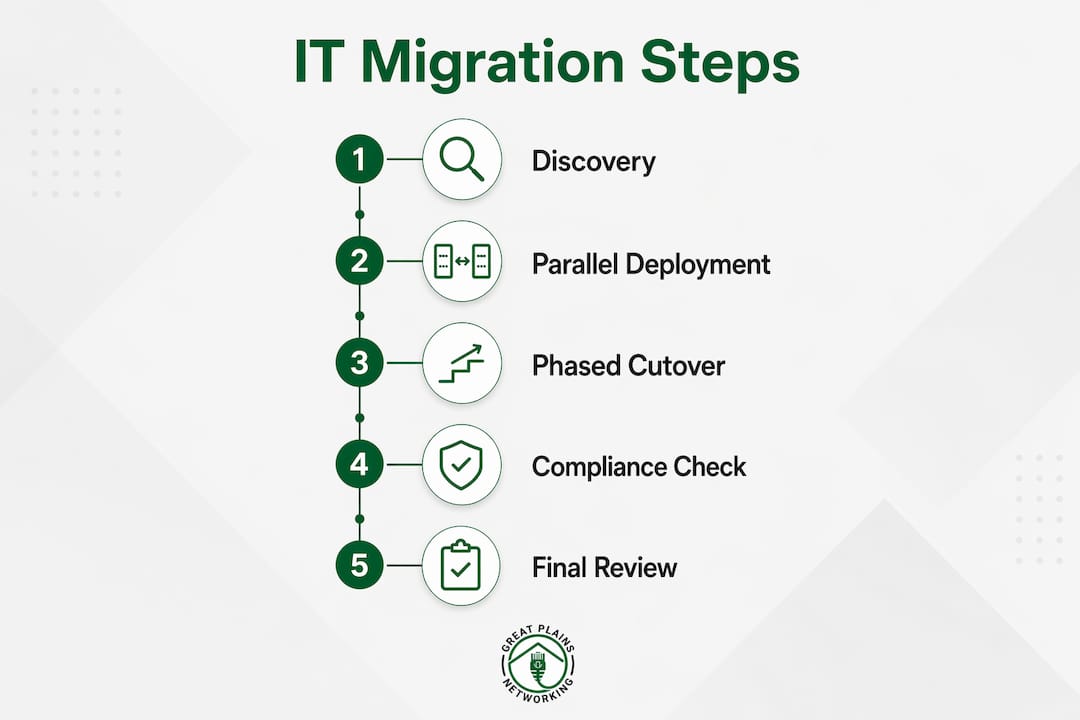
A properly managed transition takes 60–90 days and divides into three distinct phases. Rushing any phase increases the risk of service gaps, security exposure, and frustrated employees.
-
Phase 1: Discovery and documentation (weeks 1–2). The new MSP audits your environment, maps your network, and documents configurations independently. This step cannot rely on the outgoing provider's records. Outdated or incomplete documentation from an outgoing MSP creates knowledge gaps that cause problems weeks after cutover.
-
Phase 2: Parallel tooling deployment and testing (weeks 3–6). The incoming MSP installs its monitoring agents, remote management tools, and security stack alongside the existing setup. Parallel operation lets the new team test and validate services without disrupting your daily work. This phase also allows real-time knowledge transfer and system validation before the outgoing provider steps away.
-
Phase 3: Phased service cutover and knowledge transfer (weeks 7–10). Services migrate in priority order, typically starting with helpdesk and endpoint monitoring, then moving to network management and security operations. A secure overlap period of 2–4 weeks between providers prevents coverage gaps and gives the new MSP time to verify every system is functioning correctly.
The table below shows how timeline length scales with compliance complexity.
| Environment type | Recommended timeline | Primary driver |
|---|---|---|
| Standard small business | 60–90 days | Discovery and parallel deployment |
| HIPAA-regulated (healthcare) | 90–120 days | Audit trail and documentation integrity |
| SOC 2 or CMMC-regulated | 90–120 days | Compliance documentation requirements |
| Multi-site or complex networks | 90–120 days | Phased site-by-site cutover |
Regulated environments require longer timelines because HIPAA, SOC 2, and CMMC compliance demands continuous audit trail documentation throughout the transition. Cutting this short creates compliance gaps that can surface during audits months later.
What risks should you watch for when changing IT providers?
The biggest risk in any provider change is a credential access failure. If your outgoing MSP controls the only admin accounts for your domain or cloud services, they hold significant leverage. Secure those credentials before the conversation starts, not after.
Contract terms create a second category of risk. Early termination fees and contract clauses can add unexpected costs to a transition. Review your current agreement with a clear eye on notice periods, data return obligations, and any equipment ownership questions.
Common pitfalls to avoid:
- Rushing the timeline: Compressing a 90-day transition into 30 days skips validation steps and creates service gaps.
- Relying on the outgoing MSP's documentation: Independent discovery by the new provider is non-negotiable.
- Skipping the overlap period: Running both providers in parallel for 2–4 weeks is the single most effective way to prevent outages.
- Missing compliance documentation: Regulated businesses that skip audit trail continuity face real legal exposure.
- Notifying staff too late: Employees need advance notice so they know who to call for support during the cutover window.
Pro Tip: Negotiate a specific data return clause into your exit terms before you give notice. This ensures you receive all configuration files, backup data, and documentation in a usable format.
The most disruptive transitions share one trait: the business owner assumed the outgoing provider would cooperate fully. Plan as if they will not, and you will be prepared for any outcome.
What measurable benefits can businesses expect after the switch?
The benefits of managed IT support become visible within the first 90 days post-transition. The shift from reactive break-fix to proactive, continuous monitoring means problems get caught before they cause downtime, not after.
The financial case is well-documented. Organizations that adopt managed IT support can achieve ROI ranging from 20% to 300% and cut system downtime by 25%–45%. That downtime reduction translates directly to fewer lost revenue hours and lower emergency repair costs.
Employee productivity is a less-discussed but equally real benefit. Managed IT services can recover up to 91 productive hours per employee annually by eliminating the constant firefighting that plagues businesses relying on break-fix support. For a 10-person office, that is the equivalent of recovering more than two full work weeks of output per person each year.
Security improvements are structural, not cosmetic. A qualified MSP deploys MFA, endpoint detection and response (EDR), patching, backups, and incident response planning as a coordinated stack rather than disconnected tools. This layered approach closes the gaps that ransomware and phishing attacks exploit. For businesses in regulated industries, this security posture also directly supports compliance requirements.
The proactive IT support model also gives business owners strategic visibility they rarely had before. Monthly reporting, asset lifecycle tracking, and budget forecasting replace the guesswork of unpredictable repair bills.
Key takeaways
Switching to managed IT support requires structured preparation, a phased 60–90 day transition, and deliberate credential security to deliver its full benefits in reliability, security, and cost predictability.
| Point | Details |
|---|---|
| Secure credentials first | Recover domain, cloud, and firewall admin logins before notifying your outgoing provider. |
| Follow a phased timeline | A 60–90 day transition covering discovery, parallel deployment, and cutover prevents service gaps. |
| Run parallel operations | Overlap both providers for 2–4 weeks to validate systems and transfer knowledge safely. |
| Expect measurable ROI | Businesses report 20%–300% ROI and 25%–45% reductions in system downtime post-transition. |
| Plan longer for compliance | HIPAA, SOC 2, and CMMC environments need 90–120 days to maintain audit trail integrity. |
What I have learned from watching businesses make this switch
The businesses that struggle most with provider transitions are not the ones with the most complex IT environments. They are the ones that waited too long to make the decision and then tried to compress the timeline to compensate.
The trigger for switching is usually a crisis: a ransomware incident, a failed security audit, or a moment when the current provider simply could not respond fast enough. Those are valid reasons to move. But a crisis-driven transition is the hardest kind to execute well. The preparation steps get skipped, the overlap period gets cut short, and the new MSP inherits an undocumented environment.
The smarter move is to recognize the warning signs earlier. If your current provider is reactive by design, meaning they only show up when something breaks, that is a structural mismatch, not a fixable gap. No amount of escalation changes a break-fix provider into a proactive one. That distinction matters because it tells you whether a conversation with your current provider is worth having or whether you should move directly to evaluating replacements.
The businesses that transition well treat the process like a project, not an event. They assign an internal point of contact, document their own environment before the new MSP arrives, and communicate clearly with staff throughout. The 60–90 day timeline exists for good reasons. Respecting it is the most practical thing you can do to protect your operations during the change.
— Nicholas
How Greatplainsnetworking supports your transition
Greatplainsnetworking provides managed IT support for small businesses in Norman, Moore, and Oklahoma City, with an onboarding process built to minimize disruption from day one. Every new client starts with a thorough discovery audit, independent of any documentation from the outgoing provider.
The Greatplainsnetworking team handles 24/7 monitoring, cybersecurity, backup and recovery, and helpdesk support under a single plan with no long-term contracts. Same-day response times and plain-language communication mean you always know what is happening with your systems. If you are ready to move away from reactive IT management, explore managed IT services designed specifically for small businesses in the Oklahoma City metro area.
FAQ
How long does switching IT providers typically take?
A standard transition takes 60–90 days, divided into discovery, parallel deployment, and phased cutover. Regulated environments requiring HIPAA, SOC 2, or CMMC compliance typically need 90–120 days.
What credentials should I secure before switching MSPs?
Secure your domain registrar login, Microsoft 365 global admin account, firewall passwords, and backup portal access before notifying your outgoing provider. Controlling these accounts prevents operational disruption during the handover.
What ROI can a small business expect from managed IT support?
Businesses adopting managed IT support report ROI ranging from 20% to 300%, along with system downtime reductions of 25%–45%, depending on the complexity of the environment and the quality of the MSP.
Do I need to run both providers at the same time during the switch?
A 2–4 week overlap period between providers is strongly recommended. Running both in parallel allows the incoming MSP to validate systems, complete knowledge transfer, and catch issues before the outgoing provider steps away.
What are the most common mistakes when changing IT providers?
The most common mistakes are rushing the timeline, relying on the outgoing provider's documentation, and failing to secure admin credentials in advance. Each of these creates preventable disruptions that extend the transition and increase costs.
Recommended
Want help putting this into practice?
We'll audit your security, speed, and hardware in under an hour — no commitment, no sales pitch. Just a clear roadmap of what to fix and why.