
Low Cost Cybersecurity Setup for Nonprofits

Nonprofits hold some of the most sensitive data in any sector: donor payment details, client health records, immigration documents, and financial histories. Yet a low cost cybersecurity setup for nonprofits is rarely a budget priority until something goes wrong. Nonprofits increasingly lack dedicated security staff, making them attractive targets for cybercriminals who know a smaller organization is less likely to detect an intrusion quickly. The good news is that effective protection does not require a large IT department or an enterprise-sized budget. This guide gives you a clear, practical path forward.
Table of Contents
- Key takeaways
- Understanding your nonprofit's cybersecurity risks
- Low-cost foundational cybersecurity tools and policies
- Step-by-step guide to implementing your setup
- Common challenges and how to avoid them
- Measuring effectiveness and maintaining your posture
- My take on cybersecurity as a nonprofit priority
- Ready to strengthen your nonprofit's security?
- FAQ
Key takeaways
| Point | Details |
|---|---|
| Nonprofits are high-value targets | Sensitive donor and client data makes nonprofits attractive to cybercriminals, regardless of organization size. |
| Focus on high-impact controls first | Addressing just 20% of the right controls can mitigate up to 80% of your cybersecurity risk. |
| MFA and password management are free wins | Multi-factor authentication costs nothing to enable and blocks the majority of unauthorized access attempts. |
| Governance matters as much as technology | Staff training, access policies, and board awareness determine whether technical controls actually work. |
| Grants can fund your security improvements | Programs like FEMA's Nonprofit Security Grant Program exist specifically to offset cybersecurity costs. |
Understanding your nonprofit's cybersecurity risks
Before spending a single dollar on tools, you need an honest picture of what you are actually protecting. Most nonprofit leaders are surprised to discover how much sensitive data their organization holds and how many places it lives.
Start by cataloging the types of data your organization collects:
- Donor information: Names, addresses, credit card numbers, and giving histories
- Client records: Health data, immigration status, income details, and case notes
- Employee files: Social Security numbers, payroll data, and benefit enrollment records
- Operational data: Grant agreements, contracts, and board communications
Once you have that list, map where each data type is stored. Is it in a cloud platform? A local server? A staff member's personal laptop? This exercise alone often reveals serious gaps, such as a volunteer who keeps a donor spreadsheet on a personal Google Drive with no access controls in place.
Next, identify your most realistic threat actors. Nonprofits face phishing attacks most frequently, followed by ransomware targeting file servers and business email compromise scams aimed at finance staff. Cybersecurity is largely a governance and culture challenge rather than a purely technical one, which means understanding who might attack you and why is just as useful as installing software.
Finally, bring your board into the conversation. Leadership that understands cyber risk is far more likely to approve budget for protective measures and create a culture where staff take security seriously.
Pro Tip: Schedule a 30-minute data inventory workshop with your team once per year. You will consistently find forgotten systems, old accounts, and unauthorized data storage that create unnecessary risk.
Low-cost foundational cybersecurity tools and policies
The foundation of any budget-friendly cybersecurity setup is a small set of controls that deliver outsized protection. Focusing on 20% of controls can mitigate 80% of cybersecurity risks for organizations like nonprofits, which means prioritization is everything.
Here is how the most impactful low-budget cybersecurity tools and policies compare for nonprofits:
| Control | Cost | Risk Reduced | Difficulty |
|---|---|---|---|
| Multi-factor authentication (MFA) | Free | Very High | Low |
| Password manager | $0–$4/user/month | High | Low |
| Software patching schedule | Free | High | Low |
| Data minimization policy | Free | Medium-High | Low |
| Acceptable use policy | Free | Medium | Low |
| Incident response plan | Free | High | Medium |
MFA is one of the simplest protections available and costs nothing on most platforms. Enable it on your email, cloud storage, donor management system, and any banking portal. A staff member's stolen password becomes useless the moment MFA is active.

Password managers like Bitwarden offer free tiers that are more than adequate for small nonprofits. They eliminate password reuse, which remains one of the leading causes of account takeovers. Pair MFA with a password manager and you have addressed the two most common entry points attackers use.
Data minimization is another no-cost control that is frequently overlooked. Deleting unnecessary data shrinks your attack surface more effectively than many paid tools. If you do not need a donor's full credit card number after processing a payment, do not store it. If a client's case closed three years ago and retention policy allows deletion, delete the file.
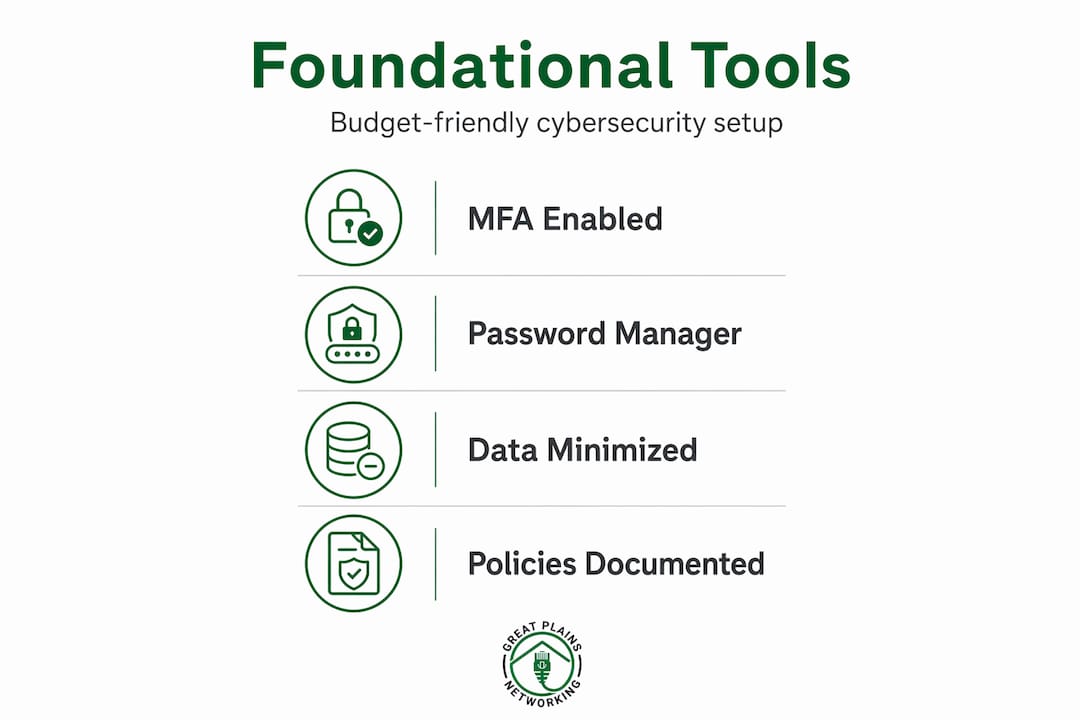
On the policy side, every nonprofit needs at minimum an acceptable use policy and a written incident response plan. These do not require lawyers or IT consultants to produce. The NIST Cybersecurity Framework 2.0 provides free templates and plain-language guidance that any organization can adapt.
Pro Tip: Search "Microsoft 365 Nonprofit" and "Google for Nonprofits" before purchasing any software. Both programs offer deeply discounted or free access to productivity and security tools that would otherwise cost thousands per year.
Step-by-step guide to implementing your setup
A practical, low cost cybersecurity setup for nonprofits does not need to be deployed all at once. A phased approach prevents team burnout and keeps costs predictable.
Phase 1: Assign ownership and assess your assets
- Designate a cybersecurity point person. This does not need to be a dedicated IT staff member. An operations manager or finance director can own this role with the right training resources.
- Complete a data and software inventory using the framework described in the previous section.
- Identify your three most critical systems. For most nonprofits, this is email, the donor management platform, and file storage.
- Document who has access to each critical system and remove accounts that are no longer needed.
Phase 2: Deploy technical controls
- Enable MFA on all critical platforms immediately. Most platforms walk you through setup in under ten minutes.
- Roll out a password manager organization-wide. Bitwarden's free plan supports unlimited passwords and basic sharing.
- Establish a monthly patching schedule. Set a recurring calendar event to check and apply updates on all staff devices.
- Configure automatic backups for critical data and verify them. Testing your data backup procedures is the step most organizations skip, and it is the step that determines whether you can recover from ransomware.
Phase 3: Train your team
- Run a 60-minute phishing awareness session using free tools like Google's Phishing Quiz.
- Share a one-page "what to do if you get a suspicious email" guide with all staff and volunteers.
- Create a no-blame reporting culture. A see-something-say-something culture reduces the time between a phishing click and a response from days to hours.
- Repeat training at least twice per year, and always after a real incident or near miss.
Phase 4: Test your incident response plan
Conduct a tabletop exercise with leadership once per year. Present a realistic scenario, such as a staff member clicking a phishing link that installs ransomware, and walk through your documented response steps. Tabletop exercises are cost-effective ways to expose gaps in your plan before a real event forces you to find them.
Common challenges and how to avoid them
Even well-intentioned nonprofits run into predictable problems when building a budget-friendly cybersecurity setup. Knowing where others stumble helps you avoid the same mistakes.
- Relying on technology alone without governance: Deploying MFA and a password manager while skipping written policies creates a false sense of security. Technical controls only work when policies define how and when to use them.
- Staff resistance: Security measures that feel burdensome get bypassed. The solution is explaining the "why" before deploying the "what." When staff understand that a breach could shut down programs or expose clients to harm, cooperation improves significantly.
- Ignoring volunteers and contractors: These groups often have access to the same systems as employees but receive no security training. Apply the same access controls and MFA requirements to every user, regardless of their employment status.
- Skipping patch management: Unpatched software is responsible for a disproportionate share of successful attacks. Many organizations delay patches out of fear they will break something. Schedule patches during off hours and keep a tested rollback plan.
- Forgetting free resources: Free training programs exist specifically for nonprofits without dedicated IT staff. The CyberAIDE program from Open North, for example, provides plain-language toolkits designed for capacity-constrained organizations.
"The cheapest incident response is the one you never need. Governance and culture are what make technical controls actually stick."
Reviewing a public laptop security checklist is also worthwhile if your staff frequently work from coffee shops, libraries, or other public spaces. Remote and mobile work creates exposures that most basic security policies do not address explicitly.
Measuring effectiveness and maintaining your posture
Deploying controls is not the end of the process. Maintaining an affordable cybersecurity setup means building lightweight routines that verify your protections are still working.
| Activity | Frequency | Cost | Owner |
|---|---|---|---|
| Review user access rights | Quarterly | Free | Operations or IT lead |
| Software and firmware patching | Monthly | Free | IT lead or designated staff |
| Phishing simulation | Twice per year | Free (basic tools) | Operations or HR |
| Board risk update | Annually | Free | Executive Director |
| Full security review | Annually | Low | Internal or managed IT |
Track a small set of metrics: the percentage of staff accounts with MFA enabled, the average days between a patch release and its application, and the number of reported phishing attempts per quarter. These numbers do not need to be perfect. They need to trend in the right direction.
Grants and philanthropic support increasingly fund nonprofit cybersecurity improvements. FEMA's Nonprofit Security Grant Program is one source. Look also at state-level programs and community foundations that have added cybersecurity as a funded category in recent grant cycles. Documenting your current posture with these metrics makes a much stronger grant application.
Pro Tip: When reporting to your board, avoid technical jargon. Frame cybersecurity as mission risk: "A breach could expose 400 client records and result in regulatory fines that would consume 15% of our annual budget." That framing gets attention and approval far faster than any technical explanation.
You can also explore Greatplainsnetworking's guidance on proactive cybersecurity solutions to understand which monitoring and response practices translate directly to nonprofit environments.
My take on cybersecurity as a nonprofit priority
I've worked alongside small organizations that told me cybersecurity was "not really their problem" right up until the moment it very much was. What I've learned from those conversations is that the hesitation is almost never about indifference. It is about the deeply human instinct to prioritize what feels urgent over what feels abstract.
A breach does not feel real until it happens. And when it does, the costs: recovery time, donor trust erosion, regulatory scrutiny, and potential loss of grant eligibility, dwarf what a basic set of controls would have cost. I've seen a mid-sized nonprofit spend more on a single incident response vendor in one week than they would have spent on two years of managed security monitoring.
What I find most encouraging is that the organizations I've seen recover well are rarely the ones with the biggest IT budgets. They are the ones where leadership treated security as a shared responsibility rather than an IT department problem. When an executive director models good password hygiene and champions phishing training, the culture shifts faster than any software deployment could accomplish.
The low-cost approach works. It requires consistency and governance discipline more than it requires spending. Start with MFA, a password manager, and a written incident response plan. Build from there. The first layer of controls is always the most valuable dollar you spend.
— Nicholas
Ready to strengthen your nonprofit's security?
Greatplainsnetworking works with nonprofits, small businesses, and mission-driven organizations across Norman, Moore, and Oklahoma City to build security postures that fit real budgets. The team provides 24/7 monitoring, plain-language guidance, and same-day response without requiring long-term contracts.

If your organization needs help assessing its current setup, deploying foundational controls, or simply understanding where your greatest risks sit, managed IT services for nonprofits from Greatplainsnetworking offer a practical starting point. You can also explore dedicated nonprofit IT support options tailored to the specific compliance and data protection challenges your organization faces. No jargon, no pressure, just the help you actually need.
FAQ
What is the most important first step in nonprofit cybersecurity?
Enable multi-factor authentication on every account that holds sensitive data. It is free on most platforms and immediately reduces your risk of unauthorized access, even if a password is compromised.
How much does a basic nonprofit cybersecurity setup cost?
A foundational setup using MFA, a free-tier password manager, a patching schedule, and documented policies can cost as little as $0 to $5 per user per month, well within reach of most nonprofit budgets.
Can nonprofits get grants to pay for cybersecurity?
Yes. Programs like FEMA's Nonprofit Security Grant Program provide direct funding, and many state-level and philanthropic funders now include cybersecurity as an eligible expense category.
How do you train nonprofit staff on cybersecurity without a big budget?
Free programs like CyberAIDE and Google's phishing awareness tools provide plain-language training resources designed specifically for organizations without dedicated IT staff. A 60-minute annual session plus a one-page quick reference guide covers the essentials.
How often should a nonprofit review its cybersecurity controls?
Review user access rights quarterly, apply software patches monthly, and conduct a full security review at least once per year. A brief annual board update keeps leadership informed and maintains organizational accountability.
Recommended
Want help putting this into practice?
We'll audit your security, speed, and hardware in under an hour — no commitment, no sales pitch. Just a clear roadmap of what to fix and why.