
IT Budget Planning for Small Business: 2026 Guide

Most small business owners discover their IT costs the hard way. A server goes down, a subscription auto-renews at triple the original price, or a cyberattack wipes out data that was never properly backed up. Effective IT budget planning for small business isn't about predicting the future perfectly. It's about building a financial structure that absorbs surprises without derailing your operations. This guide walks you through every component of a realistic IT budget, a step-by-step planning process, and the cost management practices that keep your technology spending under control year after year.
Table of Contents
- Key takeaways
- IT budget planning for small business: what to include
- How to build your IT budget step by step
- Common IT budget mistakes and how to avoid them
- Choosing affordable IT solutions that fit your budget
- My honest take on IT budgeting for small businesses
- How Greatplainsnetworking helps you control IT costs
- FAQ
Key takeaways
| Point | Details |
|---|---|
| Budget for all IT categories | Include hardware, software, cybersecurity, cloud services, and personnel costs to avoid gaps. |
| Add a contingency fund | Reserve 5–10% of your IT budget for unexpected expenses and cost overruns. |
| Plan for growth, not just today | Cloud and infrastructure costs can jump significantly as your business scales. |
| Audit subscriptions regularly | Eliminating unused SaaS tools and right-sizing cloud services can cut IT costs by 20–40%. |
| Managed IT services add predictability | Outsourcing IT management converts unpredictable costs into a fixed monthly expense. |
IT budget planning for small business: what to include
Before you can build a budget, you need to know what belongs in it. Many small business owners undercount their IT expenses because they only think about the obvious items like computers and internet. The real list is longer, and accurate budgeting is what separates businesses that grow steadily from those that get blindsided by costs they never saw coming.
Here are the core categories every small business IT budget should cover:
- Hardware and infrastructure. Computers, laptops, servers, routers, switches, and any physical networking equipment. Hardware has a lifespan, typically three to five years, so budget for replacement cycles, not just new purchases.
- Software and subscriptions. Productivity tools, collaboration programs, and cloud services are recurring costs that compound quickly. Microsoft 365, project management platforms, accounting software, and video conferencing tools all carry monthly or annual fees.
- Cloud services and hosting. If your business runs on cloud-hosted applications or stores data in the cloud, those fees scale with usage. Budget for your current consumption plus a growth buffer.
- Cybersecurity. Antivirus software, endpoint protection, firewalls, multi-factor authentication (MFA) tools, and employee security training are non-negotiable line items. Skipping them creates financial exposure that far exceeds their cost. See proactive cybersecurity solutions for a breakdown of what small businesses typically need.
- Data backup and recovery. Business data backup is one of the most overlooked IT expenses until a failure makes it the most urgent one. Budget for both the backup solution and periodic recovery testing.
- IT support and personnel. Whether you pay an internal IT person, a consultant, or a managed service provider, this cost belongs in your budget. Don't treat it as optional overhead.
- Contingency fund. Stripe's 2024 startup budgeting guide recommends including a 5–10% contingency within your core budget for unexpected technology and cybersecurity expenses. This is not padding. It's financial discipline.
On the tax side, many IT purchases qualify as business deductions. The IRS states that deductions reduce taxable income but require proper documentation. Keep organized records of every IT purchase, subscription, and service contract.
Pro Tip: Switch annual software subscriptions from monthly billing to annual billing where possible. Most vendors offer 15–20% discounts for annual commitments, and it simplifies your budget tracking considerably.

How to build your IT budget step by step
Knowing what to include is only half the work. The other half is building a process that produces a budget you can actually trust and use throughout the year.
-
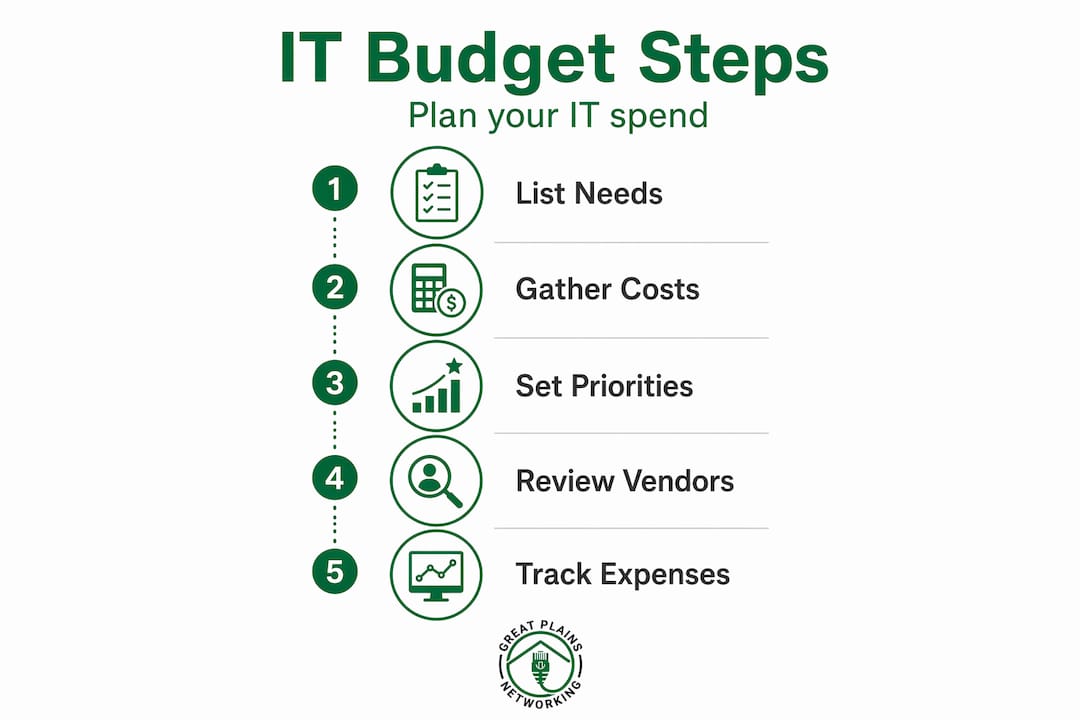
Audit your current IT environment. List every piece of hardware, every software subscription, and every service contract you currently pay for. Pull bank statements and credit card records going back 12 months. You will almost certainly find subscriptions you forgot about.
-
Define your business goals for the year. Are you hiring? Opening a second location? Moving to a new software platform? Each of these decisions carries IT implications. Your budget needs to reflect where the business is going, not just where it is today.
-
Research cost benchmarks. Technology spending varies by industry and company size, but a common reference point is 4–6% of annual revenue for small businesses. Startups with heavy technology needs often spend more. Use this as a sanity check, not a hard ceiling.
-
Categorize and prioritize by necessity and ROI. Separate your IT expenses into three tiers: must-have (operations stop without it), high-value (directly improves revenue or efficiency), and nice-to-have (useful but deferrable). Fund the first two tiers fully before allocating to the third.
-
Model for growth. Infrastructure costs can jump 5–10x between business stages. If you expect to add five employees next year, account for their hardware, software licenses, and support costs now rather than scrambling mid-year.
-
Choose a budgeting tool. Accounting software and spreadsheets with built-in formulas are practical starting points. For more structured planning, free budgeting tools designed for small businesses can simplify projections and scenario modeling.
-
Schedule quarterly reviews. A budget written in January is a hypothesis. Review it every quarter, compare actual spending to projections, and adjust. Technology costs shift faster than almost any other business expense category.
-
Add contingency and price escalation modeling. Most founders underestimate engineering and technology costs by 40–60% in year one. Build in a 20–30% contingency buffer for any new technology project, and assume annual price increases of 5–10% for existing subscriptions.
Here is a simple framework for structuring your IT budget categories:
| Category | Example items | Budget approach |
|---|---|---|
| Hardware | Computers, routers, servers | Replacement cycle (3–5 years) |
| Software and SaaS | Microsoft 365, CRM, accounting tools | Annual subscription totals |
| Cloud services | Hosting, storage, backup | Usage-based with growth buffer |
| Cybersecurity | Endpoint protection, MFA, training | Fixed annual allocation |
| IT support | Managed services or internal staff | Monthly retainer or salary |
| Contingency | Unexpected failures, price increases | 5–10% of total IT budget |
Pro Tip: When modeling your IT budget for the coming year, pull your actual invoices from the past 12 months and compare them to what you originally budgeted. The gap between those two numbers tells you exactly where your estimates need adjustment.
Common IT budget mistakes and how to avoid them
Even business owners who take budgeting seriously make predictable errors with IT costs. Recognizing these patterns early saves real money.
The most damaging mistake is underestimating hidden costs. Cloud services look inexpensive at entry-level pricing, but costs rise quickly as storage, users, and compute needs grow. Many businesses also fail to account for the labor required to manage cloud infrastructure, which can dwarf the infrastructure cost itself.
Unused SaaS subscriptions are a chronic drain. The average small business pays for software tools that a portion of the team never uses. A quarterly subscription audit, where you pull every active subscription and verify active usage, is one of the highest-return activities in IT cost management. Optimizations like right-sizing and eliminating unused SaaS tools can reduce total IT spending by 20–40%.
Another common error is ignoring vendor discounts. Annual billing, multi-year contracts, and nonprofit or small business pricing tiers exist across most major software vendors. Failing to ask about them is leaving money on the table.
| Mistake | Impact | Fix |
|---|---|---|
| Skipping subscription audits | Paying for unused tools monthly | Quarterly audit of all active subscriptions |
| No contingency fund | Cash flow disruption from unexpected costs | Reserve 5–10% of IT budget |
| Ignoring annual billing discounts | Overpaying 15–20% on software | Switch to annual billing where possible |
| Not modeling growth | Budget shortfalls mid-year | Project headcount and usage 12 months out |
| Poor documentation | Missed tax deductions | Track every IT expense with receipts |
Maintaining thorough documentation also matters beyond just tax season. Detailed expense tracking records support IRS deduction claims, vendor contract negotiations, and internal budget reviews. Treat every IT invoice as a document worth keeping.
Pro Tip: Involve your IT vendor or managed service provider in your annual budgeting process. They can flag upcoming hardware end-of-life dates, licensing changes, and security requirements that would otherwise catch you off guard.
Choosing affordable IT solutions that fit your budget
Affordable doesn't mean cheapest. The right IT solution for a small business balances upfront cost, total cost of ownership, and the risk of failure or replacement within two to three years.
When evaluating any new IT investment, consider these factors:
- Total cost of ownership. A low-cost server that requires frequent maintenance and has no vendor support can cost more over three years than a mid-range solution with a solid warranty and support contract.
- Scalability. Choose solutions that grow with you. Switching platforms because you outgrew a cheap option is expensive in both money and downtime.
- Free tiers and startup credits. Major cloud providers offer free tiers and startup credit programs that can meaningfully reduce costs in the early stages. These are worth pursuing, but model what your costs look like after the credits expire.
- Vendor reliability and support. A vendor that disappears when something breaks is not a bargain. Check support response times, contract terms, and customer reviews before committing.
- Security and compliance requirements. Depending on your industry, certain security standards are non-negotiable. A dental practice or law firm has compliance obligations that affect which IT solutions are even eligible. Cutting corners here creates legal and financial liability, not savings.
- Managed IT services as a predictable cost model. Managed IT services convert unpredictable break-fix expenses into a fixed monthly fee. For most small businesses, this is the most reliable path to IT cost control. You gain access to expertise, 24/7 monitoring, and documented response times without the cost of a full-time IT hire.
A useful benchmark: technology spending in the range of 4–6% of annual revenue is a reasonable target for most small businesses. If you are spending significantly less, you may be underinvesting in security or reliability. If you are spending significantly more, a cost audit is worth the time.
My honest take on IT budgeting for small businesses
I've worked with enough small business owners to know that IT budgeting is almost always reactive rather than planned. Something breaks, money gets spent, and the lesson fades by the next budget cycle. That pattern is expensive.
What I've found actually works is treating IT as a fixed operational cost, not a discretionary one. The businesses I've seen handle IT costs well are the ones that budget for it the same way they budget for rent. It's not optional, it's not negotiable, and it gets funded before anything else.
The contingency fund is where most owners push back. It feels like budgeting for failure. But in my experience, the businesses that skip it are the ones calling us in a panic after a ransomware incident or hardware failure, trying to find money they don't have. The fund isn't pessimism. It's preparation.
I'd also push back on the instinct to defer cybersecurity spending. Proactive IT support and security investments are far cheaper than the cost of a breach, the downtime, the recovery, and the reputational damage that follows. The math is not close.
If you are not confident your current IT budget reflects your actual risk and growth trajectory, get an outside perspective. A good IT partner will tell you what you are missing, not just sell you what they offer.
— Nicholas
How Greatplainsnetworking helps you control IT costs
Greatplainsnetworking works directly with small businesses in Norman, Moore, and Oklahoma City to build IT plans that are predictable, documented, and aligned with real business goals. Their managed IT services replace unpredictable break-fix costs with a flat monthly fee that covers 24/7 monitoring, cybersecurity, data backup, and same-day response when something goes wrong.
For small businesses that want help building or auditing their IT budget, Greatplainsnetworking offers consultations with no long-term contract required. They work with dental practices, law firms, and a range of other local businesses, translating technical requirements into plain-language plans that fit your budget and your operations. If you want to know exactly what your IT should cost and where your current setup has gaps, that conversation is worth having.
FAQ
What percentage of revenue should a small business spend on IT?
Most small businesses spend between 4–6% of annual revenue on IT. Businesses with higher security or compliance requirements, such as healthcare or legal firms, often spend toward the higher end of that range.
What should a small business IT budget include?
A complete IT budget covers hardware, software subscriptions, cloud services, cybersecurity, data backup, IT support, and a contingency fund of 5–10% for unexpected expenses.
How often should I review my IT budget?
Quarterly reviews are the standard practice. Technology costs shift frequently, and a budget reviewed only once a year will almost always be out of date by mid-year.
Can managed IT services actually reduce my IT costs?
Yes. Managed IT services replace unpredictable repair and emergency costs with a fixed monthly fee, which makes budgeting more accurate and often reduces total annual IT spending.
Are IT expenses tax deductible for small businesses?
Most IT expenses qualify as business deductions. The IRS requires proper documentation to claim them, so keeping organized records of every IT purchase and subscription is critical.
Recommended
Want help putting this into practice?
We'll audit your security, speed, and hardware in under an hour — no commitment, no sales pitch. Just a clear roadmap of what to fix and why.