
Manufacturing Remote Monitoring IT Checklist for OKC Shops
Use this prioritized manufacturing remote monitoring IT checklist to secure and stabilize your small shop in Norman, Moore, or Oklahoma City, then assign monitoring ownership to Greatplainsnetworking for local 24/7 coverage and same-day response.
Three actions to start today:
- Run an automated inventory discovery across every device, server, endpoint, and SaaS account. You cannot protect what you cannot see.
- Enable automated backups and test a single restore this week. A backup you have never restored is a hypothesis, not a recovery plan.
- Assign monitoring ownership now. Decide whether an internal staff member or a local MSP holds the SLA for critical systems, and document that decision in writing.
Compliance frameworks to keep in view include industry standards and data-privacy rules relevant to your operations. Fing's guide for small teams confirms that SMB monitoring should prioritize fast deployment and accurate device discovery over enterprise complexity.
Key Takeaways
A complete manufacturing IT monitoring program starts with verified inventory, tested backups, and documented escalation ownership before adding any advanced tooling.
| Point | Details |
|---|---|
| Inventory first | Automated discovery of every device, endpoint, and SaaS account is the foundation of any monitoring program. |
| Test every backup | A restore you have never run is unverified; schedule a tested restore within the first two weeks. |
| Baseline critical metrics | Measure CPU, memory, bandwidth, and latency now so alerts have a meaningful threshold to trigger against. |
| Security hygiene on a schedule | Patch status, firewall rules, MFA enforcement, and RBAC audits belong on a documented quarterly review cycle. |
| Greatplainsnetworking | Local 24/7 monitored managed IT for Norman, Moore, and OKC with same-day response and no long-term contracts. |
Table of Contents
- Do your onsite and remote sensors match your hardware?
- What compliance rules apply to your manufacturing IT?
- How should your shop handle incidents remotely?
- How do you evaluate a local MSP's manufacturing IT experience?
- Does your staff know what to do when an alert fires?
- Why local managed IT matters more than most OKC manufacturers expect
- Greatplainsnetworking puts this checklist to work for your shop
- Sources
Do your onsite and remote sensors match your hardware?
Not every device in a manufacturing shop can be monitored purely over the network. Workstations, managed switches, and servers accept lightweight RMM agents. Older or air-gapped machines may need a local probe or a network tap to surface traffic data. Before deploying any tool, map each asset to one of three categories: agent-capable, probe-monitored, or manually checked on a schedule.
Hardware compatibility matters too. Confirm that your chosen monitoring platform supports the operating systems and firmware versions running on shop-floor PCs. Fing's SMB monitoring guidance recommends favoring tools with transparent pricing and lightweight agents that reduce the need for site visits through remote diagnostics.
What compliance rules apply to your manufacturing IT?
The answer depends on your customers and contracts. Defense suppliers must meet CMMC Level 1 or higher, which requires documented access controls, patch currency, and audit logs. Shops handling health-adjacent data face HIPAA obligations. All manufacturers storing customer payment data fall under PCI DSS. Even without a formal mandate, NIST SP 800-171 gives a practical security baseline any small shop can follow.
Your monitoring checklist should log patch status, user access events, and firewall changes continuously. Those logs are evidence of compliance, not just operational data.
How should your shop handle incidents remotely?
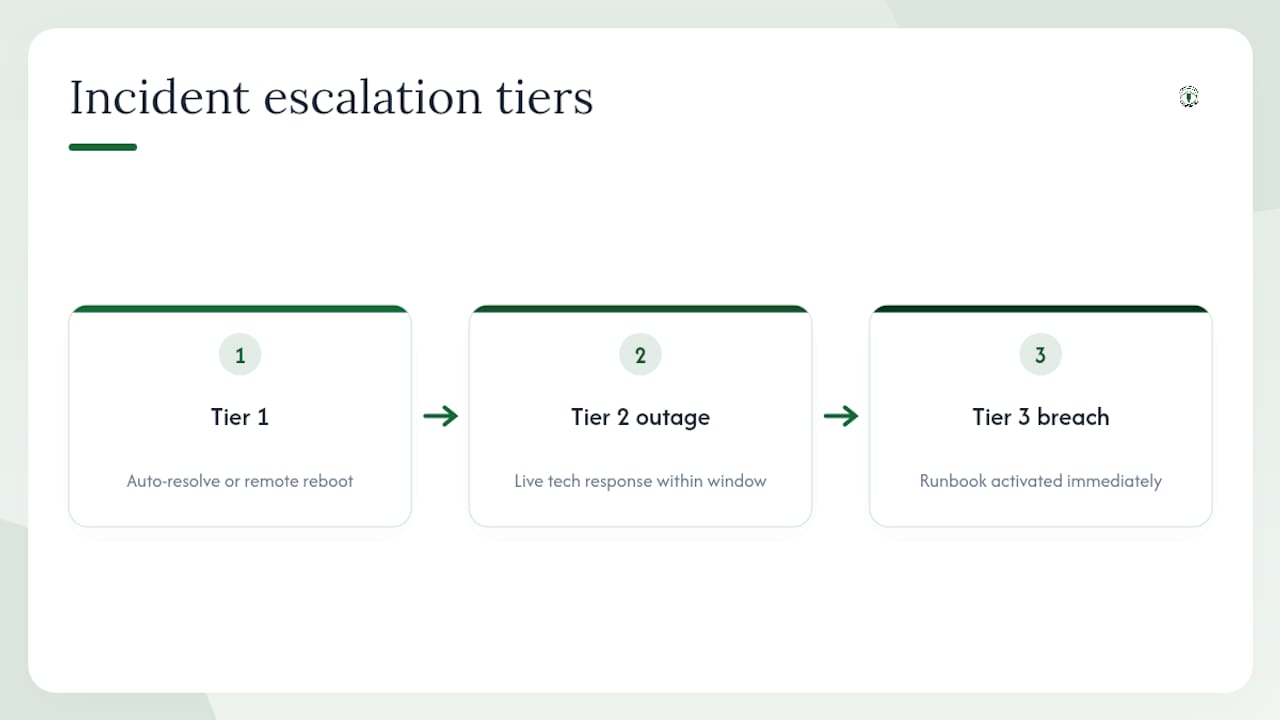
Define escalation tiers before an incident happens. Tier 1 covers alerts that auto-resolve or need a remote reboot. Tier 2 covers outages affecting production systems and requires a live technician response within a defined window. Tier 3 covers confirmed breaches or data loss and triggers your documented runbook immediately.
On-Site Technology's 24/7 support analysis notes that the majority of overnight tickets are monitoring alerts rather than user calls, which means a Follow-the-Risk Coverage Map helps you decide whether full live response or monitoring-only coverage fits your actual risk window. For most small manufacturers running a single shift, monitored alerting with a guaranteed callback SLA covers the gap without the cost of a fully staffed overnight desk.
How do you evaluate a local MSP's manufacturing IT experience?
Ask four direct questions before signing anything. First, does the MSP perform proactive monitoring with documented SLAs, or do they respond only when you call? Second, do they actively test backup restores, or just confirm the backup job ran? Third, do they provide a named account contact, not just a ticket queue? Fourth, is there a written out-of-scope list so surprise charges cannot appear later? Uprite's managed IT checklist and Sys-Int's service scope guide both flag these four points as the clearest differentiators between reactive and genuinely proactive providers.
Local manufacturing experience adds a fifth criterion. An MSP familiar with Norman, Moore, and OKC understands local ISP reliability patterns and can roll a technician to your floor the same day, which matters when a network switch fails mid-shift.
Does your staff know what to do when an alert fires?
Monitoring tools only work if the people receiving alerts know what the alert means and what to do next. Create a one-page reference card for each alert type: what triggered it, the first three steps to take, and who to call. Store it where floor supervisors can find it without logging into a ticketing system.

Remote monitoring for small offices works best when staff treat alerts as early warnings rather than IT-department-only events. Brief your team quarterly, update the reference cards when systems change, and log every alert response so patterns become visible over time.
Why local managed IT matters more than most OKC manufacturers expect
The conventional wisdom says remote monitoring is mostly a cost play: fewer site visits, lower overhead. That framing undersells the real value for a manufacturing shop in the Oklahoma City metro.
The deeper benefit is context. A provider familiar with your building, ISP, and production schedule can better distinguish routine network events from signs of security threats. That judgment call does not come from a dashboard. It comes from familiarity with your environment, built over repeated visits and documented baselines.
Greatplainsnetworking's manufacturing network guidance reflects exactly this approach: inventory visibility across devices and endpoints, asset classification with polling intervals matched to criticality, CPU/memory/bandwidth baselines, automated and tested backups, patch and firewall hygiene, and RBAC with MFA enforced at every access point. Remote-first monitoring reduces site visits and lowers operational costs, but it must connect to local on-site capability for physical fixes. Las Vegas Tech Pros' remote monitoring analysis makes the same point: remote monitoring complements on-site support rather than replacing it.
For Norman and Moore manufacturers especially, same-day truck rolls for machine-room cabling or a failed switch are not a luxury. They are the difference between a two-hour delay and a lost production day.
Greatplainsnetworking puts this checklist to work for your shop
Skipping the checklist and hoping nothing breaks is a plan many small manufacturers run until the day it fails. Greatplainsnetworking gives you a faster path: local managed IT support in Norman, Moore, and OKC with 24/7 monitoring, same-day response, and no long-term contracts.

The onboarding sequence maps directly to the checklist: automated discovery and RMM agent deployment in the first week, verified backup test and baseline measurement in week two, then ongoing patch management, endpoint detection, firewall rule reviews, and SLA-backed runbook ownership. Backup and recovery and cybersecurity are included in the managed IT scope. Hardware replacement and one-time infrastructure projects are quoted separately. Schedule a local assessment with Greatplainsnetworking to see exactly what your shop needs and what it will cost.
Sources
- Remote network monitoring guide for small teams — Fing
- Network monitoring checklist — ManageEngine
- What's included in managed IT services? — Sys-Int
- What 24-7 IT support really means and costs — On-Site Technology
- What does managed IT include? — Uprite
- Remote monitoring for small offices that works — Las Vegas Tech Pros
Recommended
Want help putting this into practice?
We'll audit your security, speed, and hardware in under an hour — no commitment, no sales pitch. Just a clear roadmap of what to fix and why.