
Best Multi-Factor Authentication for Legal Offices

For most small and mid-size law firms, enforced phishing-resistant MFA — authenticator apps with push notifications as the baseline, hardware security keys for partners and high-risk accounts — is the best balance of security and usability. MFA blocks nearly all credential-based account takeovers when properly configured, which makes it the single highest-return control a legal office can deploy today.
Three actions your IT team can delegate this week:
-
Enforce MFA on email and remote access immediately. Microsoft 365, VPN, and any cloud-based practice-management system are the highest-value targets for credential attacks. Start there.
-
Pilot hardware security keys (YubiKey) for a small group of partners and admin staff. This tests your highest-risk accounts against phishing and gives you real helpdesk data before a firm-wide rollout.
-
Document MFA in your written security policy and cyber-insurance record. Insurers increasingly require written evidence of enforced controls, not just verbal confirmation. Get it on paper now.
Table of Contents
- What is MFA and how does it actually work?
- Why law firms must treat MFA as a baseline control
- Which MFA methods should your firm actually use?
- Best practices for implementing MFA in your law office
- How MFA integrates with Microsoft 365, Clio, and your other legal systems
- Your MFA rollout plan: timeline, steps, and cost estimates
- How Greatplainsnetworking implements MFA for law firms in Oklahoma
- Key Takeaways
- Greatplainsnetworking offers managed MFA for law firms in Norman, Moore & OKC
What is MFA and how does it actually work?
Multi-factor authentication requires a user to verify identity using two or more distinct factor types before a session is granted. The three factor categories are:
| Factor Type | What It Is | Law Firm Examples |
|---|---|---|
| Something you know | A secret only the user holds | Password, PIN |
| Something you have | A physical or digital possession | Authenticator app, YubiKey, smart card |
| Something you are | A biometric characteristic | Fingerprint, face scan on a managed device |
The authentication flow works like this: a user enters their password (first factor), then receives a challenge for the second factor, typically a push notification to Microsoft Authenticator or a time-based one-time password (TOTP) from Google Authenticator. Once both factors are verified, the identity provider issues a session token. With single sign-on (SSO) configured through Microsoft Entra ID (formerly Azure AD), that token carries across connected applications — Clio, PracticePanther, document management systems — so the user authenticates once rather than repeatedly throughout the day.
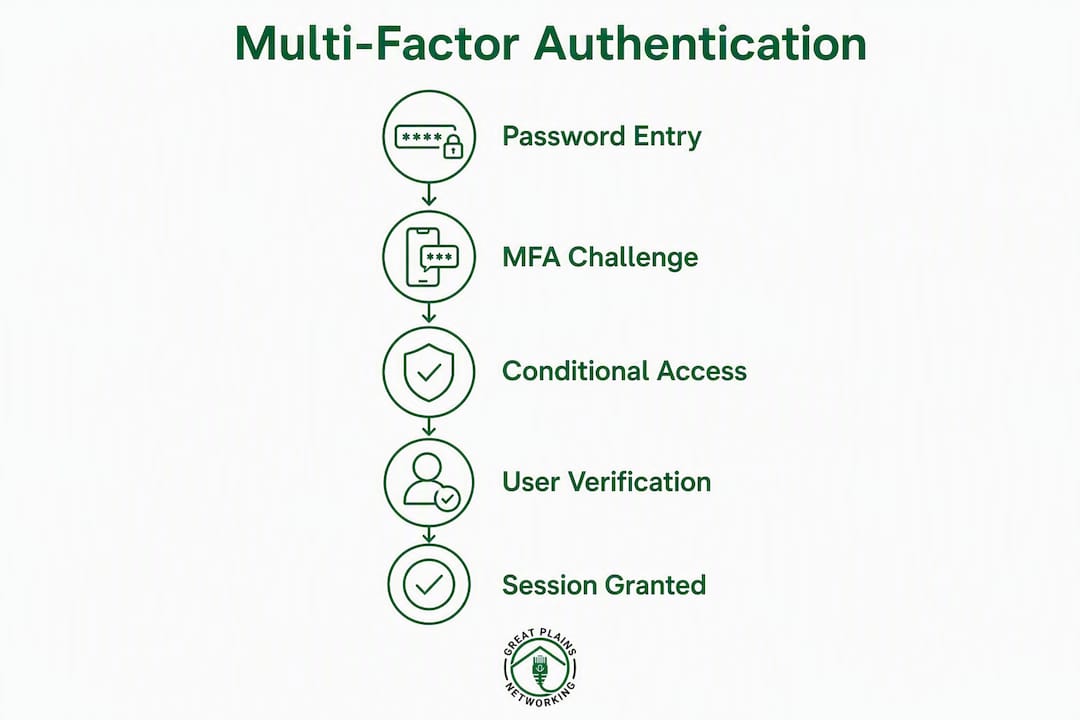
Conditional access adds a policy layer on top of this flow. Instead of requiring the same MFA challenge for every login, conditional access evaluates context: device compliance status, network location, user role, and sign-in risk score. A partner logging in from a managed laptop on the office network may pass with a single push; the same account accessing from an unrecognized device in another state triggers a step-up challenge or blocks access entirely. That context-aware enforcement is what separates a well-configured legal office MFA setup from a basic password-plus-code arrangement.
Why law firms must treat MFA as a baseline control
The stakes for a law firm are different from those of a typical small business. Client files contain privileged communications, financial records, and personally identifiable information that attackers specifically target. A single compromised email account can expose years of matter history.
The ethical obligation is explicit. ABA Model Rule 1.6 and Comment 18 require attorneys to make reasonable efforts to prevent unauthorized disclosure of client information. State bars are increasingly interpreting "reasonable efforts" to include baseline technical controls, and many state bar ethics opinions now scale that reasonableness standard to the sensitivity of the matters a firm handles. Enforced MFA on email and remote access is no longer an optional enhancement — it is the floor most ethics guidance points to.
Attorneys who outsource IT do not transfer their ethical duties. Managed providers must produce audit logs, provide written attestation of controls, and actively monitor for anomalies. The firm remains responsible for demonstrating "reasonable efforts" to any bar authority or court that asks.
Cyber insurers are the practical enforcers. Insurers are conditioning coverage on MFA, endpoint detection and response (EDR), and immutable backups. Firms without these controls face denied claims, reduced sub-limits, or sharply higher premiums. The underwriting questionnaire your firm fills out at renewal is, in effect, a compliance audit. Written policy documentation and retained audit logs are the evidence underwriters want to see.
Two scenarios illustrate the exposure. In the first, a firm's Microsoft 365 account is compromised through a phishing email. The attacker uses the account to access client matter files and exfiltrate settlement documents over several weeks before detection. MFA with conditional access would have blocked the initial session from an unrecognized device. In the second, a remote-access VPN credential is stolen via a credential-stuffing attack. Without MFA on the VPN, the attacker moves laterally to the document server. A hardware key requirement on VPN access would have stopped the intrusion at the perimeter.
Understanding why law firms are cybercrime targets helps partners grasp why these controls are worth the friction. The combination of privileged data, lean IT staffing, and high-value transactions makes legal offices a preferred target.
Which MFA methods should your firm actually use?
Not all MFA is equal. The table below maps common methods against the dimensions that matter most for legal office deployments.

| Method | Phishing Resistance | User Friction | Admin Controls | Legal App Compatibility | Est. Cost | Recovery Options |
|---|---|---|---|---|---|---|
| SMS OTP | Low (SIM-swap risk) | Low | Minimal | Universal | Free | Carrier-dependent |
| Email magic link | Low | Low | Minimal | Limited | Free | Admin reset |
| TOTP app (Google Authenticator, Microsoft Authenticator) | Medium | Low–Medium | Moderate | Broad | Free–included | Backup codes, admin reset |
| Push notification (Microsoft Authenticator, Cisco Duo) | Medium–High | Very low | Strong | Broad | Included / per-user | Admin reset, backup codes |
| Hardware key (YubiKey, FIDO2/WebAuthn) | Very high | Low (tap) | Strong | Growing | $25–$60/key (one-time) | Spare key, admin recovery |
| Biometric (device-bound, e.g., Windows Hello) | High | Very low | Moderate | Microsoft 365 native | Included in device | PIN fallback |
| Okta Adaptive MFA | High | Low (risk-based) | Very strong | Broad (Salesforce/Litify, Clio via SAML) | Per-user/month | Admin console, backup codes |
SMS is the least secure common MFA method due to SIM-swapping and interception risks. It is better than nothing, but for any account that touches client data, an authenticator app is the minimum acceptable standard.
Recommendation matrix by account risk tier:
- Low risk (internal scheduling tools, non-client portals): TOTP app or push notification.
- Medium risk (email, practice-management systems, cloud storage): Push notification via Microsoft Authenticator or Cisco Duo with conditional access enforced.
- High risk (partner accounts, admin consoles, VPN, billing systems, matter databases): Hardware security key (YubiKey with FIDO2/WebAuthn) as the primary method, push as fallback.
NIST SP 800-63B defines Authentication Assurance Level 2 (AAL2) as requiring proof of possession of two distinct factors with approved cryptographic techniques — the standard most legal office accounts should meet. AAL3, required for the highest-sensitivity federal systems, mandates a hardware-based phishing-resistant authenticator with a non-exportable key, which maps directly to a YubiKey deployment for your most privileged accounts.
NIST IR 8523 also recommends that identity services support multiple authenticator types to accommodate diverse user needs, including staff without smartphones or those requiring accessibility accommodations. Plan for that from the start rather than retrofitting it.
Best practices for implementing MFA in your law office
A technically sound MFA deployment fails without the right policy framework behind it. The following checklist covers the policy, technical, and human dimensions that auditors and insurers look for.
Policy items
- Require MFA on all email and remote access accounts — no exceptions for partners or senior staff. Role-based exemptions are the most common source of breaches.
- Define role-based access controls (RBAC) that tie MFA method requirements to account sensitivity. Document which roles require hardware keys.
- Create break-glass accounts for emergency administrative access. These accounts must be stored securely (physical safe or encrypted vault), logged on every use, and reviewed quarterly.
- Document recovery procedures for lost authenticators, including who approves recovery, what identity verification is required, and how the event is logged.
- Retain audit logs for a minimum of 90 days (longer if your state bar or insurer requires it). Log every MFA success, failure, and bypass event.
Technical controls
- Configure conditional access in Microsoft Entra ID to enforce MFA based on device compliance, sign-in risk, and network location. Disable legacy authentication protocols (SMTP AUTH, basic auth) that bypass MFA entirely.
- Integrate SSO so users authenticate once through the identity provider rather than maintaining separate credentials for each application. This reduces password fatigue without reducing security.
- Enable device posture checks to block sign-ins from unmanaged or non-compliant devices, even when MFA is passed.
- Disable SMS as an MFA option for any account tier above low-risk. If SMS must remain for accessibility reasons, document the exception and review it annually.
Human factors
- Run a structured onboarding session when rolling out MFA. A 15-minute walkthrough with a printed cheat sheet covering "how to approve a push," "what to do if you lose your phone," and "how to use a backup code" cuts helpdesk tickets significantly.
- Conduct mandatory annual phishing awareness training. MFA reduces the damage from stolen passwords, but training reduces the likelihood of credential theft in the first place. Pair the two.
Monitoring and verification
- Schedule quarterly compliance checks to confirm MFA is enforced on all in-scope accounts, no legacy auth exceptions have crept back in, and break-glass accounts have not been used without a logged reason.
- Collect and retain evidence for underwriting. Your cyber-insurance renewal will ask for proof of enforced MFA. A screenshot of your Entra ID conditional access policy and a 30-day MFA enforcement report are the two documents most underwriters want. A written security policy that references MFA requirements is the third.
Pro Tip: Pair MFA enforcement with a review of your cybersecurity compliance documentation before your next insurance renewal. Insurers reward firms that can produce written evidence of controls, not just verbal assurances.
How MFA integrates with Microsoft 365, Clio, and your other legal systems
Most small law firms run their identity infrastructure through Microsoft Entra ID, which makes it the natural enforcement point for MFA across the entire application stack.

Microsoft Entra ID and Microsoft Authenticator
Microsoft Entra ID's conditional access engine is the most practical starting point for firms already on Microsoft 365. Configure a baseline policy that requires MFA for all users, then layer a stricter policy for admin roles that requires a compliant device and, optionally, a hardware key. Disable legacy authentication in the Exchange admin center and the Entra ID authentication methods policy — legacy protocols are the most common MFA bypass vector and should be turned off before you announce the rollout.
Microsoft Authenticator supports push notifications, TOTP, and passwordless phone sign-in. For most staff, push is the right default: one tap to approve, no code to type. For partners and IT admins, pair push with a registered YubiKey as a second option so they have a phishing-resistant fallback.
Federation and SSO for practice-management systems
Federation reduces repeated MFA prompts and eases authenticator reuse across apps. When Clio, PracticePanther, or a document management system is connected to Entra ID via SAML or OpenID Connect, the user's authenticated session carries over. MFA is enforced once at the identity provider; the downstream app trusts the token. This is the configuration to target — it preserves security while eliminating the friction of repeated challenges throughout the workday.
For practice-management systems that do not support federation natively, enforce MFA at the application level using the platform's own settings, and document that separately in your policy. Okta Adaptive MFA and Cisco Duo both offer broad SAML/OIDC compatibility and can act as the identity broker if Entra ID is not your primary IdP.
What to test during a pilot
Before broad rollout, run a two-to-four-week pilot with 8–12 users covering different roles and device types. Test the full SSO login flow from both managed and unmanaged devices, verify that backup codes work and are stored securely, confirm that admin account recovery procedures function as documented, and check that disabled accounts cannot authenticate even with a valid MFA token. Pilots that include a mix of authenticator types — app push and hardware keys — surface support friction and edge-case accessibility needs before they become firm-wide problems.
Your MFA rollout plan: timeline, steps, and cost estimates
A phased rollout protects against the two most common failure modes: helpdesk overload and executive resistance. The table below gives a practical schedule for a firm of 10–30 users.
| Phase | Duration | Key Activities | Success Metric |
|---|---|---|---|
| Discovery & policy | 1–2 weeks | Inventory accounts, draft policy, select authenticator types, identify break-glass accounts | Policy document signed; account inventory complete |
| Pilot | 2–4 weeks | Enroll 8–12 pilot users (mixed roles), test SSO flow, collect helpdesk tickets, iterate policy | <2 helpdesk tickets per user; all test cases pass |
| Phased rollout | 4–12 weeks | Enroll remaining staff in cohorts, deliver onboarding sessions, disable legacy auth | All in-scope accounts enforced |
| Verification & audit | 2 weeks | Pull enforcement report, review audit logs, collect insurance documentation, close policy gaps | Audit log retained; underwriting evidence package complete |
Pilot plan steps
- Select pilot users across roles: one partner, two associates, one paralegal, one admin, and your IT lead.
- Enroll half on push (Microsoft Authenticator) and half on hardware keys (YubiKey) to compare friction and support volume.
- Log every helpdesk contact during the pilot and categorize by issue type (lost phone, push fatigue, app setup).
- Review conditional access sign-in logs weekly to catch legacy auth attempts or policy gaps.
- Adjust the onboarding cheat sheet based on the top three support issues before rolling out to the full firm.
Ballpark cost estimates
Most MFA solutions use a per-user, per-month model, with common options typically ranging around $3–$5 per user per month. Microsoft Entra ID P1 (which includes conditional access) is bundled in Microsoft 365 Business Premium, making it effectively no additional cost for firms already on that plan. Cisco Duo's entry tier and Okta's base plan fall in a similar per-user range — request current vendor quotes, as pricing changes frequently.
Hardware security keys are a one-time purchase. YubiKey 5 Series keys typically run $25–$60 per key; plan for two keys per high-risk user (one primary, one backup). For a firm with five partners and two IT admins, that is roughly $350–$840 in hardware, a one-time cost.
Internal support time is the largest hidden cost. Budget 30–45 minutes per user for initial enrollment and expect a short spike in helpdesk tickets during the first two weeks of each rollout cohort.
Rollout success metrics to track: percentage of in-scope accounts with MFA enforced, MFA failure rate (failed challenges per day), helpdesk ticket volume by week, and time required to produce the audit log package for underwriting.
How Greatplainsnetworking implements MFA for law firms in Oklahoma
Greatplainsnetworking handles the full MFA implementation cycle for law firms in Norman, Moore, and Oklahoma City, so your team does not have to manage the technical configuration, the policy drafting, or the staff training on top of daily operations.
Service scope for a managed MFA engagement:
- Assessment and discovery: inventory all accounts, identify legacy auth dependencies, and map application integrations before touching any configuration.
- Policy drafting: produce a written MFA policy aligned with ABA Model Rule 1.6 expectations and your insurer's underwriting requirements.
- Pilot management: enroll and support the pilot cohort, collect helpdesk metrics, and iterate the configuration before firm-wide rollout.
- Device provisioning: source and configure YubiKey hardware keys for partners and admin accounts, including spare-key registration.
- SSO and conditional access configuration: set up Microsoft Entra ID conditional access policies, disable legacy auth, and connect practice-management systems via federation where supported.
- Monitoring and audit log collection: configure log retention, schedule quarterly compliance checks, and produce the documentation package your insurer requests at renewal.
- Staff training: deliver a structured onboarding session and a printed reference card for every staff member, with follow-up support during the first 30 days.
For a typical 10–20 user law firm, the full deployment from discovery to verified audit runs 8–12 weeks. At the end of that engagement, the firm receives a signed policy document, a conditional access configuration report, a 30-day MFA enforcement log, and a written attestation of controls suitable for cyber-insurance underwriting.
Outsourcing IT does not transfer your ethical obligations. Greatplainsnetworking provides the audit logs, written attestation, and ongoing monitoring that demonstrate "reasonable efforts" under ABA and state bar standards — so the firm can show its work, not just claim it.
Greatplainsnetworking operates without long-term contracts and maintains same-day response times for issues affecting firm operations. For firms that need cybersecurity compliance guidance alongside MFA, the same team handles EDR, immutable backup, and incident-response planning as part of a unified managed IT engagement. Understanding how to prevent a data breach in your office is the natural next step after MFA is enforced.
Key Takeaways
Phishing-resistant MFA — authenticator apps with push for all staff, hardware security keys for partners and admins — is the single most effective credential-security control a law firm can deploy, and it directly satisfies ABA Model Rule 1.6 "reasonable efforts" and cyber-insurance underwriting requirements.
| Point | Details |
|---|---|
| Deploy phishing-resistant MFA first | Enforce push-based MFA on email and remote access before any other security control. |
| Ethics and insurance both require it | ABA Model Rule 1.6 and most cyber insurers now treat enforced MFA as a baseline expectation, not an option. |
| Use a phased rollout with a pilot | A 2–4 week pilot with mixed authenticator types surfaces support issues before firm-wide deployment. |
| Hardware keys for high-risk accounts | Partners and admin accounts should use YubiKey (FIDO2/WebAuthn) as the primary or backup authenticator. |
| Greatplainsnetworking handles the full cycle | From policy drafting to audit log collection, Greatplainsnetworking manages MFA deployment for law firms in Norman, Moore, and OKC. |
A practical note from Nicholas
The two obstacles that derail most law firm MFA rollouts are not technical — they are legacy authentication protocols that nobody knew were still active, and a senior partner who believes the policy does not apply to them. Both are solvable, but only if you find them during a pilot rather than after a breach.
On the legacy auth side: run a sign-in log report in Microsoft Entra ID before you touch any policy. You will almost certainly find at least one application or device still using basic authentication. Disabling legacy auth without that inventory first is the fastest way to lock someone out of a critical system on a Monday morning.
On executive buy-in: frame MFA as an insurance requirement, not an IT preference. When a managing partner understands that the firm's cyber-insurance coverage depends on documented, enforced MFA, the conversation changes quickly. Bring the underwriting questionnaire to that meeting.
Greatplainsnetworking offers managed MFA for law firms in Norman, Moore & OKC
Law firms in the Oklahoma City metro area that need MFA deployed correctly — with the policy documentation, audit logs, and staff training that actually satisfy insurer and ethics requirements — have a direct path through Greatplainsnetworking's managed IT support program.

The engagement starts with a no-obligation security assessment that identifies your current authentication gaps, legacy auth dependencies, and insurance documentation needs. From there, Greatplainsnetworking manages the full pilot and rollout, provisions hardware keys for high-risk accounts, and delivers the written attestation package your insurer expects at renewal. There are no long-term contracts, and same-day response is standard for issues affecting firm operations. If you are in Norman, Moore, or Oklahoma City and want MFA done right the first time, request your free assessment to get started.
Authoritative references
| Source | Why It Matters |
|---|---|
| ABA Model Rule 1.6 and Comment 18 — Cyber Defense Agent Guide | Ethics framework establishing attorney duty to protect client data; defines "reasonable efforts" standard for cybersecurity controls. |
| NIST SP 800-63B: Digital Identity Guidelines | Defines Authentication Assurance Levels (AAL1–AAL3) and permitted authenticator types; the technical standard most compliance frameworks reference. |
| NIST IR 8523: MFA for Criminal Justice Information Systems | Practical implementation guidance for MFA rollouts, including federation, pilot design, and accessibility considerations. |
| ABA: Best Cybersecurity for Solo and Small Firms | ABA-published guidance ranking MFA as the top cybersecurity control; cites Microsoft data on credential attack prevention. |
| State Bar of Texas — Cyber Insurance and MFA Requirements | Explains how insurers tie coverage to enforced MFA and EDR; useful for underwriting conversations and partner buy-in. |
| ABA Standing Committee on Ethics and Professional Responsibility | Primary source for state bar ethics opinions on technology competence and cybersecurity obligations. |
| CISA: Multi-Factor Authentication Guidance | Federal agency guidance on MFA deployment; useful for framing baseline controls and communicating urgency to firm leadership. |
| Legal Industry Cybersecurity Frameworks for Law Firms | Framework mapping for legal-sector compliance controls; useful for aligning MFA policy with broader security program requirements. |
| Why Cyber Compliance Reduces Malpractice Risk | Explains the direct link between documented cybersecurity controls and reduced malpractice exposure for law firms. |
Recommended
Want help putting this into practice?
We'll audit your security, speed, and hardware in under an hour — no commitment, no sales pitch. Just a clear roadmap of what to fix and why.