
SMB Help Desk Escalation With 5 Field Handoff to Stop SLA Breaches

A help desk escalation process is a documented, SLA-aligned path that moves tickets by trigger or by time to named owners, with a defined handoff at each step. If your team escalates by gut feeling and Slack pings, start today by drafting a one-page escalation matrix that maps severity to owner, response timers, and required handoff data. Templates and worked examples follow below.
TL;DR:
- Escalation should follow clear, documented rules that distinguish between skill-based and authority-based triggers to prevent confusion and delays.
- Use condition-based and SLA timers as primary triggers, with escalation alerts set around 75% of the SLA window to prevent last-minute failures.
- An effective escalation matrix must include severity levels, responsible owners, timers, triggers, required handoff fields, and backup contacts, all stored where agents can access easily.
- Mandatory handoff information includes symptom details, current steps taken, reasons for escalation, user availability, and business impact to avoid redundant questions and wasted time.
- Regularly measure escalation metrics such as MTTA, MTTR, and mis-escalation rates, and conduct post-incident reviews to identify process gaps and improve response accuracy.
Table of Contents
- What Is a Help Desk Escalation Process, Really?
- When Should a Ticket Be Escalated?
- How Do You Structure Escalation Tiers and Ownership?
- What Should an Escalation Matrix Template Include?
- What Information Must Travel With an Escalated Ticket?
- How Do You Automate Escalation Without Losing Human Context?
- Which Metrics Show Your Escalation Process Is Working?
- What Goes Wrong With Escalation Processes, and How Do You Fix It?
- How Great Plains Networking Handles Escalation for Small Business Clients
- What Actually Moves the Needle on Escalation
- Get Your Escalation Matrix Built, Not Just Written
- Sources
- FAQ
What Is a Help Desk Escalation Process, Really?
Ticket escalation is the act of moving a support request to someone better positioned to solve it, either because they have deeper technical skill or because they hold more authority to act. Those two paths get lumped together constantly, and that mistake causes most of the friction IT support managers complain about.
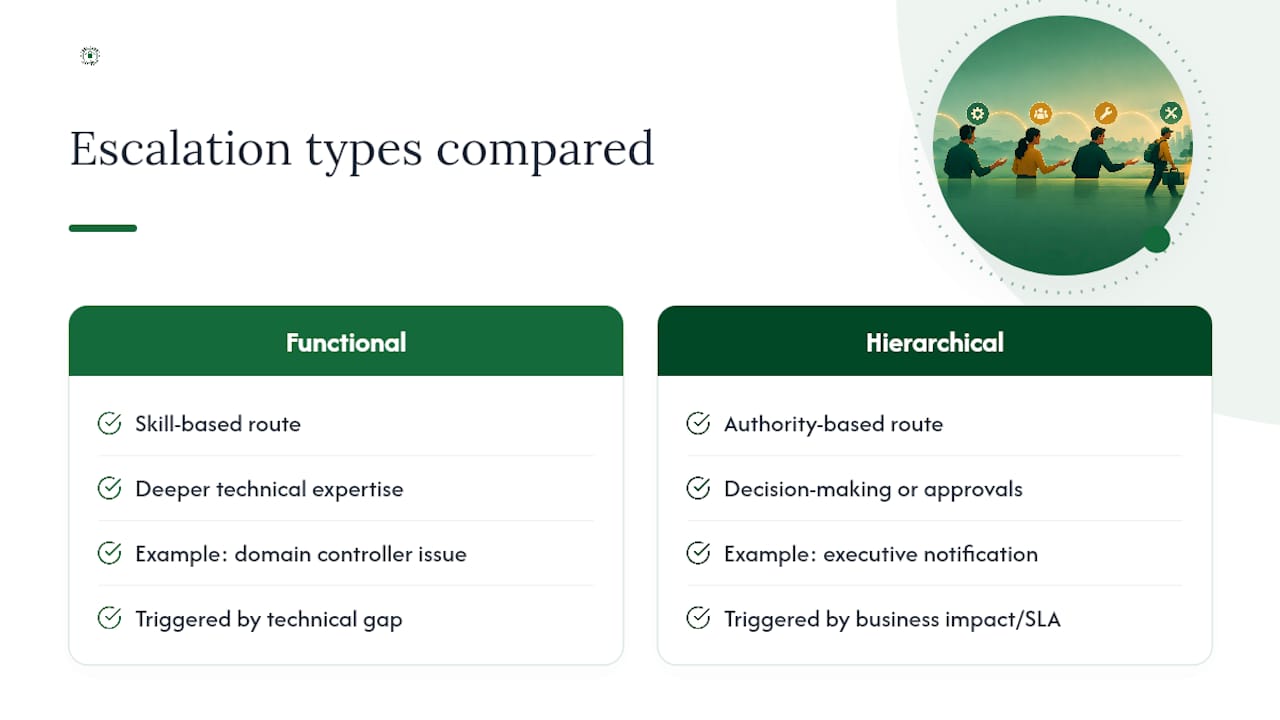
Functional escalation is skill-based. A password reset stays at L1; a failing domain controller moves to a network engineer at L2 or L3 because L1 lacks the access or expertise to touch it. Hierarchical escalation is authority-based. It notifies a manager or executive not because the technical work changed, but because business impact, SLA risk, or a client relationship now needs someone with decision-making power.
Conflating the two creates a specific, avoidable problem: managers get paged for routine technical handoffs that never needed their input, while genuine business-risk situations sit buried in a technical queue waiting for a skill match that was never the real gap. Your escalation matrix needs separate lanes for each. It also helps to classify tickets correctly from intake: an incident (something broken) escalates on urgency and impact, while a service request (something needed) escalates on approval chains and provisioning delays. Mixing those categories skews your SLA math and confuses everyone about what "urgent" actually means.
When Should a Ticket Be Escalated?
Escalation should never be a judgment call made fresh every time. It should follow rules agents can point to, defend, and apply consistently.
Two categories of triggers do the job:
- Condition-based triggers: any indicator of a security breach or active compromise, a permissions or access-control issue the agent can't resolve at their tier, an outage affecting multiple users or a whole department, and any issue that depends on a third-party vendor's response.
- Time-based (SLA) triggers: thresholds tied to how much of the SLA response or resolution window has already elapsed.
A workable percentage model looks like this: fire an at-risk warning to the current owner once a moderate share of the SLA window is consumed, escalate formally near the SLA breach threshold, and treat anything past that as a breach in progress rather than a warning sign, according to guidance from IPSIP's escalation matrix framework.
Pro Tip: Set your at-risk alert well before the escalation threshold, around 75% of the SLA window. An alert that fires exactly at breach is a report on a failure, not a chance to prevent one.
Some situations skip the clock entirely. A ransomware indicator or a payroll system down on payday escalates the moment it's spotted, timer be damned. Everything else follows the percentage model, which keeps escalation decisions defensible instead of political.
How Do You Structure Escalation Tiers and Ownership?
Most SMB help desks work fine with three functional tiers plus a hierarchical layer that only activates for business-impact events.
L1 handles password resets, basic connectivity issues, software installs, and anything answerable from a knowledge base. L2 takes server and network issues, configuration problems, and anything requiring elevated system access. L3 covers architecture-level problems, vendor-dependent fixes, and anything touching core infrastructure. A major-incident tier activates in parallel, not in sequence, when the issue affects multiple users, core revenue systems, or carries compliance exposure, and it pulls in an owner with authority to communicate externally.
A few rules make this structure actually work instead of just looking good on a wall poster:
- Name the role responsible for each tier, then name the current person holding it and their backup, because a matrix that says "Network Team" with no named human gets ignored during an actual crisis.
- Set explicit criteria for when a manager or executive gets looped in, tied to business impact and client visibility, not technical difficulty.
- For genuinely complex, cross-domain incidents, consider swarming, pulling the right specialists together at once, rather than forcing a strict sequential handoff through tiers. Swarming can cut resolution time meaningfully on incidents that don't fit neatly into one skill silo, according to ITSM incident management guidance.
Investing in a stronger knowledge base and giving L1 more resolution authority also reduces how often tickets need to leave L1 at all. Better first contact resolution lowers both escalation volume and cost per ticket, per ITIL v4 process guidance. A managed help desk provider that already runs this tiered model can shortcut months of trial and error for a small IT team building one from scratch.
What Should an Escalation Matrix Template Include?
An escalation matrix is a single table. Severity runs down one side; owners, timers, and triggers run across the top, according to customer service escalation management guidance. It works because anyone on the team can glance at it mid-crisis and know exactly who to call and how long they have.
The columns that matter: Priority/severity, owner role, response target, resolution target, escalation trigger, required handoff fields, and backup owner. Skip any of these and the matrix becomes decoration instead of a working tool.
These timers are illustrative starting points. Calibrate them against your own client contracts and historical resolution data before locking them in.
Pro Tip: Store the matrix where agents already look during a live ticket, pinned in the ticketing tool's knowledge base or embedded directly in the ticket UI, not buried in a shared drive nobody opens under pressure. Mirroring these timers as automated fields in your ticketing platform means the system nudges the right person instead of relying on someone remembering to check a spreadsheet.
What Information Must Travel With an Escalated Ticket?
The single biggest cause of wasted escalation time is a ticket that arrives at L2 or L3 with none of the context L1 already gathered. The receiving tier re-asks the same questions, the user repeats themselves, and the clock keeps running on a problem nobody has actually started working yet.
The fix is a mandatory five-field handoff, sometimes called an Escalation Defense Log, that must be completed before the escalate button becomes clickable, per IT help desk escalation rule guidance:
- Symptom: exactly what the user reported, in their words and in technical terms.
- Steps already tried: every fix attempted at the current tier, with outcomes.
- Why the current tier can't resolve it: the specific access, tool, or expertise gap.
- User availability: when the affected person or system can be reached or tested.
- Business impact: who and what is affected, and how urgently.
Enforcing this inside the ticketing system, making these fields required before the escalation action fires, works far better than a checklist agents are asked to remember on their own. When a field genuinely can't be filled (the user is unreachable, for instance), the agent notes that explicitly rather than leaving it blank, so the receiving tier knows it was addressed, not skipped.
How Do You Automate Escalation Without Losing Human Context?
Automation earns its place by removing manual drift, agents forgetting to check the clock, forgetting to notify a manager, not by removing judgment from the process entirely.
Useful automation types include automated SLA-warning alerts, auto-escalation when a timer crosses its threshold, category-based routing that sends security tickets straight to a security queue, and templated status updates that keep affected users informed without an agent typing the same message five times, according to ITIL-aligned incident management practices.
- Connect monitoring tools directly to ticket creation, so an outage generates a ticket before a user even notices, an approach proactive IT monitoring is built around.
- Route the resulting alert to on-call paging and, for customer-facing outages, to a status page update.
- If you're piloting an internal chatbot to triage incoming requests, review a chatbot pilot playbook before wiring it into your escalation flow, since a poorly scoped bot can create its own escalation noise.
Pro Tip: Never let auto-escalation skip the Defense Log fields. An automated rule that fires a ticket up the chain without symptom, prior steps, and business impact just moves the confusion faster, it doesn't solve it. If an AI tool or bot handles first-line triage, define in advance what happens when it fails or gets used outside its intended scope, a gap AI governance guidance covers well.
Which Metrics Show Your Escalation Process Is Working?
You can't fix what you don't measure, and escalation processes degrade quietly if nobody's watching the numbers.
Track these on a recurring basis:
- MTTA (mean time to acknowledge): how long a ticket sits before anyone touches it.
- MTTR (mean time to resolve): total time from open to close.
- Escalation rate: percentage of tickets that leave L1.
- Mis-escalation rate: tickets escalated that didn't actually need to be, or escalated to the wrong tier.
- Reopen rate: tickets marked resolved that come back.
- SLA compliance: percentage of tickets meeting response and resolution targets.
Run a post-incident review (PIR) for every major incident and for any P1 that breached SLA, and consider a lighter monthly review for recurring P2/P3 patterns. A solid PIR covers what triggered the escalation, whether the trigger fired correctly, what context was missing at handoff, and what the fix cost in time. Major incident processes typically require a named incident commander and a mandatory PIR before the incident is considered closed, and that discipline scales down fine for smaller teams handling fewer incidents.
Pro Tip: If your mis-escalation rate climbs, the fix usually isn't stricter rules, it's a knowledge-base gap. Feed every mis-escalation back into L1 training and documentation before tightening the matrix further.
What Goes Wrong With Escalation Processes, and How Do You Fix It?
Three failure patterns show up again and again in help desk audits, and each has a specific, known fix.
Escalation creep happens when agents escalate reflexively to avoid ownership of a hard ticket, and it snowballs until L2 and L3 are drowning in tickets that never needed them. Fix it with a tight feedback loop: track mis-escalations, feed the pattern back into L1 knowledge-base updates, and give L1 slightly more resolution authority so escalation stops being the easy way out.
- Set explicit authority limits so agents know what they're allowed to fix without asking permission.
- Review mis-escalated tickets weekly, not quarterly, while the context is still fresh.
Paused-clock abuse is the second pattern: teams pause the SLA timer while waiting on a customer or vendor, which is legitimate, but without audit controls, pausing becomes a way to protect metrics while a user stays blocked. Require a documented reason and a timestamped audit trail for every pause, per escalation matrix guidance on SLA controls.
Alert fatigue from over-eager monitoring thresholds is the third: too many low-value alerts train agents to ignore all of them, including the real ones. Tune thresholds regularly and retire alerts that haven't produced a genuine action in months.
How Great Plains Networking Handles Escalation for Small Business Clients
For clients across Norman, Moore, and Oklahoma City, monitoring alerts don't just log an event and wait. Each alert maps to a severity level tied to a same-day response commitment, so a flagged issue routes to the right technician with the context already attached, not rediscovered from scratch.
Consider a dental practice whose scheduling server threw intermittent connection errors overnight. The 24/7 monitoring system caught the pattern before opening hours, created a ticket with the error logs and affected system already noted, and routed it straight to a network technician rather than sitting in a general queue. The office manager got a same-day update before the first patient checked in. That's the tiered model in this article, applied to a five-person front desk that has no interest in running its own escalation matrix.
What Actually Moves the Needle on Escalation
Most help desks don't fail at escalation because the concept is complicated. They fail because nobody wrote the rules down, so every ticket becomes a fresh negotiation about whose problem it is. A clear matrix, a mandatory handoff, and a habit of reviewing what broke fix most of what goes wrong, in roughly that order of impact.
If you do one thing this week, draft the one-page matrix and run a single tabletop drill with your team to test it. Teams that would rather have this built and enforced for them, without spending a month iterating on spreadsheet versions, can lean on a managed IT support partner to do it faster.
— Nicholas
Get Your Escalation Matrix Built, Not Just Written
You can engage a managed IT support provider to design an escalation matrix, integrate it into your ticketing system, and train your staff on it, completing the process in a streamlined engagement rather than a drawn-out internal project.

A typical engagement runs in four steps: a network and process assessment, matrix design with severity tiers and named owners, configuration of SLA timers and auto-escalation rules inside your ticketing platform, and hands-on training so your team actually uses it under pressure. Because Greatplainsnetworking already runs 24/7 monitoring and same-day response for law firms, dental practices, and accounting offices around Norman, Moore, and Oklahoma City, the matrix gets tested against real alert volume from week one, not a theoretical scenario. If a security trigger is part of your escalation plan, our cybersecurity team builds that handoff path too, so a breach indicator never sits in a general queue waiting for someone to notice.
Start with the free network assessment or the 10-minute readiness audit to see exactly where your current escalation gaps are before we design anything.
Sources
- Escalation Matrix: Escalation Management, Template, Example
- Incident Management ITSM: Process & ITIL v4 Guide
FAQ
What Is the Escalation Process in a Service Desk?
It's the documented path a ticket follows when the current owner can't resolve it in time or lacks the authority to act, moving either to a more skilled team (functional escalation) or to management (hierarchical escalation). A well-run process ties this movement to a written escalation matrix rather than ad hoc judgment calls.
When Should a Help Desk Ticket Be Escalated?
Escalate immediately for security indicators, multi-user outages, or anything with clear business urgency, regardless of the clock. For everything else, escalate once the SLA timer hits a set threshold, commonly in the 85 to 95% range, with an earlier at-risk warning around 75%, per escalation matrix guidance.
What Is the Difference Between Functional and Hierarchical Escalation?
Functional escalation moves a ticket to someone with more technical skill; hierarchical escalation moves it to someone with more authority, usually because of business impact or SLA risk. Confusing the two means managers get paged for routine fixes while genuine business-risk tickets stay buried in a technical queue.
What Fields Should Be Required Before a Ticket Is Escalated?
Five fields make up a solid handoff: the symptom, steps already tried, why the current tier can't resolve it, user availability, and business impact. This "Escalation Defense Log" approach, enforced as mandatory fields in the ticketing tool, is recommended in help desk escalation rule guidance.
Does Greatplainsnetworking Help Set Up an Escalation Process?
Yes. Greatplainsnetworking designs escalation matrices, configures SLA timers and auto-escalation rules inside your ticketing platform, and trains staff on the handoff requirements as part of its managed IT support services. Pricing is available on request after a free network assessment.
Recommended
Want help putting this into practice?
We'll audit your security, speed, and hardware in under an hour — no commitment, no sales pitch. Just a clear roadmap of what to fix and why.