
Disaster Recovery vs Backup: What Small Businesses Must Know

Backup and disaster recovery serve different purposes. Backup means creating copies of your data to protect it. Disaster recovery (DR) refers to the documented plan, tools, alternate infrastructure, and trained personnel who use those copies to restore your systems after a serious failure. Backups protect data, while DR helps ensure business operations continue.
That distinction changes how you budget. Backups limit data loss (measured by RPO, or Recovery Point Objective). DR limits downtime (measured by RTO, or Recovery Time Objective). Most small businesses need both, and where to invest more heavily depends on one question: does an hour of downtime cost you more than a proper DR setup would?
- Backup = copies. DR = the restoration process, infrastructure, and playbook.
- Most businesses need both layers, not one or the other.
- Invest in DR specifically where downtime cost outweighs the cost of building it.
Pro Tip: A backup you have never restored is a hypothesis, not a plan. Test both your backups and your DR runbook on a schedule, not just when something breaks.
Backups create recoverable copies. Disaster recovery is the broader strategy that orchestrates bringing services back online.
Key Takeaways
Backups protect your data, disaster recovery protects your uptime, and small businesses need both sized to what each workload can actually afford to lose.
| Point | Details |
|---|---|
| Backups and DR differ | Backups copy data; DR is the tested plan and infrastructure that restores full operations. |
| RTO and RPO drive cost | Faster recovery targets require replication or DRaaS, which cost more than periodic backups. |
| Use 3-2-1-1-0 | Add an immutable, air-gapped copy to the classic 3-2-1 rule to defend against ransomware. |
| Test both layers | Restore tests confirm backup integrity; DR drills validate the full runbook and team response. |
| Greatplainsnetworking builds both together | Local, jargon-free managed backup and DR planning for small businesses in Norman, Moore, and OKC. |
Table of Contents
- What Is a Backup, and What Does It Actually Cover?
- What Does Disaster Recovery Actually Mean?
- Disaster Recovery vs Backup: A Side-by-Side Comparison
- How to Plan and Choose the Right Combination
- Strategies and Technologies Behind Backup and DR
- Sources
What Is a Backup, and What Does It Actually Cover?
A backup is a point-in-time copy of files, databases, virtual machines, or entire system images, stored separately from the production system that generated them. The goal is simple: if the original is deleted, corrupted, or encrypted, you have something to restore from.
Not all backups work the same way:
- Full backups copy everything, every time. Reliable, but slow and storage-heavy.
- Incremental backups capture only what changed since the last backup, saving space and time.
- Differential backups capture changes since the last full backup, a middle ground between full and incremental.
- Snapshots freeze the state of a system or volume instantly, common in virtualized environments.
- Continuous data protection (CDP) captures changes in near real time, minimizing potential data loss.
Where you store those copies matters as much as how you make them. Local disk, tape, an offsite vault, and cloud object storage each carry different retrieval speeds and cost profiles, as TechTarget explains in its breakdown of the 3-2-1 rule. The rule itself is simple: three copies of your data, on two different media types, with one copy offsite. Given the surge in ransomware, most vendors now recommend the updated 3-2-1-1-0 version: add one immutable or air-gapped copy, and verify zero errors on recovery, a standard Veeam outlines in detail.
Pro Tip: Verify immutability and run automated restore checks regularly. A backup that fails on restore isn't protection, it's a false sense of security.
What Does Disaster Recovery Actually Mean?
Disaster recovery is the documented, tested plan and supporting infrastructure that restores applications, networks, and full business operations after a major outage. It uses backup copies as raw material, but the plan itself is the product. IBM defines DR as the processes to reestablish systems and operations, not just the copies those processes draw on.
A handful of concepts define whether a DR plan is real or aspirational:
- RTO (Recovery Time Objective): how long you can tolerate being down before it hurts.
- RPO (Recovery Point Objective): how much data loss, measured in time, is acceptable.
- Failover: automatically or manually shifting operations to standby systems.
- Failback: returning operations to the primary systems once they are stable again.
- Runbooks: step-by-step documented sequences for who does what, in what order, during recovery.
DR also covers things backups never touch: who calls the internet provider, how staff communicate if email is down, and in what sequence systems come back online so nothing depends on a system that hasn't recovered yet. A point-of-sale system might need an RTO of 30 minutes. A back-office file share might tolerate 24 hours. Treating both the same wastes money on the file share or risks the business on the register.
Testing is the proof. Restore tests confirm backup integrity, while DR drills validate the runbook, sequencing, communications, and personnel, according to Dbvisit's comparison of the two.
Having backups is necessary. It is not sufficient. Only a tested runbook confirms you can actually recover.
Disaster Recovery vs Backup: A Side-by-Side Comparison
| Factor | Backup | Disaster Recovery |
|---|---|---|
| Main goal | Preserve copies of data | Restore full operations |
| Scope | Files, databases, systems | People, networks, sequencing, communications |
| Typical objective | RPO (data loss tolerance) | RTO (downtime tolerance) |
| Testing needed | Restore tests | Full DR drills and runbook validation |
| Cost driver | Storage volume and retention | Standby infrastructure and speed of failover |
| Sufficient alone when | A file gets deleted or corrupted | Never, for a full outage |
A deleted spreadsheet is a backup problem. A flooded server room or a regional cloud outage is a DR problem, because restoring files does nothing if you have no place to run them. The rule of thumb: if downtime cost exceeds the cost of building DR, invest in DR. If the workload can tolerate a slow, manual restore without real business damage, solid backups may be enough.
How to Plan and Choose the Right Combination
Start with an inventory, not a purchase. You cannot price disaster recovery planning until you know what you're protecting and how fast each piece needs to come back.
- Inventory every workload. List every system: email, POS, EHR, file shares, line-of-business software.
- Assign RTO and RPO per workload. Not every system deserves the same targets, and setting them should be a business decision, not an IT one, since downtime cost varies by role.
- Map the recovery method to the target. Backup-only restore for tolerant workloads; replication or standby infrastructure for tight RTOs.
- Estimate the cost of each tier. Faster recovery costs more to maintain, every time.
- Schedule tests by criticality. Critical systems deserve quarterly drills; lower-priority systems can go annually.
The tradeoff is straightforward: continuous replication and Disaster-Recovery-as-a-Service (DRaaS) buy you a low RTO but carry ongoing costs. Periodic backups cost less but assume you can tolerate hours, not minutes, of downtime. A dental practice with EHR software feeding daily patient visits cannot tolerate the same downtime as a law firm's archived case files.
- This week: pick one critical system and define its RTO and RPO on paper.
- This month: run one actual restore test and document what broke.
- This quarter: review your backup practices for gaps against the 3-2-1-1-0 standard.
Pro Tip: Budget conversations go faster when you frame RTO in dollars, not hours. Ask "what does an hour of downtime cost us?" before "what does DR cost?"
Strategies and Technologies Behind Backup and DR
Several distinct technical approaches solve different pieces of the backup-vs-DR puzzle, and picking the wrong one for your risk level either wastes money or leaves a gap.
- Backup and restore: the baseline. Cheap, slow to recover, fine for low-priority data.
- Snapshots: fast point-in-time captures, ideal for quick rollback of a single system.
- Replication: mirrors data continuously to a second location, but it also mirrors deletions and corruption, so replication alone is not a backup.
- Warm standby: partially running infrastructure ready to scale up on failover.
- Multi-site active-active: full redundancy across locations, expensive but near-zero downtime.
- DRaaS: a provider hosts your standby environment and manages failover, common for businesses that lack in-house infrastructure.
Cloud-based approaches generally offer faster deployment and lower upfront cost than maintaining a second physical site, but on-premises setups can offer more control over compliance-sensitive data. Many small businesses land on a hybrid: cloud backups for offsite protection, combined with a local immutable copy for fast ransomware recovery, an approach that pairs well with a documented ransomware recovery playbook.
Pro Tip: Snapshots are enough for accidental deletions. Ransomware calls for an immutable, air-gapped copy, because an attacker who can reach your live backups can encrypt those too.
Signs You Should Hire a Managed IT Provider or DR Specialist
If you cannot state your RTO and RPO for your most critical system, that's the first sign you need help. Other red flags: no tested restores in the past year, no offsite or immutable copy, or no staff available to execute a recovery outside business hours.
- Ask any provider: how do you verify backup integrity, not just completion?
- Ask what RTOs they've actually met for similar-sized clients.
- Ask whether immutable, offsite copies are standard or an upsell.
Pro Tip: Request a live recovery demonstration or tabletop DR drill during procurement, not after you sign a contract.
A Small-Business IT Provider's Take
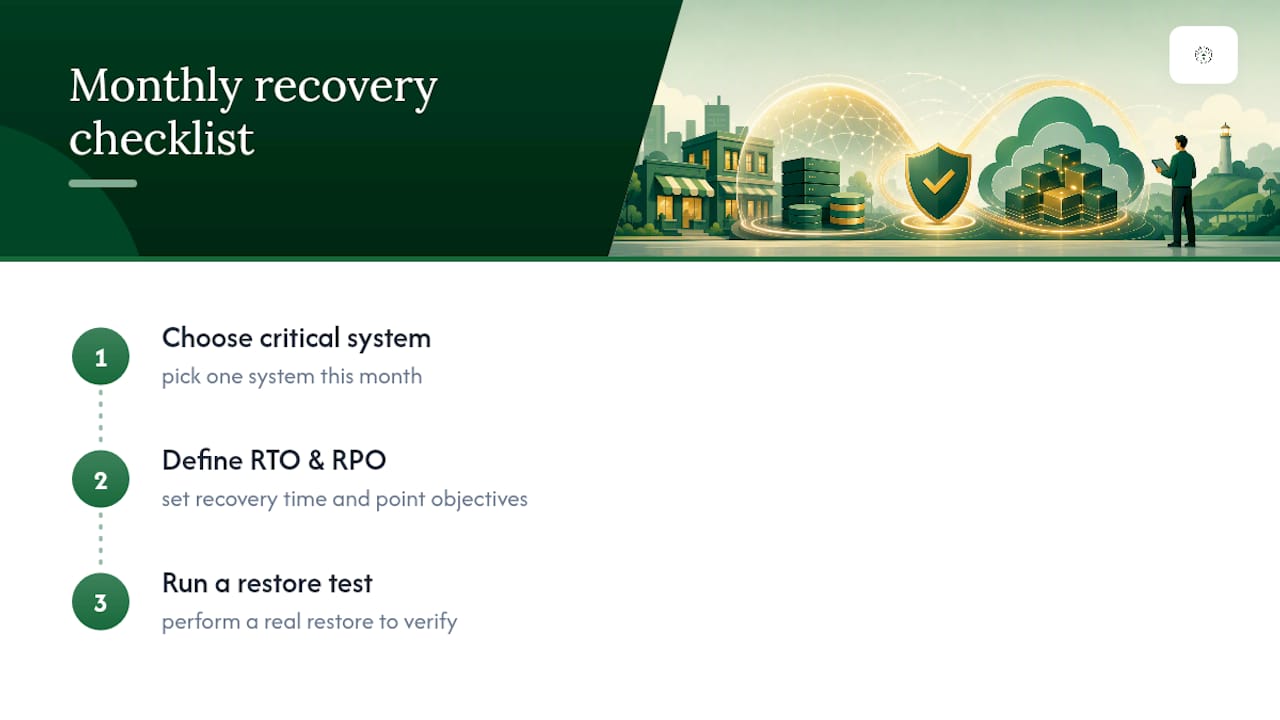
We treat backup and DR as one connected system for the small businesses we support, not two separate line items, because that's how failures actually happen. Pick one critical system this month, define its RTO and RPO, and run a real restore test. Skipping that step is the single most common gap we find in Oklahoma small businesses.
How Greatplainsnetworking Helps You Close the Gap
Greatplainsnetworking builds backup and DR as one plan, not two disconnected purchases, which is where most small businesses in Norman, Moore, and Oklahoma City lose money on redundant tools that still leave gaps. A first engagement starts with a discovery call to inventory your critical systems, followed by defining RTO and RPO per workload, documenting a runbook, and running an actual test restore before anything goes live.

From there, 24/7 monitoring watches for the failures that turn a backup problem into a full outage, and ongoing DR testing keeps your runbook current as systems change. If you want a clear picture of where your current setup has gaps, request a backup and recovery assessment this week. No long-term contract required to get the answer.
Sources
- What Is Backup and Disaster Recovery? | IBM
- 3-2-1 backup strategy explained — Is it effective? | TechTarget
- 3-2-1 backup rule explained: Do I need one? | Veeam
- Disaster Recovery vs Backups - What's the Difference? - Dbvisit
Recommended
Want help putting this into practice?
We'll audit your security, speed, and hardware in under an hour — no commitment, no sales pitch. Just a clear roadmap of what to fix and why.